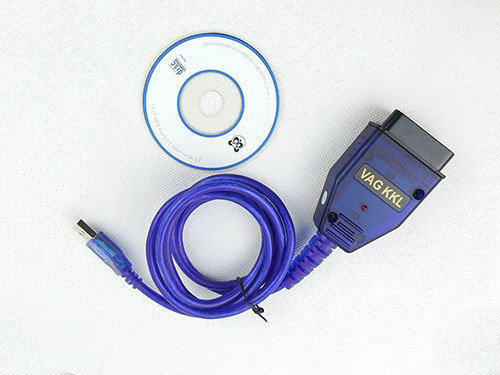
Description:
Primary Function: USB Vag-Com interface cable
OBDII Plug: J1962 16-Pin Male (to Car)
Operating Software Compatibility: Windows 98SE / ME / 2000 / NT and XP.
Supports terminal (K) bus communication
Terminal (L) ignition for waking up car computing system (ECU) engine control unit
Has 3 different protocols with same OBD2 connector including ISO/KWP, VPW, PMW.
Refer to your car user manual or check with your car dealer or local mechanic whether your car is compatible with this product.
Compatible Vehicles: Volkswagen, Audi, skoda, seat:
Audi Models:
- Compatible: A2 / A3 / A4 Cabriolet / A6 / A8 / S2 / S3 / TT
- Not Compatible: 80 / 100 / 200 / A3(8P) / A4(B7) / A6(C6/4F) / A8 / A8L(D3/4E) / Q7
SEAT Models:
- Compatible: Alhambra / Altea / Arosa / Cordoba / Ibiza / Inca / Leon MK 1 / Leon MK 2 / Toledo
- Not Compatible: Altea (5P) / Leon (1P) / Toledo (5P)
Skoda:
- Compatible: Fabia / Felicia / Octavia MK 1 / Octavia MK 2 / Superb
- Not Compatible: Octavia (1Z)
VW:
- Compatible: Beetle / Bora / Caddy / Corrado / Golf MK2 / Golf MK3 / Golf MK4 / Jetta MK3 / Jetta MK4/ Lupo / Passat MK3 / Passat MK4 / Polo MK3 / Polo MK4 / Touran / Touareg / Transporter T3 / Transporter T4 / Transporter T5.
- Not Compatible: Caddy (2K) / Golf MK5 (1K) / Golf Plus / Jetta MK5 (1K) / Passat MK5 (B6) / Passat MK6 (B6) / Phaeton /
Touran (1T)
Dimension: L:154 (CM)
Manufacturer Ref: C44D47A6AF72
Catalog Ref: Car accessories, cable fault code, VAG-COM, OBD2 cable
Other Features
Also supports ISO9141 protocol
No DC or alternate power supply needed, just connect to your car and computer
Work with most Volkswagen and Audi models sold worldwide from 1994 to current year
The CVFG-A11 cable can not work if your car uses a protocol bus system like VPW, PWM or CAN -bus
The K/L Diagnostic interface cables works on ISO/KWP (Key Word Protocol) that were launched after 1996.
Package Including:
1pc x VAG COM 409.1 Cable
1pc x CD Drive

This VAG_COM OBD II interface enables you to connect your PC to your car so that you can troubleshoot any problems in your vehicle by reading the Diagnostic Trouble Codes (DTC’s) that appear when the ‘check engine’ light is showing.Workable ModelsThis diagnostic cable is usable for ISO9141 and KWP2000 transmission protocol (16pin OBD II style Data Link Connector).Reference Data
This cable can not work if your car uses a protocol/bussystem like VPW, PWM or CAN-bus.
Terminal K = Bus of communication
Terminal L = Ignition for waking up car computing system (ECU: Engine Control Unit)
Existed 3 different protocols with same OBD2 connector incl. ISO/KWP, VPW, PMW
This K/L Diagnostic interface & cables work on ISO/KWP (Key Word Protocol) launched after 1996 only.
Supported also ISO9141 protocol
The Cables may work with some versions of the Carsoft, but carsoft used a lot of different interfaces during the different versions and also had some custom interfaces.
Features
Supports VAG-COM version 409.1 or older
Fully automatic support for 2002+ Audi models with dual K-lines
High quality precision moulded diagnostic connector made to fit all Audi/VW vehicles
LED light shows cable communication status
Fully CE approved
In-built electronic protection from ‘aftermarket radio problems’
This purchase is for one 145cm long, 16 pin OBD diagnostic socket to RS232 9 pin interface cable with USB connector
About VAG-COMVAG-COM is a Windows based diagnostic software for Volkswagen, Audi, Seat and Skoda vehicles that emulates the functions of expensive professional scan tools. It is:
Fully compatible with all models of the above makes of car or van produced between 1996 and 2006 (see below for more information on earlier models)
Compatible with the above makes of car with CAN connection
Has a data base of more than 7500 fault codes and measuring block texts
Can use the new 7 digit PIN/SKC codes to match new keys in all immobilizer-equipped W, Audi, Seat and Skoda models
Is my Car VAG-COM Compatible?VAG-COM will work with most Volkswagen and Audi models sold worldwide from 1994 onwards. It will also work with most late-model SEAT and Skodas sold outside of N. America.See below for full list. It does not work with diesel engines. If your VW or Audi has a 16pin OBD II style Data Link Connector then VAG-COM will work. If your car has the old 2x2 Data Link Connection check to see if there is a wire going to each pin - if there are 4 wires VAG-COM should work – if there are only 3 it won’t.
| Make | Model | Connector | Compatible |
| Audi | 80 | 2X2 | YES |
| 100 | 2X2 | YES | |
| 200 | 2X2 | YES | |
| A2 | 16 Pin | YES | |
| A3 | 16 Pin | YES | |
| A3 (8P) | 16 Pin | NO | |
| A4 (B7) | 16 Pin | NO | |
| A4 Cabriolet | 16 Pin | YES | |
| A6 | 16 Pin | YES | |
| A6 (C6/4F) | 16 Pin | NO | |
| A8 | 16 Pin | YES | |
| A8/A8L (D3/4E) | 16 Pin | NO | |
| Q7 | 16 Pin | YES | |
| S2 | 16 Pin | YES | |
| S3 | 16 Pin | YES | |
| TT | 16 Pin | YES | |
| Seat | Alhambra | 16 Pin | YES |
| Altea | 16 Pin | YES | |
| Altea (5P) | 16 Pin | NO | |
| Arosa | 16 Pin | YES | |
| Cordoba | 16 Pin | YES | |
| Ibiza | 16 Pin | YES | |
| Inca | 16 Pin | YES | |
| Leon MK 1 | 16 Pin | YES | |
| Leon MK 2 | 16 Pin | YES | |
| Leon (1P) | 16 Pin | NO | |
| Toledo | 16 Pin | YES | |
| Toledo (5P) | 16 Pin | NO | |
| Skoda | Fabia | 16 Pin | YES |
| Felicia | 16 Pin | YES | |
| Octavia MK 1 | 16 Pin | YES | |
| Octavia MK 2 | 16 Pin | YES | |
| Octavia (1Z) | 16 Pin | NO | |
| Superb | 16 Pin | YES | |
| VW | Beetle | 16 Pin | YES |
| Bora | 16 Pin | YES | |
| Caddy | 16 Pin | YES | |
| Caddy (2K) | 16 Pin | NO | |
| Corrado | 16 Pin | YES | |
| Golf MK 2 | 16 Pin | YES | |
| Golf MK 3 | 16 Pin | YES | |
| Golf MK 4 | 16 Pin | YES | |
| Golf MK 5 (1K) | 16 Pin | NO | |
| Golf Plus | 16 Pin | NO | |
| Jetta MK 3 | 16 Pin | YES | |
| Jetta MK 4 | 16 Pin | YES | |
| Jetta MK 5 (1K) | 16 Pin | NO | |
| Lupo | 16 Pin | YES | |
| Passat MK 3 | 16 Pin | YES | |
| Passat MK 4 | 16 Pin | YES | |
| Passat MK 5 (B6) | 16 Pin | NO | |
| Passat MK 6 (B6) | 16 Pin | NO | |
| Phaeton | 16 Pin | NO | |
| Polo MK 3 | 16 Pin | YES | |
| Polo MK 4 | 16 Pin | YES | |
| Touran | 16 Pin | YES | |
| Touran (1T) | 16 Pin | NO | |
| Touareg | 16 Pin | YES | |
| Transporter T3 | 16 Pin | YES | |
| Transporter T4 | 16 Pin | YES | |
| Transporter T5 | 16 Pin | YES |
What System Requirements do I Need?A PC or laptop that is running Windows 95, 98, ME, NT4, 2000 or XP. A Pentium 100 (or AMD equivalent) that has 16MB of RAM is recommended. VAG-COM only needs 1MB or less, so availability of disk-space is not a problem.How to get Started·Download the shareware 409.1 for a free trial or purchase the registered version from the manufacturer’s website:www.ross-tech.com
Run it, follow the prompts and let it install (on your PC or laptop’s hard disk)
Plug one end of the interface into a serial (RS232) (or USB) port on your PC and the other into your car’s OBD II port
Turn on the ignition without starting the engine
Start the VAG-COM programme, click ‘options’, select the correct communications port and run the test to confirm that the programme is working and can find the interface. Click ‘save’.
We want to make it even easier for you to use your OBDII USB cable, so here are some links to sites where you can download the software:Free Software
Scantool
OBD Gauge by Dana Peters
OBD Loggerby Jonathan Senkerik
OBD-II ScanMasterby Wladimir Gurskij
obd2crazy
OBD2 Scantoolby Ivan Andrewjeski
OBDII for ELM322by David Huffman
RDDTCby Pete Calinski
Real Scanby Brent Harris
ScanTestby Ivan Ganev
Software Available to Purchase
Digimoto
PCMSCAN
ProScan