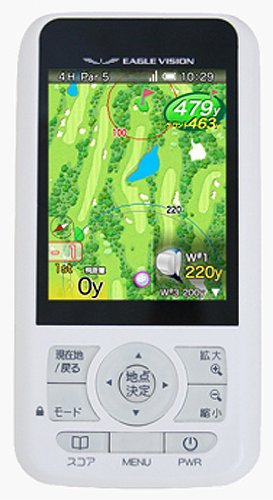
Item Descriptions:
Product introduction
High performance GPS loaded
Luo net of almost all course data throughout the country.
Note: Please refer to the manufacturer's website for details.
Over 2,300 courses offered by Zenrin Data Com Corporation (coverage rate 97%) Within 2,100 layouts will be expanded sequentially
Display function (2.7 inch color liquid crystal, QVGA, outdoor clear display)
Waterproof raindrop (Waterproof standard IPX-3)
Color liquid crystal with backlight
Battery type battery adopted (5 hours full charge.It can be used for up to 10 hours)
Size · weight, height: 117.5 mm, width: 60.0 mm, thickness: 16.9 mm, weight: 120 g
Display: Color Liquid Crystal QVGA · Outdoor Vivid Display Power: Li-ion Battery 1500 mAh External Interface: Mini USB Operating Temperature: 0 ° to 40 ° Waterproof: Waterproofing of Raindrops (IPX - 3) Applicable Standard: VCCI
· GPS positioning function: Receive radio waves from GPS satellites, calculate date and time, position (latitude / longitude), direction of travel,
· My weapon view: My weapon view will show the concentric circle of the club according to the remaining distance.
The carry distance of My weapon can be set with EAGLE VISION,
· Hazard view: Hazard view makes it easy to see the location and distance of hazards such as bunkers and trees on the course layout.
The golfer will be able to make the best judgment and concentrate on the play.
,,
· Display function: Displays the name of the golf course, course name, hole NO, remaining distance to the green and the target and flight distance, course layout (updated as needed) etc. on the display,
· Button operation: You can perform operations, display change, and setting operation when selecting golf courses, courses, and halls.
Even with quick button operation, it works without missing buttons,
· Communication function: You can communicate with external devices via USB,
· Log function: Automatically record the position of the terminal,
Destination Information: Displays the distance and direction from your current location to your destination.
Destination can be registered by user,
· Broad view: In the plot view, you can display the locus and distance you registered.
, It becomes possible to look back on the trajectory and the flight distance, and you can know your condition on that day
· Standard View: In the Standard View, the concentric circle of the distance set from the current position of the course layout is displayed.
It can be used simply without setting.
Because it can be used sensuously, it is best for golfers who want to play easily.
Round History · Upload score: Point information and scores registered with EAGLE VISION can be uploaded to "Genki Golf".
, The round history registered in "Genki! Golf" leaves the feelings and circumstances felt at the place as comments, and by linking with My Weapon which club was used, the round image is detailed
You can record.
From the accumulated data so far, you can see the round tendency of the golf course, compare past and past traces of yourself and superimpose it
Taiwan
From Amazon
Eagle Vision EAGLE VISION Golf GPS EV-027CL
Eagle Vision EAGLE VISION
Golf GPS EV-027CL
High performance GPS golf navigation & recorder
Attention design
The GPS of EAGLE VISION is compatible with DGPS,
It is possible to accurately grasp the position of the golfer in the round.
Automatically search the golf course from the position where you are,
It will set up the necessary information for the round.
The layout displayed during the round,
We adopted the evolutionary full layout which can also grasp the surrounding hall.
From the full layout with reality you can avoid penetration of dog legs,
You can find an optimal strategy route, such as deciding shortcuts.
Also, by thinking in conjunction with the information felt on the skin during a round such as wind direction
A more accurate course strategy will be possible.
Supports various scenes with various views
High power core
For EAGLE VISION,
· Layout mode expressing the course layout by illustrations
· Yardage mode to display the number of yards with easy-to-view and simple display
There are two kinds of modes.
The layout mode has four more views,
We support golfer 's intuitive judgment.
1. Standard view
2. My weapon view
3. Hazard view
4. Plot view
EAGLE VISION provides the golfer with the information necessary for the course capture in the most appropriate form.
A golfer can create a course strategy using his own view.
Skill up with self-management
EAGLE VISION can change the setting according to your golf skill.
We will accumulate experience by accumulating rounds and reflect on the setting of EAGEL VISION.
Easier to use, your own original navigation is completed.
It is also possible to simulate golf courses in advance.
Let's image training and aim for a score increase!
Enjoy more golf life with Web collaboration
Website cooperating with EAGLE VISION "I'm fine!
Golf "
"Golf diary" that spells daily golf life and "I'm fine!
Golf "
You can do "fellow registration" with the golfer who you found and the friends you know about.
By registering as a buddy, you can display trajectories in a round history by overlapping
Private message exchange becomes possible.
Also, "I'm fine!
Golf "targeting golfers nationwide
We are holding a driving contest.
With the golfers nationwide connected by EAGLE VISION
Let 's compete in distance in the driving contest.
Of course you can also check your rank so you can enjoy more golf
Please join us.
Usage worries for everyone
To switch modes
To switch modes during round, press mode button.
Every time you press the mode button,
The layout mode and the yardage mode are displayed alternately.
The layout mode expresses the course including the surrounding hall by illustration.
Depending on the strategy, you can switch between the four views.
In case
In the yardage mode, there are green center / reception and
Express the distances to each hazard with easy-to-understand icons and large numbers.
※ 1
For golf courses where layout does not exist
It corresponds only to the yardage mode.
2 No operation required for green
Depending on the golf course, there may be 2 green halls.
Since EAGLE VISION displays two green at the same time
Unnecessary operation is unnecessary.
The golfer was able to focus more on play without hesitation.
※ 1
The displayed distance is the horizontal straight line distance
How to record scores
When you press the score button during play, the score table is displayed.
Select the hole you want to enter and press the Enter button
The "score / put input screen" is displayed.
As the initial value, the score is 2 / par / pat
Please correct it to the correct value and press decision button.
To return to the original play state after input, please press the [Hometown / Back] button.
Score correction etc. of the previous hall are also possible.
You can also display score information on the layout by entering the score.
To know the shot's flight distance
In order to know the flight distance of the shot, it is necessary to register the spot at the place where the shot was done.
Register the spot at the place where you shot,
When moving toward the falling position of the ball is started
Automatically calculate the distance between the point registered location and the current location,
It displays in real time as a flying distance on the screen.
When you arrive at the falling point of the ball, you will know the flight distance of that shot.
When you register a spot at that place, it becomes the information of the next shot and the distance display becomes 0.
In case you want to check each flight distance in the hall
You can check by switching to the plot view.
※ 1
The displayed distance is the horizontal straight line distance
To switch views in layout mode
When the layout mode is displayed
You can switch between the four views by pressing the left and right buttons.
Standard view
← → My weapon view
← → Hazard view
← → Plot view
(The display switching will be patrolled)
It is possible to build a course strategy using the view that suits you on the spot.
Confirm whether it is necessary to update the latest golf course data
From [Menu] ⇒ [EAGLE VISION] ⇒ [VISION latest golf course data]
Select the golf course that you plan to round.
The data creation date on the upper right displayed in the golf course
"I'm fine!
Compare the creation dates of definition files that can be confirmed with "golf"
If new data exists, new golf course data is required.
"I'm fine!
Golf "regularly distributes the latest golf course data,
For those who have registered for membership, we have sent notifications by e-mail magazine.
"I'm fine!
Please log in to Golf and download the latest golf course data.
※ 1
Even if you can not get the latest golf course data depending on the situation,
It can be used without problems as long as it is not a whole hole renovation.
Features:
- High performance GPS loaded
- Luo net of almost all course data throughout the country.
- Note: Please refer to the manufacturer's website for details.
- Over 2,300 courses offered by Zenrin Data Com Corporation (coverage rate 97%) Within 2,100 layouts will be expanded sequentially
- Display function (2.7 inch color liquid crystal, QVGA, outdoor clear display)
- Waterproof raindrop (Waterproof standard IPX-3)
- Color liquid crystal with backlight
- Battery type battery adopted (5 hours full charge.It can be used for up to 10 hours)
- Size · weight, height: 117.5 mm, width: 60.0 mm, thickness: 16.9 mm, weight: 120 g
- Display: Color Liquid Crystal QVGA · Outdoor Vivid Display Power: Li-ion Battery 1500 mAh External Interface: Mini USB Operating Temperature: 0 ° to 40 ° Waterproof: Waterproofing of Raindrops (IPX - 3) Applicable Standard: VCCI
- · GPS positioning function: Calculate date and time, position (latitude / longitude), direction of travel by trusting the radio waves of the GPS satellite,
- · My weapon view: My weapon view will show the concentric circle of the club according to the remaining distance.
- The carry distance of My weapon can be set with EAGLE VISION,
- · Hazard view: Hazard view makes it easy to see the location and distance of hazards such as bunkers and trees on the course layout.
- The golfer will be able to make the best judgment and concentrate on the play.
- ,,
- · Display function: Displays the name of the golf course, course name, hole NO, remaining distance to the green and the target and flight distance, course layout (updated as needed) etc. on the display,
- · Button operation: You can perform operations, display change, and setting operation when selecting golf courses, courses, and halls.
- Even with quick button operation, it works without missing buttons,
- · Communication function: You can communicate with external devices via USB,
- · Log function: Automatically record the position of the terminal,
- Destination Information: Displays the distance and direction from your current location to your destination.
- Destination can be registered by user,
- · Broad view: In the plot view, you can display the locus and distance you registered.
- , It becomes possible to look back on the trajectory and the flight distance, and you can know your condition on that day
- · Standard View: In the Standard View, the concentric circle of the distance set from the current position of the course layout is displayed.
- It can be used simply without setting.
- Because it can be used sensuously, it is best for golfers who want to play easily.
- Round History · Upload score: Point information and scores registered with EAGLE VISION can be uploaded to "Genki Golf".
- , The round history registered in "Genki! Golf" leaves the feelings and circumstances felt at the place as comments, and by linking with My Weapon which club was used, the round image is detailed
- You can record.
- From the accumulated data so far, you can see the round tendency of the golf course, compare past and past traces of yourself and superimpose it
Product information:
Shipping Weight: 480 g
Package Dimensions: 5.89 x 11.99 x 17.09 cm
SHIPPING METHOD
Delivered directly from Japan by Japan Post. It will take 3 to 5 business days to prepare the order for shipping. We guarantee careful packing and safe shipping.Please note that in some cases additional import or VAT charges may incur and have to be borne by the client.
1. Japanpost registered mail
Shipment by Japanpost Registered Mail (Standard). Trackable any time with tracking number. Insurance is not available. Delivery time usually is between 1-3 weeks from the date of dispatch. Some items are not eligible for Standard Shipping.
2. Qxpress Standard
Shipment by Qxpress standard service. Trackable at any time with tracking number. Registered and insured up to a value of item price and shipping fees.Delivery time is usually between 5-10 business days from the date of dispatch.
3. EMS
Shipment by Expedited Mail Service. Trackable at any time with tracking number. Registered and insured up to a value of $200 and usually delivered in 2-6 business day from the date of dispatch.

| Japanpost registered mail | Qexpress | EMS | |
|---|---|---|---|
| Shipping Method | Japanpost Registered Mail (Standard) | Standard Qexpress | EMS (Expedited Mail Service) |
| Trackable | Yes | Yes | Yes |
| Insured | N/A | Yes (Up to item price and shipping fees) | Yes (Up to $200.00) |
| Asia | 1-3 weeks | 5-10 days | 2-5 days |
| Oceania; North America; Central America and the Middle East | 2-4 weeks | 6-14 days | 2-6 days |
| Europe | 2-4 weeks | 6-16 days | 3-8 days |
| South America and Africa | 2-4 weeks | 10-18 days | 4-8 days |
NOTICE:
- For overseas delivery, please be aware that damage to the outer box can be seen.
- If you would like to avoid as much damage as possible, please choose the EMS shipping method.
"According to Qoo10 guide line,overseas shipping fees will be charged to you extra if you choose Qxpress standard shipping.We recommend you to compare the total price of your purchase with EMS."
