Chromecast 2 Edition - latest (marries your phone and television) Now Comes in: Original Black | Red/Carol | Yellow/Lemonade
_
Chromecast Audio - Cast your google music (for wireless music streamer - marries your phone and stereo/hifi)
[Authentic - with official firmware updates]
Brand new in original retail packaging
Stock status : In Stock (Ship out from local - Singapore - frequency: Everyday)
We specialise in selling authentic Google Chromecast. Our Google Chromecast gets latest firmware update wherever and whenever it is connected to internet. We are proud to say our supply orginate from USA. Get firmware update with original chromecast only.
<Seller announcement> -Beware shoppers- We are shoppers too, we do not encourage sellers to collect and harvest buyers' personnel data. We do not harvest and sell your personal details (setting mandatory options such as email, contact no.) to other parties or spamming purpose.
No additional hidden charge
Comes with orginal adapter (US-pins) as an alternative power source
We offer warranty upon delivery!
<Recent Chromecast Updates>
Always catching up with the local drama?
Welcome Toggle to the Chromecast family.
Fans of Toggle, we come bearing good news: you now have the option of watching our comprehensive catalogue of content on your very own chromecast, in the comfort of your homes – on big HD screens.
Viewers with Chromecast can now ‘cast’ their videos* directly from their mobile phones and tablets onto TV screens to enjoy the full HD experience. Users can download the Toggle app and enjoy the big screen experience as they catch up on their favourite TV shows and get their latest entertainment news fix.
*Toggle account services and subscription sign-up may be required not included or related to chromecast
"When you buy a google product,you will always get yours updates coming in" : Google 2015
What is Chromecast?
Chromecast is a thumb-sized media streaming device that plugs into the HDMI port on your TV. Simply use an Android phone, tablet, iPhone®, iPad®, Mac® or Windows® laptop, or Chromebook to cast your favourite entertainment and apps right to the big screen.
Everything you love, now on your TV
Chromecast works with a growing number of apps. Find your favourite apps and discover more at chromecast.com/apps.
For everything else, you can mirror what you see on the small screen to the big screen. If you’re on your laptop, you can cast any website in Chrome; and from your Android phone or tablet, you can mirror your screen to the TV.*
A whole new way to TV
With Chromecast, your phone is your personalised remote control. You can use it to search and browse, play, pause, rewind, control the volume and even make playlists. While casting, you’re free to use your phone for other things.
Your friends and family can cast to the TV using their own phone or tablet too – with no additional setup required. Everyone can sit back and enjoy together on the biggest screen in the home.
For everyone
It’s easy for everyone to enjoy Chromecast. It works with the devices you already own including smartphones, tablets and laptops. Plus, it automatically updates with new features and we're adding more apps all the time, so your Chromecast keeps getting better. It takes only a few minutes to set up, and at $65, it’s affordable to get one for every HDTV in the house.
Your friends and family can cast to the TV using their own phone or tablet, too. With the guest mode feature, they don't even need to connect to your Wi-Fi. Everyone can sit back and enjoy together on the biggest screen in the home.
Game on, game big
Turn your TV screen into a game board, racetrack, dance floor or trivia quiz. With Chromecast, everyone can play games using their phone as their personal controller, while watching the action live on the big screen.
How to try your first cast (Get started in 3 easy steps)
Use your phone or tablet to cast your first video from YouTube to your TV in three easy steps:
Remote-free
Chromecast works with Android tablets and smartphones, iPhone® and iPad® devices, Chrome for Windows, Chrome for Mac® and Chromebooks. Browse for what to watch, control playback and adjust volume using your smartphone, tablet or laptop.
Sit Back, Watch Together
Chromecast is the easy way to enjoy online video and anything from the web on your TV. Plug it into any HDTV and control it with your existing smartphone, tablet, or laptop. No more huddling around small screens and tiny speakers. Chromecast automatically updates to work with a growing number of apps.
With Chromecast, you can easily enjoy your favorite online content on your HDTV - Learn how.
Remote Free
Control in the Palm of Your Hand
Chromecast works with devices you already own, including Android tablets and smartphones, iPhones, iPads, and Chrome for Mac and Windows. Browse for what to watch, control playback, and adjust volume using your smartphone, tablet, or laptop. You won't have to learn anything new.
Specifications
The second generation Chromecast has a disc-shaped body with a small length of HDMI cable attached (as opposed to the HDMI plug built into the original model). The cable is flexible and can magnetically attach to the device body for more positioning options behind a television.
The second generation model uses a Marvell Armada 1500 Mini Plus 88DE3006 SoC, which has dual ARM Cortex-A7 processors running at 1.2 GHz.
The SoC contains an Avastar 88W8887 which has improved Wi-Fi performance and offers support for 802.11 ac and 5 GHz bands while containing three adaptive antenna for better connections to home routers.
WHAT’S IN THE BOX?
1 x Chromecast 2 1 x Power cable (USB) 1 x Power adapter
REQUIREMENTS:
TV with an HDMI port WiFi network Compatible computer or mobile device.
Supported OS and devices: Android 4.1+, iOS 7.0+, Windows 7, or Mac OS X 10.7, ChromeOS.
Chromecast Audio (Affordable, simple wireless music streamer marries phone and stereo/hifi)
What is Chromecast Audio?
Chromecast Audio is a small device that plugs into your speaker for streaming music through WiFi.
Once set up, simply use your iPhone®, iPad®, Android phone and tablet, Mac® and Windows® laptop, or Chromebook to cast your favorite tunes to the best speakers in the house.
SPEAKER INPUTS SUPPORTED:
Easily cast music, without the hassle of pairing
Tap the Cast button from music apps to send the music instantly to your speakers. Search, play, pause, queue songs and change the volume right from your phone—anywhere in the house.
Chromecast Audio Specs
Chromecast Audio: 51.9 x 51.9 x 13.49 mm Audio cable: 146 mm Power cable: 1.75 m Weight: 30.7 g (0.068 lbs) Ports & Connectors: 3.5mm jack with analog and optical digital audio output Micro-USB Connectivity/Network: Wi-Fi 802.11ac (2.4GHz/5Ghz) Power: 5V, 1A power supply
WHAT’S IN THE BOX? 1. Chromecast Audio 2. 3.5mm analog stereo patch cable 3. Power cable (micro USB to normal USB) 4. Power adapter (Unplug for USB Connector)
REQUIREMENTS:
A speaker system with an aux/line input, RCA or optical input (RCA and optical cables not included) WiFi network A compatible computer or mobile device. Minimum OS requirements are Android 4.1+, iOS 7.0+, Windows 7, or Mac OS X 10.7. Availability and performance of certain features, services and applications are device- and network-dependent and may not be available in all areas; subscription(s) may be required, and additional terms, conditions and/or charges may apply.
Subscriptions may be required to access certain content. Performance of certain Chromecast features, services and applications depends on the device you use with Chromecast and your internet connection. Certain features, services and applications may not be available in all areas. Chromecast is compatible with WiFi-enabled Android 4.1+ smartphones and tablets; iOS 7.0+ iPhone®, iPad®, and iPod®; Chrome for Mac® and Chrome for Windows®; and ChromeOS. Mirroring is available on most Android devices. More information is available on the Chromecast help center.
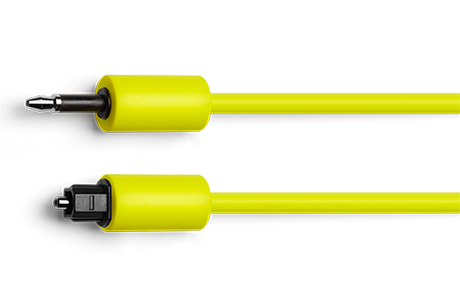
Mini-TOSLINK-to-TOSLINK (optical) cable - Not included with Chromecast Audio
This cable is another commonly available adapter that provides access to the optical digital audio output on Chromecast Audio. Digital audio is popular among users with high power speaker systems. TOSLINK inputs are commonly found on modern AV receivers, soundbars, and some high-end desktop speakers, and studio monitor speakers.
Chromecast's official optical accessory cable ensures audio performance and compatibility and looks great.
*Please note, once order/ item is opened, full refund is not provided.
Reason of Our Presence:
We believe supporting of originality and quality gadgets with no shortcuts in bringing them to our local customers as we think they will pay off end of the day. We are not limited to bring you closer chromecast device, we can offer after-sale support advice too.
Please feel free to look at all our positive reviews for all of our products!
Our shoutout to our buyers! **Many thanks to everyone who have taken effort and gave us many many great reviews to this product with us. Thank you for your supports guys and appreciate every each of them. - Geekzalley
FAQ- buying with us:
1. Why buy from us?
We are responsible Singapore-based seller. We use and love chromecast too!
We hear from you guys through feedbacks and make enhancements everytime! All our reviews are solely for chromecast only~
2. Is there stock and when the stock will come?
Once we confirmed your order, rest assured that available stock has been reserved for you. We will ship out based on the posting date indicated.