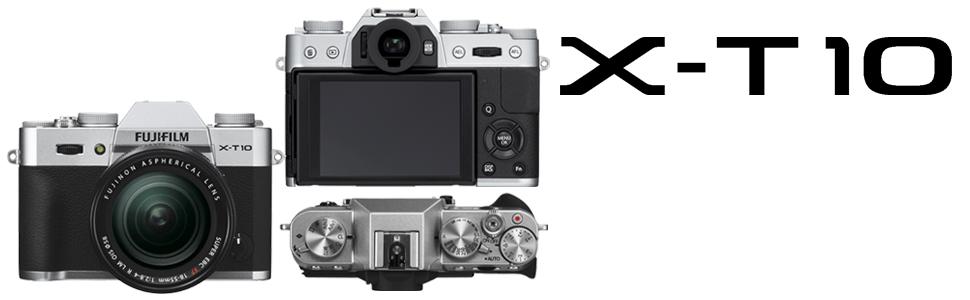
Operation & Design
 |
 |
 |
|---|---|---|
|
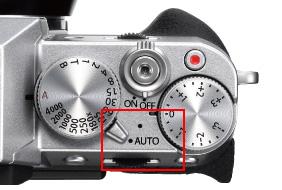
Auto mode —Capture premium quality photographs with ease The top plate features a Auto Mode Switch Lever. Setting it to AUTO switches the camera into the Advanced SR AUTO mode, which automatically selects the optimum shooting settings from 58 preset scenes so you can take high-quality shots with ease. This function, which also automatically selects the optimum AF mode, is perfect for snapshots and occasions when you don't want to use the wrong settings by mistake. The rear Command Dial lets you select a scene type using your choice of scene-specific presets. |
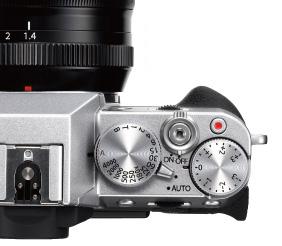
Control mode —Settings that help you enjoy photography more Despite its compact size, the FUJIFILM X-T10 has a full set of controls. You can shoot in Program (P), Shutter Speed Priority (S), Aperture Priority (A) or Manual (M) by combining the Shutter Speed Dial with lens's aperture settings. The design allows quick and simple selection of exposure mode to suit each and every scene. Use the 1/3EV steps on the 3-stop exposure compensation dial for delicate exposure control. Exposure compensation can even be used when shooting in the Manual mode. |
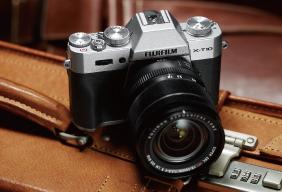
Design The camera body weighs just 13.4oz/381g. It has been designed to be compact, while maintaining the optimum balance between width and height. |
Auto Focus - New AF system captures the subject perfectly
 |
 |
 |
|---|---|---|
|
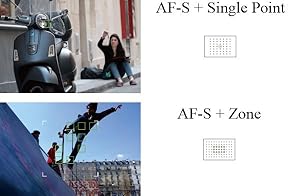
Six different AF modes AF-S + Single Point Delivers highly accurate autofocus on a specific area. Choose any one of 49-point focus areas, then select the size of the area in five different levels. AF-S + Zone Effective for a subject with moderate movements, which the Single Area mode may have difficulty capturing. Choose a 3x3, 5x3 or 5x5 AF area. Use the centrally-positioned 3x3 and 5x3 phase detection AF areas for faster autofocusing speeds. |
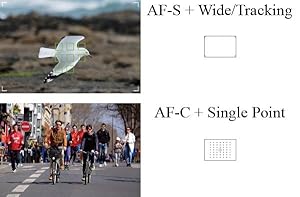
AF-S + Wide/Tracking The camera automatically selects and focuses using several of the 77-point focus areas. This is ideally suited to subjects with unpredictable movements, or multiple moving subjects. AF-C + Single Point Pin-points a subject with a fixed direction of movement, e.g. moving towards the camera. Choose any one of 49-point focus areas, and select the size of the area in five levels. |
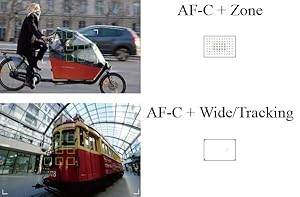
AF-C + Zone Tracks a subject when shooting hand-held, using a 3x3, 5x3 or 5x5 area to maintain focus. Choose the phase detection AF areas for faster autofocusing speeds. AF-C + Wide/Tracking Perfect for capturing a subject that moves unpredictably up/down, left/right and closer/further from the camera. Suitable for shooting with a tripod, simply pick the starting position to start tracking the subject. |
Image Quality / Viewfinder

|
|
|
|
|---|---|---|---|
|
Maximizing the power of APS-C-sized X-Trans CMOS II sensor A - APS-C image sensor 23.6 x 15.6mm B - Micro Four Thirds 17 x 13mm C - 1-inch 13.2 x 8.8mm |
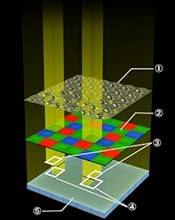
Capture each strand of hair in crisp detail. The FUJIFILM X-T10's large APS-C-sized 16M X-Trans CMOS II sensor features an original color filter array with a highly random pattern that minimizes moire and color aberrations, eliminating the need for an optical low-pass filter (OLPF). The result is image quality that rivals a full-frame sensor. 1: Microlenses 2: X-trans color filter 3: L/R light interception filter 4: Phase detection sensor / green filterpixel 5: Photodiode |
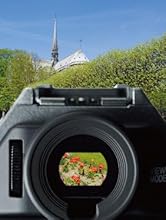
Real-Time Viewfinder The FUJIFILM X-T10 has a high magnification 2.36M-dot organic EL electronic viewfinder, which shows the subject clearly even in bright conditions. It has been designed with improved magnification ratio of 0.62x***, world's shortest lag-time of 0.005 sec.* and a more intuitive user interface to provide an even better shooting experience. Being electronic, the display can show the effects of Film Simulation, exposure settings, etc. It offers a full real-time shooting experience that no optical viewfinder can provide, as there's no need to check effects after taking each image. * Fujifilm research as of April 2015. *** Market leading viewfinder magnification ratio. Approx. 0.65x magnification 50mm (35mm format equivalent)at infinity and diopter set to -1.0 m-1. |
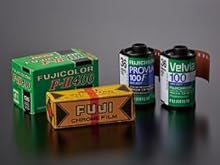
Recreating the colors of Fujifilm's photographic films 80 years of photo film research adds up to color reproduction that's second to none. Over decades of film manufacture Fujifilm has perfected the skill of color reproduction and it lives on in the FUJIFILM X-T10. Pleasing skin tones, natural blues and greens, and the ability to perfectly record the diversity of white balance conditions throughout the day are all taken in the camera's stride, and it also boasts a wide dynamic range for better reproduction of detail. If you shoot RAW, the in-camera RAW processing function enables any of the 11 Film Simulation options to be applied post-capture, broadening your shooting options. |
Advanced Features

|
|
|
|
|---|---|---|---|
|
Continuous Shooting The camera offers High Speed Continuous shooting (CH) at approx. 8.0 fps and Low Speed Continuous shooting (CL) at approx. 3.0 fps. While in JPEG mode, you can shoot around 8 frames in CH and can shoot until the memory card is full in CL. |
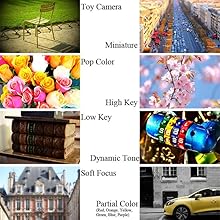
Advanced Filters Create unique images by using one of eight Advanced Filters. Effects include Toy Camera for a retro look, Miniature for creating a diorama effect, and Pop Color for high contrast and saturation. You can preview the effect through the viewfinder or on the LCD screen. |
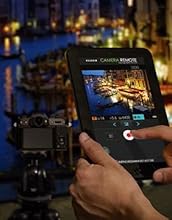
Focus with a Touch - FUJIFILM Camera Remote With the new dedicated "FUJIFILM Camera Remote" application, you can focus and trigger the camera release from your smartphone or tablet. The app not only lets you adjust focus, but also control settings like shutter speed, aperture, exposure compensation and ISO sensitivity. You can even apply other settings like Film Simulation, self-timer, and flash while "Touch AF" lets you focus from your phone or tablet, too. Imagine all the situations where this smart assistant will come in handy! Take commemorative group photos with yourself in the shot, capture wildlife photos, or remotely release the shutter for night shots free from camera shake.The photographic possibilities are endless. |
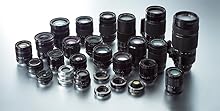
X Mount Lenses X Mount Lens - the product of integrated lens & sensor development with original digital technology. Every new addition to the expanding line-up is a gem of optical excellence. Every facet of the development and design of Fujifilm's original X Mount began with a clean slate. The result was the marriage of high-precision optical engineering with the latest digital technology. From the acclaimed high resolution XF lens series to the compact portability of the XC lens series, each lens exploits the full potential of the X Mount's descriptive performance. |
Notice
1、Customs Duties and Taxes
All customs taxes/VAT and related charges are not included in the order, these charges are the buyer's responsibility to bear. Please check with your country's customs authority to determine if there will be additional costs or restrictions prior to order.
2、Product Exchange and Return
1)、For the product return,the buyer must contact us first and follow our return policy and procedure. Return without authorization will not be handled.
2)、For a faulty or defective product found within 7 days of receiving, buyer can request a refund or exchange, we will pay for the return shipping cost. But if found buyer misrepresents the condition of the product, we may impose a USD30 handling fee and the product will be returned to you at your expense.
3)、For approved returning, all original packaging materials and accessories must be returned and are in resellable condition. Buyer will take full responsibility of the product damage/lost of the during the return shipping, thus is advised to use insured courier shipping (Fedex, DHL, UPS etc.).
3、Product authenticity
All products we sell are 100% brand new and genuine. We source products directly from manufacturers and suppliers all over the world so there may be some differences between packaging and version. If you have any doubt, please contact us before order.