Product Overview
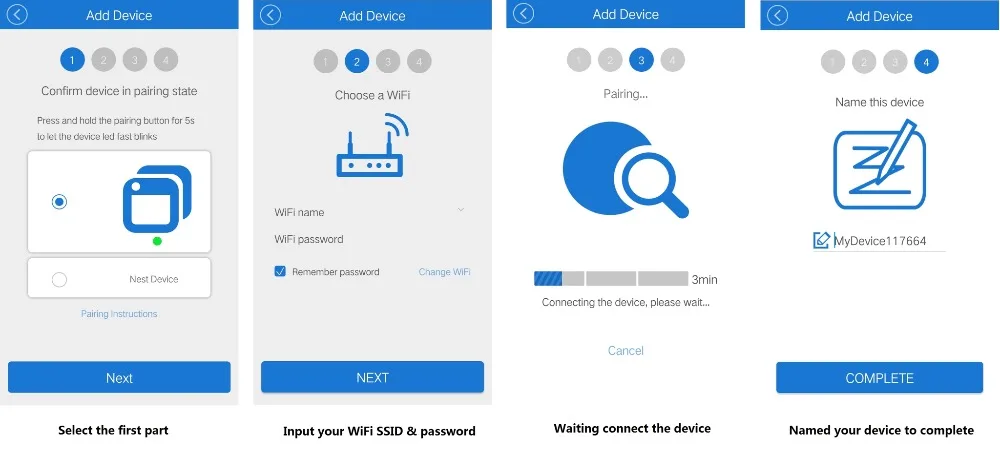
Wi-Fi smart lamp connects to the Internet through WiFi network and controls the power of home appliances, smart phone or other device can control the switch of socket and track the status of socket at any place where network is available, one device can support more than one WiFi smart lamp controller. WiFi smart lamp using SmartLink net technology you can easily access settings, besides, it has timing function you can DIY for your favorite and power indicator for your energy tracking, let you have fun on local or remote control your home appliances, enjoy with it.
Feature
l Support WiFi network.
l Support Amazon Alexa and Google home.
l Support Smart configure net technology, easy to access settings.
l Support status tracking, home appliances status timely feedback to your device.
l Support Max 8 timing task.
l Support Max 150 WiFi smart devices from one smart phone.
l Easy installation, easy handling and can be activated immediately and stably.
l FCC,CE, ROHS, RED approval.
Question of Alexa
Q1. Is there a fee to link my Echo to my eWeLink system?
No. If you have already purchased an Amazon Echo and you have a eWeLink system, you can link your Echo to your system for no additional cost.
Q2. If I already have an Echo, can I link it to my eWeLink?
Yes, as long as you have a eWeLink single channel device. Please read above tutorial to learn how the link the Echo to your system.
Q3. What features of my system can I control with my Echo?
With Echo, you can turn on/off any electrical devices that connect with our single channel devices, such as turn your lights on and off.
Q4. My commands are not working, how to solve it?
Please check the following to resolve the issue.
4.1. Make sure you are using a valid command for your eWeLink system.
4.2. Make sure your network works normally.
Q5. How to connect Echo to Wi-Fi?
You may read the detailed tutorial from here.
Q6. Where can I find more information about and support for Echo?
Amazon has detailed support content for every aspect of your Echo here.
Q7.I can't find Skill in my language, why?
Currently, we only have Skill in US English and UK English.
German Skill is our next plan. While we don't have plan for other languages now.
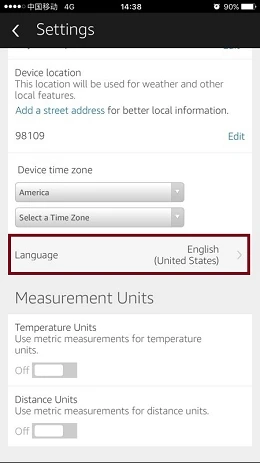
If you want to use this function. Please go to Setting on your Alexa App. In language, please select English(United States) or English(UK). Then you can search our Skill.
As shown below:
Question of Google Home
1. How can I set up Google Home?
Please refer to this post from Google.
2. My Google assistant often misunderstands me when I try to control specific lights. What can I do?
If you experience recognition issues, we recommend that you rename your lights to names which do not include numbers, special characters or colour names since these can be misunderstood by Google assistant.
3. Do I need a Google account to use Google Home?
If your device is not linked to a Google account, Google Home will only work as a speaker. You will not be able to use Google Assistant.
4. Can I connect multiple Google accounts with Google Home?
Today, Google Home supports a single account on the device but you can use multiple accounts with your music services.
5. Can I ask Google to activate timers like “wake up timer” or “sleep timer”?
This feature is not currently supported by Google Assistant.
6. Can I control scenes or smart scenes with Google Assistant?
We are working to support scenes(one tap to turn on/off a gang of devices). Please keep an eye on our eWeLink Facebook news. But we don't plan to support smart scenes(use conditions like temp. or hum. to trigger on/off).
7. Can I ask Google Assistant to adjust temperature and humidity?
Not now. But we plan to realize this function.
8. Why I can't ask Google Assistant to control the Google Nest that has added to eWeLink app?
Sorry, "Smart We Link" doesn't support to control Google Nest currently. You can directly add Nest to Google Home device list and control it.