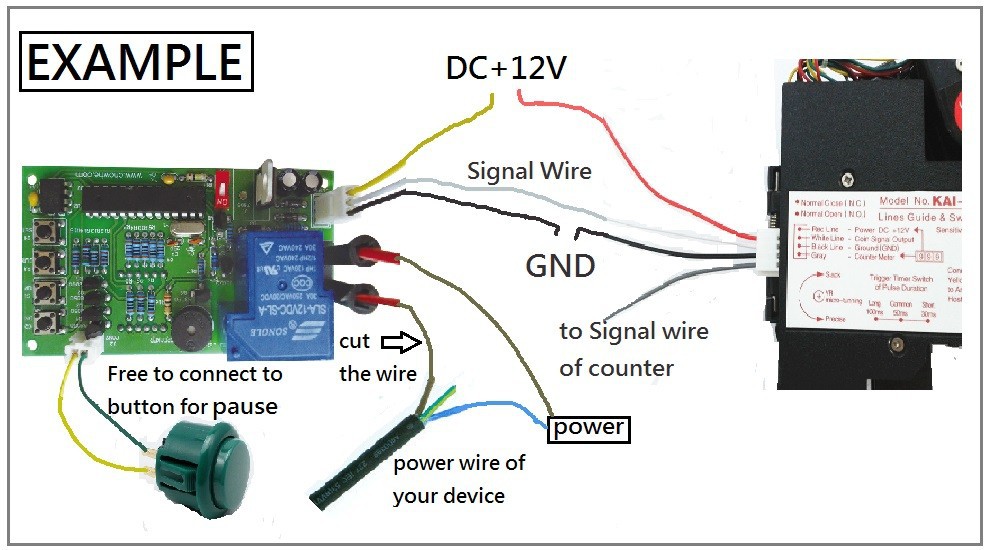
Connection

1: Display
2:Output-connect to your device
3: AC jack-5.5mm*2.1mm
4: YELLOW: DC12V, WHITE: input signal, BLACK: GND
5: Push button for coin mode 01:02
6: Pausing
7-10: Button S2, S1, S3, and S4
NOTE: Free to connect DC12V to either No. 3 or No.4.
Setting
GIVEN TIME and VALUE: User can get extra free time when the amount reach the value you have set up during the working time.
---------------------------------------------------------------------------------------------------------------------
If the function of GIVEN TIME is not needed, please skip step 5-step 7 by press button S4.
Mode Setting
1. Please hold on button "S1" and "S2" to get into MODE SETTING.
2. Please use button "S1" and button "S2" to set up CODE for FIRST MODE.
3. Please press button "S4" after setting.
4. Please repeat step 2 and step 3 for setting rest mode.
Code Introduction
Operating Mode
01:01: Time counts down without pressing button
01:02: Time counts down by pressing button
TIME TYPE
02:03: MINUTE: SECOND
02:04: HOUR: MINUTE
-----------------------------------------------------------------------------------------------------------------
MEMORY MODE
03:05: Continue counting time after power off and on
03:06: Reset time and value after power off and on
-----------------------------------------------------------------------------------------------------------------
TIME for RESET AUTOMATICALLY
04:??: 1-30 minutes are adjustable.
Description: Time and value will be reset automatically if user does not choose any function after the
user inserts coins.
DEFAULT
Operating Mode: 01:01 Time Type: 02:03 Memory Mode: 03:06