BEST Deal in Qoo10! Cheapest in Singapore!
100% Authentic!
For Mi Tv, software are always updating and there's always new tv apps enable to watch more TV using Xiaomi Tv Box
Here in Qoo10 Passion Living, We'll teach you how to DIY & learn to install TV apps!
24hrs UNLIMITED:

Limited Time only!
Don't miss this fantastic deal! Grab it now!
Singapore Shop Warranty Assurance
LATEST UPDATE:
Ultimate Drama

For Mi Tv, software are always updating and there's always new TV apps enable to watch more TV using Xiaomi Tv Box
Here in Qoo10 Passion Living, We'll teach you how to DIY & learn to install TV apps!
Please take note : Do not factory reset the mi tv box if not all the program will be gone
For reinstallation there will be additional charges applied
Pls note that pre-installed software Chrome, Showbox, Youtube may not work due to updates, pls use below link youtube for your mi tv box, XH for home for web browser, other channel apps to replace showbox.
Xiaomi TV Box Mini English UI Replacement & How to Install Apps on MiBox.
To install apps, select shafa market -> Tools - > remote control . key the ip address on your laptop browser .
More information on Live Soccer http://miniliew.blogspot.sg/2014/08/xiaomi-box-jailbreak-or-not.html
How to get EPL on Mi Tv Box:(Do not Update): https://drive.google.com/file/d/0B2N3i51I1Nv-TlVtR3llN2MtNFk/view
CloudTV (New! 3 Sept 2015) APK at http://www.mediafire.com/download/s7cvjym52bh667d/CloudTV_CTV-B-20141003.apk
MiTv Youtube at http://s000.tinyupload.com/index.php?file_id=19850873568723883780
Tv Games APK: http://s000.tinyupload.com/?file_id=12740969425470567732
If you want to watch football, install this apk: http://s000.tinyupload.com/?file_id=44088118518965848084
How to Install Apps & on MiBox:
1.Download the application (APK) file to a folder of your choice on your computer.
1.0.Shafaguanjia.apk (Our Mi Tv Box already installed App store called 沙发管家 Sha Fa Guan Jia "Sofa Butler")
2.The next step is to copy the APK file from your computer to an flash drive.
3.Connect flash drive to Mi box.
All these Apps can be easily download via here http://app.shafa.com/apk/dianshibibei.html
This 电视必备 app has all the latest version that allows you to run Tudou, Sohu, Youku and so on.
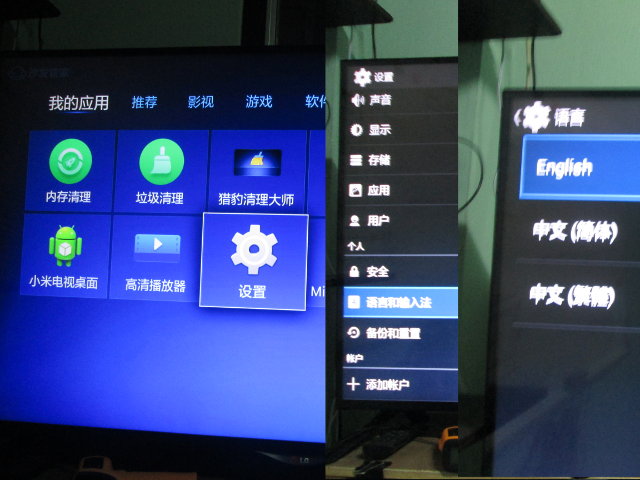
A bunch of apk have been provided, including Google services, Google Play, and YouTube, but unfortunately, so the only one you really need to download is Shafaguanjia.apk, as it will allow you to access Android settings, and change the language and input method, as well as upload more apk, which may fail with the Xiaomi uploader. Once the file is transfered to Mi Box Mini, you’ll get the usual installation prompt asking to review permissions before installation, and installation is complete, you should see “Shafa Market” app (in Chinese) shown in the right of the main screen.
Start the app, select the Setup icon to enter the “standard” Android settings, scroll down until your the the options for Language (“A” icon), select the first options, and you should be able to select English, simplified Chinese, or traditional Chinese as shown in the picture below.
SG!TV (You have to DIY Install from XBMC/KODI)
For Live SG Channel use HPDTv apps Channel 7001 to 7005
(Channel U, Channel 5, Channel 8, Okto, Channel News Asia)
http://kodi.tv/download/ Download Android APK, install to your Mi Box using Shafa Remote install.
If you faced Green screen while playing, go setting -> Video -> Acceleration -> disable libstagefright & Mediacodec.
http://kodi.wiki/view/Add-on:Mediacorp_Singapore

Mega Reborn / Mega IPTV / Phoenix TV
(You have to DIY Install from XBMC/KODI)
World IPTV List https://www.youtube.com/watch?v=IKS4ZQWrRV8
https://www.youtube.com/watch?v=xA1rhb2LQBs
http://tutorial-iptv-xbmc.blogspot.sg/2014/11/xbmc-how-to-install-phoenix-add-on-for.html
http://www.husham.com/mega-reborn-how-to-install-guide-for-kodi-xbmc-iptv-addon/
If you are looking for a great XBMC KODI TV addon you might want to check out Phoenix. Most of you may of not heard of it but to most I am sure you will like it. It features playlists from 6 users and has some Live TV playlists on it. Woody one of the lists has USA TV section which has Animal Planet, ABC, AMC, Bravo, CBS, C.I, CNBC, CW, Discovery Channel, Fox, FYI, HBO, MTV, Nat Geo, NBCSN, NFL Network, Outdoor Channel, Showtime, Syfy, TLC, USA Network.
It also has USA TV Series section with 24 hours of Two and a half Men, Adventure Time, Breaking Bad, Bones, Curb Your Enthusiasm, Friends, House Of Cards, How I met Your Mother, King Of The Hill, King of Queens, Lost, Mash, Scrubs, Star Trek, The Cleveland Show, The Walking Dead, trailer Park Boys.
Also take a look at the Woody's Channels section that has a bunch more TV channels I will mention some Comedy Central, Crime and Investigation, ID Investigation Discovery, ESPN, Fox Sports 1, History Channel, NFL RedZone, Pawn Stars, Travel Channel, VH1 Classics, WGN.
There is also a Kids TV section and more.
Staael2014 playlist includes HD movies, 3D movies, Kids & Animation, Christmas, Halloween, 80's Movies, Live TV, Documentary, Music, Radio.
One243415 Playlist includes movie and TV categories such as Christmas Films, Marilyn Monroe, Retro TV, Elvis Presley, Clint Eastwood, Jack Nicholson, Stephen King, Erotic Thrillers, James Bond, Star Trek, Animation, Scariest Movies of All-Time, Sports Films, Mafia/Gangster and so many more.
TNPB playlist includes categories with Hot 30 Movies, 3D Movies, KidZone, Kiz Collectionz, Kids TV shows, Cartoonland and more.
Crusader88 playlist has international channels
Demon categories include 1080p Movies, 720p Movies, 3D Movies, New Movies and TV Series
BUYER pls take note: How to change from Chinese to English?
小火电视桌面 (XH Home for TV) or Domo Setting:
This App Change Chinese to English for Mi Tv Box.
Go Setting -> Language-> Select English
Come with Live TV, Internet Browser, Game, Music, Apps and more!
http://app.shafa.com/apk/xiaohuodianshizhuomian.html

Ray Sports Channel
How to get EPL on Mi Tv Box:(Do not Update): https://drive.google.com/file/d/0B2N3i51I1Nv-TlVtR3llN2MtNFk/view
Xiaomi Mini TV Box


New Xiaomi Tv Box Gen 3s (as known as 6th Gen)


New Xiaomi Tv Box Gen 3 (New A53 )
Xiaomi Mi Box III A53 Chipset specifications:
OS: Google Android 5.0
CPU: Amlogic S905 Cortex-A53, Quad core, 64-bit
GPU: Mali 450 3+2 core 750MHz
RAM: 1GB DDR3 dual channels
ROM: 4GB eMMC5.0
Shell Material: PC + ABS
Output: 4K(3840*2160 pixels)
Bluetooth: Bluetooth 4.1+ EDR (enhanced data rate)
WiFi: 2.4GHz/5GHz 802.11a/b/g/n/ac
HDMI: HDMI 2.0
Video Encoding: H.265 4K*2K@60fps, H.264 up to 4K@30fps; MPEG1/2/4, VC-1, DivX4/5, WMV3 up to 1080P @ 60fps, Real8/9/10 to 720P @ 60fps
Video Formats: RM, RMVB, FLV, MOV, AVI, MKV, TS, M2TS, MP4, 3GP, MPEG, support 3D video output.
Audio Formats: MP3, APE, Flac, AAC,Ogg
Decoding: DTS 2.0+Digital Out, Dolby Digital Plus
Image Formats: JPG, BMP, GIF, PNG
USB: stand USB 2.0
Other functions: Miracast, Airplay, DLNA, SMB and WiDi (xiaomi phone 1/1S do not support Miracast)
Storage extension: Mobile hard disk / usb flash drive
Power supply: 100~240V 50/60Hz, 5.2V,2.1A
Remote Control: Support, also support xiaomi smart phone remote control
Size: 101*101*19.5mm
Weight: 176g
Ports
1 x HDMI 2.0 Port
1 x USB 2.0 port
1 x AV Port
1 x Power port
Comprehensive upgrade to Amlogic S905 Cortex-A53 64 bit chip
Cortex-A9 Quad Core 2.0Ghz processor makes this new Mi Box Enhanced 3x faster than its predecessor. It guarantees reliable Wi-Fi connection to bring you a seamless visual and audio experience. Combining power and economics, the new processor keeps the Mi Box cool all the while consuming less power.

Xiaomi Tv Box Gen 3 Black


Watch live world cup at home


Watch NBA Live

Playing games on your TV now with this great perfomance device


Even now you can play your favorite games on TV

4k Super High HD Resolution


| Specification | |
| Model: | MDZ-09-AA |
| Output resolution | 4K ( 3840 * 2160 ) |
| Color: | Black |
| Capacity |
RAM:1GB DDR3 ROM: 4GB eMMC
|
| Multi-Languages |
Simplified Chinese Note: Original Xiaomi TV box only support Chinese, if customer need other language, |
| Chipset |
CPU: Cortex-A9,Quad Core 2.0GHZ GPU: Mali-450MP6,6+2 CORE 600MHz RAM: 1GB DDR3 RAM Others: eMMC 4.5 high standard flash memory |
| System | Google CTS certified MIUI TV based on Android 4.4 |
| Wireless Connectivity |
2.4GHz/5GHz 802.11a/b/g/n/ac Bluetooth 4.0 |
|
Entertainment |
Video play formats: MKV, TS, FLV, AVI, VOB, MOV, WMV, MP4 H.264,VC-1,WMV-HD,MPEG1/2/4 to 1080P@30Zhen/sec;real7/8/9 up to 1080@30 frames/sec. Audio play formats: MP3, WMA, APE, Flac MP3 64kbps-320kbps,WMA 64kbps to 320kbps,APE/Flac≤1500Kbps Picture formats: JPEG/PNG/GIF/BMP Support 3D Video output. |
| Interface |
1x USB: Micro-USB interface 1x USB Standard 2.0 1x HDMI: standard HDMI1.4 1x Composite video: 3.5mm composite video output to support digital audio output |
| Remote | Support IR remote,can control by xiaomi cell phone |
|
|
|
| Size |
Dimensions: 101x 101 x 19.5 mm (3.97 x 3.97 x 0.76 in) Net Weight: 200g (7.05 oz) |
| Package |
1 x Mi Box Enhanced 1x IR Remote Control 1x HDMI Cable 1x Manual,Guarantees card |

Passion USB to 4 USB PORT + Ethernet Network LAN Adapter - White
Mi Tv Keyboard + Touchpad Mouse
http://list.qoo10.sg/GMKT.INC/Goods/Goods.aspx?goodscode=435369339
We recommended to buy this if you using Mi TV Box Gen4![[Local Seller!] 2in1 Wireless Bluetooth Keyboard+Touchpad Mouse Slim Ultra-thin Apple Android Samsung Xiaomi Tablet PC mini Keyboard With Backlight Support Windows 8 Android ios System](http://gd.image-gmkt.com/li/344/691/505691344.g_400-w_g.jpg)
Mi Tv Remote Silicone Case
Xiaomi Wireless Bluetooth Game Controller
![[Local Seller!] Authentic! Xiaomi Wireless Bluetooth Game Handle Controller Remote Joystick GamePad for Smart TV PC Xiao mi TV Box Gen 4 Games Controllers](http://gd.image-gmkt.com/li/117/875/473875117.g_400-w_g.jpg)
http://list.qoo10.sg/item/XIAOMI-LIVING-LOCAL-SELLER-AUTHENTIC-XIAOMI/426437702
Terios T-3 Bluetooth Gamepad