


For more demo please go to http://www.moshilifestyle.com/Product/VoiceControlAlarmClock
Set the alarm just by talking
The Moshi Alarm Clock is probably the most user-friendly alarm clock ever made. To operate it, you simply speak commands. Need to set the time? Tell Moshi, "Set Time" and when prompted, say the current time.
Setting the alarm is just as easy. Tell Moshi your alarm time and you're all done. No more messing around with switches, buttons, or complicated setup procedures just to set your alarm.

To operate, simply tell the Moshi Alarm Clock what you want it to do.
Responds to twelve voice commands
To initiate communication with Moshi, simply say, "Hello Moshi". Moshi will respond, "Command, please". At this point, you can use any of the twelve commands listed on the back of the clock's display.
Moshi's voice recognition works best in quiet environments. However, we have been able to set the time accurately even with loud music playing.
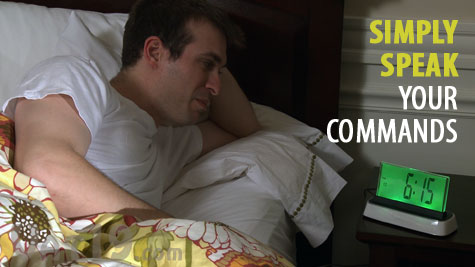
Setting the time is as simple as telling Moshi the current time.
List of Commands:
| Time: |
Moshi speaks the current time |
| Set Time: |
Set the time using your voice |
| Alarm: | Moshi speaks the time of the current alarm |
| Set Alarm: | Set the alarm using your voice |
| Alarm Sound: |
Choose 1 of 3 available alarm sounds using your voice |
| Turn off the Alarm: | Turns off the alarm and then Moshi speaks the current time, date, and temperature |
| Sleep Sound: | Choose 1 of 3 available sleep sounds using your voice |
| Play Sleep Sound: |
Moshi plays 5 minutes of your chosen sleep sound |
| Today's Date: | Moshi speaks today's date |
| Temperature: | Moshi speaks the current temperature |
| Night Light: | Moshi turns on the night light |
| Help: | Moshi speaks a help menu |
Command quick-reference is printed on the back of Moshi
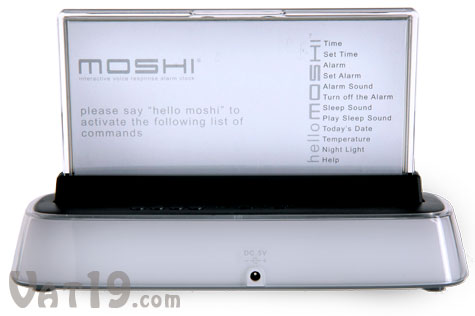
The 12 commands for operating the Moshi Alarm Clock are listed on the back of the display.
Easy-to-read display
There's nothing worse than an alarm clock with a puny display. Thankfully, the Moshi Alarm Clock does not disappoint in that department. Its screen is large (approximately 6" across and 2.75" tall) and the numbers are big and easy-to-read.
If you like to check the time in the middle of the night, you can set Moshi to "Night Light" mode. In this mode, Moshi's display will remain illuminated and can either cycle continuously through its array of colors (light blue, red, green, and dark blue) or remain a single color.
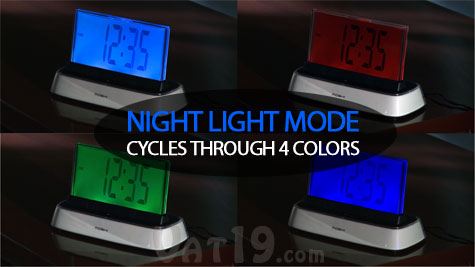
Moshi's large, backlit display makes it easy to read the time in the middle of the night.
Includes soothing sleep sounds for those restless nights
If you're having a little trouble getting to sleep, the Moshi Alarm Clock can help you out. Simply issue the "Play Sleep Sound" command and Moshi will play five minutes of your pre-selected sleep sound. You can use the "Sleep Sound" command to choose between the following three nature sounds:

If you're having difficulty sleeping, Moshi can help by playing one of three different nature sound loops.
Uses either batteries or a wall outlet
The Moshi Voice Activated Alarm Clock can be powered either by 3 AAA batteries (not included) or via the included AC adapter. The AAA batteries are great for preserving the time if your power goes out. You do not need to use batteries, though. Moshi will operate just fine with the included AC adapter.
Frequently Asked Questions
Question: How does Moshi know that I'm talking to it?
Answer: To initiate communication, you must first say, "Hello, Moshi". Moshi will then say, "Command, please". At this point, you can give Moshi your command.
Question: Can I initiate communication without saying, "Hello, Moshi" every time?
Answer: Yes, if you set Moshi to "manual mode", it will only accept voice commands after you push back the display. Imagine the display as a large toggle switch.
Question: How good is its voice recognition?
Answer: Excellent. It responds to voices of all ages and does an excellent job in fairly noisy conditions, although we recommend issuing commands to the Moshi Alarm Clock in a relatively quiet environment.
Question: I noticed there isn't a "Set Date" command. Why?
Answer: You must set the date manually using the buttons on the back of Moshi. Moshi is clever enough to determine the day of the week based upon the date you enter.
Question: Does Moshi have a way of preserving the current time if the power goes out?
Answer: Yes. Moshi can be powered using 3 AAA batteries (not included and not necessary for operation). However, since setting the time is so easy with Moshi, we don't think this is as essential as with other, more complicated alarm clocks.
Question: Can I adjust the volume of Moshi's voice?
Answer: Yes. The Moshi Alarm Clock features volume control.