IMPORTANT NOTICE No Refunds / Replacements will be provided for all purchases. If you receive a "Dead on Arrival" unit, please claim your warranty from Seagate.
Seagate Backup Plus Hub 8TB External Desktop Hard Drive Storage (STEL8000100) 2 Year Warranty by Seagate
Two integrated high-speed USB 3.0 ports on the front allow you to connect and recharge your other USB devices
Formatted for Windows computers out of the box
Install the provided NTFS driver for Mac and use the drive interchangeably between Windows and Mac computers without reformatting
Back up, Connect, Recharge
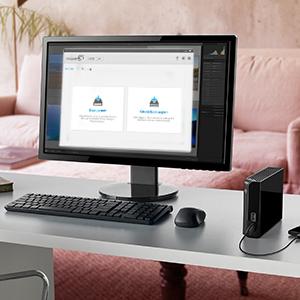
Back up your files, precious photos and videos while connecting to and recharging any USB device, such as your tablet, smartphone or camera even if your system is off or in standby mode.
Completely Manage Your Backups with Seagate Dashboard
With Seagate Dashboard software, you can easily back all your documents, photos and videos by a programmable schedule or on-demand backups.
Seagate Expansion 8TB Desktop External Hard Drive USB 3.0 (STEB8000100) 1 Year Warranty by Seagate
The Seagate Expansion External hard drive by Seagate offers an easy-to-use solution when you need to add data storage to your computer instantly.
- Drag and drop file saving, right out of the box.
- Fast data transfer with USB 3.0 connectivity.
The easy-to-use storage solution
The Expansion external hard drive can be installed easily by plugging in two cords. Start saving your digital files to this hard drive within seconds of removing it from the box.
Adds storage capacity instantly
Digital photos, video and music files can tax your computer’s storage, causing performance to decline as its internal hard drive fills to capacity.
1. Photos based on a 10 megapixel camera producing images 5MB in size.
2. Songs based on average length of 4 minutes, 4MB size.
3. HD video based on 720p or 1080i video.
4. Blu-ray HD Movie was calculated at 16.2GB per hour recording rate.
Can be installed in seconds
Seagate Expansion External hard drive features make it easy to start using this drive within seconds of removing it from the box:
- Simply plug in the included power supply and USB cable.
- The hard drive is automatically recognized by the Windows operating system — no software to install and nothing to configure.
- Drag and drop to save files to the Expansion external hard drive.
- Built-in power management automatically ensures energy-efficient operation.