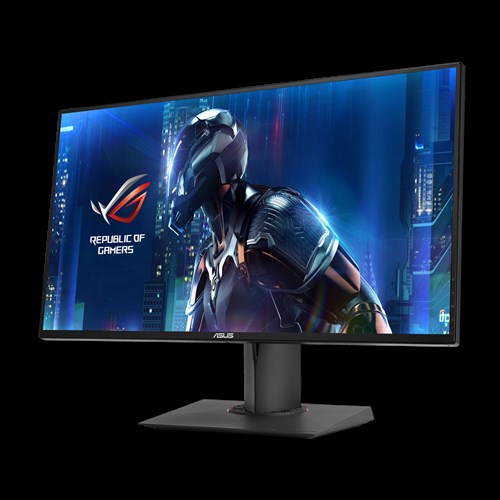

The ROG SWIFT PG278Q represents the pinnacle of gaming displays, seamlessly combining the latest technologies and design touches that gamers demand.
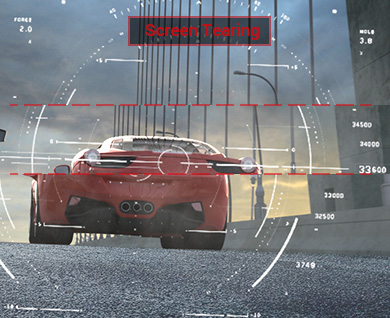
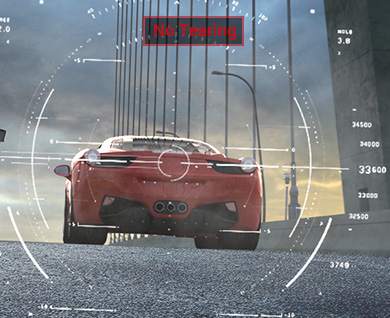
This 27-inch WQHD 2560 × 1440 gaming monitor packs in nearly every feature a gamer could ask for. An incredible 144Hz refresh rate and a rapid response time of 1ms eliminate lag and motion blur, while an exclusive Turbo key allows you to select refresh rates of 60Hz, 120Hz or 144Hz with just one press. The ROG SWIFT contains integrated NVIDIA® G-SYNC™ technology to synchronize the display's refresh rate to the GPU. This technology eliminates screen tearing, while minimizing display stutter and input lag to give you the smoothest, fastest and most breathtaking gaming visuals imaginable. Connectivity is simple, yet robust, with a single DisplayPort 1.2 port to enable NVIDIA®G-SYNC™ and dual USB 3.0 ports for convenience.
ASUS-exclusive GamePlus Technology enhances your gaming experience further by providing you with crosshair overlays for FPS games and multiple in-game timers for RTS/MOBA games.
The ROG Swift has a super-narrow 6mm bezel that begs this monitor to be used in multi-display gaming set-ups. With VESA wall mount capability and an ergonomic stand designed with full tilt, swivel, pivot and height adjustments, the ROG SWIFT is ready for long gaming in session comfort.

Images are relatively blurrier.
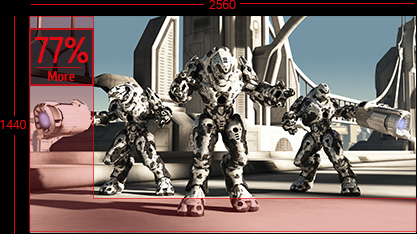
Images are much more crisp and detailed.
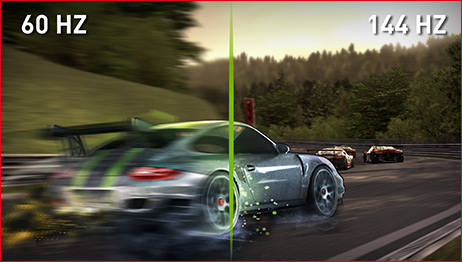


NVIDIA®G-SYNC™ display technology delivers the smoothest, fastest and most breathtaking gaming imaginable. G-SYNC™ synchronizes the ROG SWIFT's refresh rate to the GPU in your GeForce GTX-powered PC, eliminating screen tearing and minimizing display stutter and input lag. Scenes appear instantly, while objects look sharper and more vibrant. Gameplay is fluid and responsive too, ensuring a serious competitive edge.
The ASUS Display R&D team works closely with NVIDIA to ensure that everything runs smoothly on ASUS G-SYNC™ monitors. The ROG SWIFT PG278Q gaming monitor with built-in G-SYNC™ delivers super smooth and stunning visuals.
Note: G-SYNC features require an NVIDIA® GeForce GTX650Ti BOOST GPU or higher. For more detailed information, please refer tohttp://www.geforce.com/hardware/technology/g-sync
Display
True Resolution : 2560x1440 *
Pixel Pitch : 0.233mm
Brightness(Max) : 350 cd/㎡
Contrast Ratio (Max) : 1000:1
Viewing Angle (CR≧10) : 170°(H)/160°(V)
Response Time : 1ms (Gray to Gray)
Display Colors : 16.7M (real 8 bit)
Flicker free
Video Feature
Color Temperature Selection : 4 Modes
3D Technology : Shutter Glasses 3D Technology
GamePlus(modes) : Yes (Crosshair/Timer)
HDCP support : Yes
Convenient Hotkey
5-way OSD Navigation Joystick
Turbo key
I/O Ports
USB Port(s) : 3.0x2
Signal Frequency
Power Consumption
Power Saving/Off: <0.5W
Mechanical Design
Tilt : +20°~-5°
Swivel : +60°~-60°
Pivot : 0°~+90°
Height Adjustment : 0~120 mm
VESA Wall Mounting : 100x100mm
Super Narrow Bezel Design : Yes
Security
Dimensions
Box Dimension (WxHxD): 756x456x300mm
Weight
Gross Weight (Esti.):10.5Kg
Accessories
Power adapter
DisplayPort cable
USB 3.0 cable
Quick start guide
Support CD
Warranty Card
Compliance and Standards
Note
NVIDIA 3D Vision Ready (3D Vision 1 and 2 kit-compatible)
*WQHD Resulution
2D mode: 2560x1440 (up to 144Hz)
3D mode: 2560x1440 (up to 120Hz)
2D Surround: 7680x1440 (up to 144Hz)
3D Surround: 7680x1440 (up to 120Hz)