JUST LEAVE YOUR EMAIL ADDRESS IN THE MEMO,

WE WILL SEND THE REDEEM CODE TO YOU WITH IN 24 HOURS

Redeem a prepaid code on a computer at Xbox.com

You can redeem the different types of prepaid codes and have them applied to your account immediately. Here’s how:

  1. On a computer, go toRedeem Codeand sign in with your Microsoft account (formerly Windows Live ID). 
  2. Enter the 25-character prepaid code and clickRedeem Code.

Redeem a prepaid code on your console

  1. Sign in to Xbox LIVE with the account for which you want to use the prepaid code.
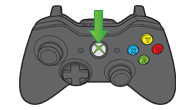
  2. Press theGuide button on the controller.


picture
Xbox 360 Controller


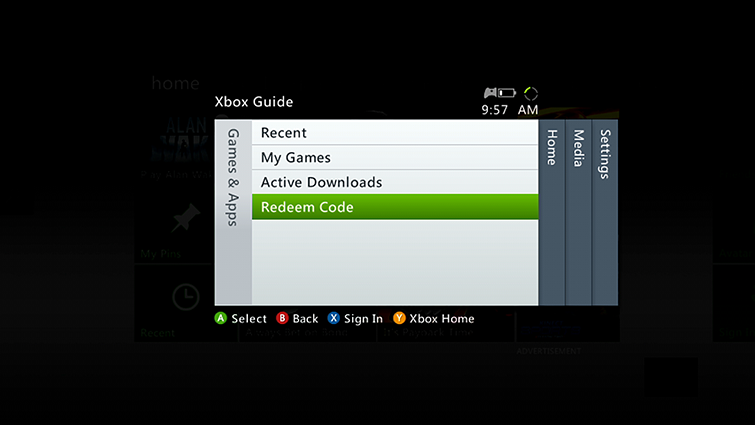
  1. Go toGames & Apps, and then selectRedeem Code.


picture


  1. Enter the 25-character prepaid code and selectDone.
  2. When prompted, clickYesto confirm the redemption.

JUST LEAVE YOUR EMAIL ADDRESS IN THE MEMO,

WE WILL SEND THE REDEEM CODE TO YOU WITH IN 24 HOURS

Redeem a prepaid code on a computer at Xbox.com

You can redeem the different types of prepaid codes and have them applied to your account immediately. Here’s how:

  1. On a computer, go toRedeem Codeand sign in with your Microsoft account (formerly Windows Live ID). 
  2. Enter the 25-character prepaid code and clickRedeem Code.

Redeem a prepaid code on your console

  1. Sign in to Xbox LIVE with the account for which you want to use the prepaid code.
  2. Press theGuide button on the controller.


picture
Xbox 360 Controller


  1. Go toGames & Apps, and then selectRedeem Code.


picture


  1. Enter the 25-character prepaid code and selectDone.
  2. When prompted, clickYesto confirm the redemption.