Item Descriptions:
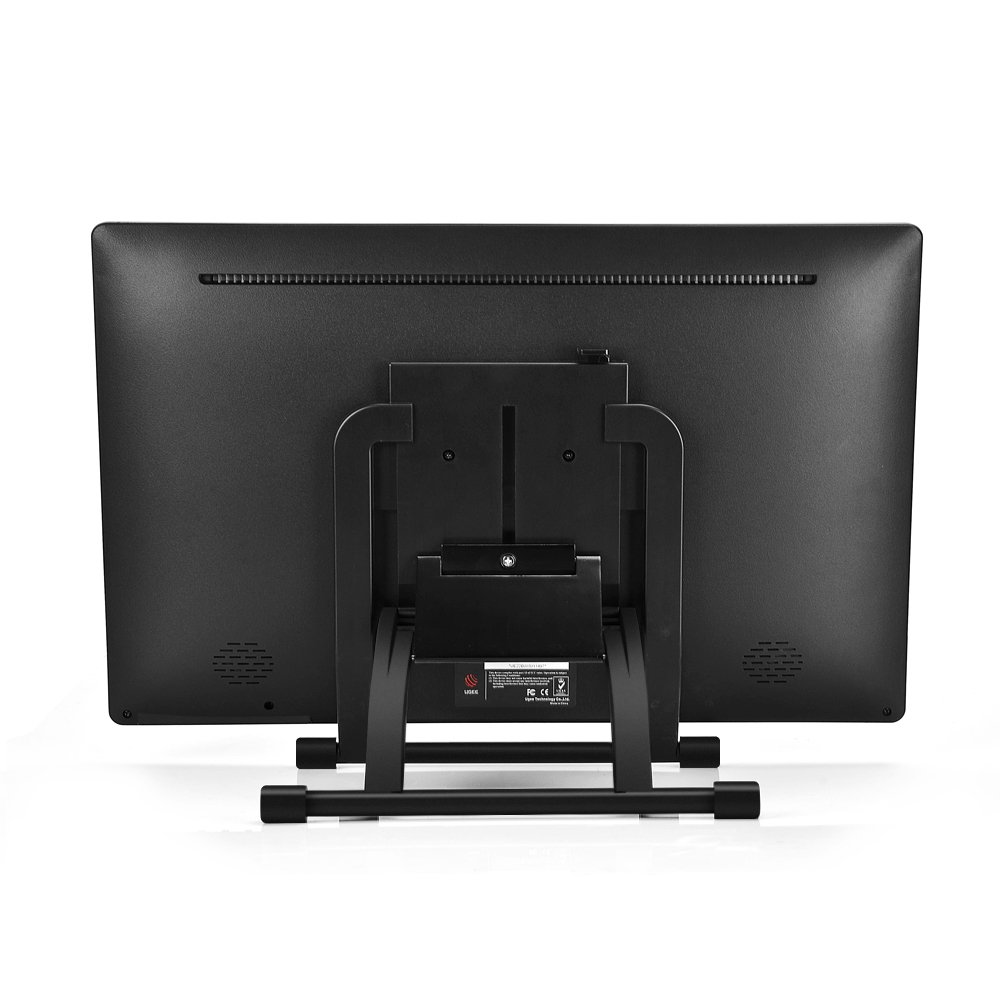
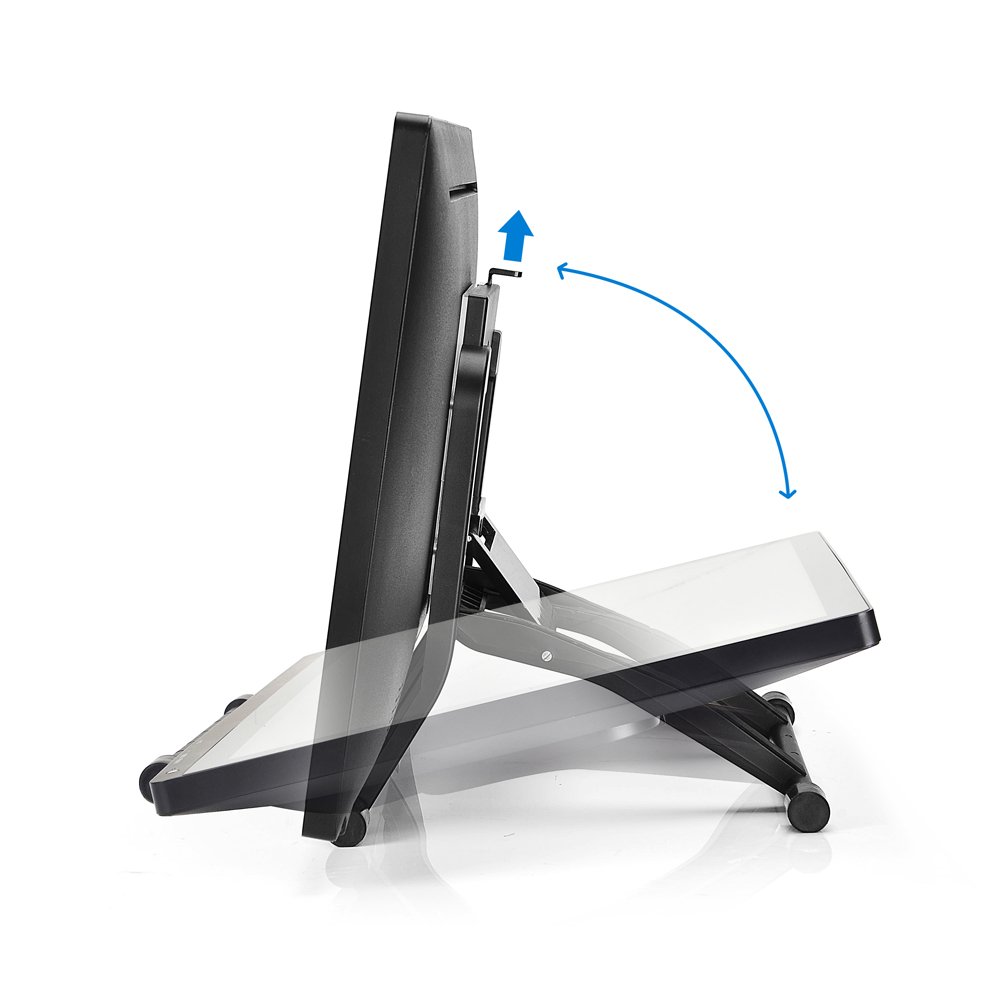
The multi-angle adjustable stand freely sets the angle and fits various customs and demands of different artists.
[Application system] Windows 2000 / XP / Vista / Windows 7/8 / 8.1 Mac OS 10.2.6 and above edition
【Genuine & Japanese manual included & one year warranty】 PSE certified (with adapter noise filter for converting 3P plug to 2P)
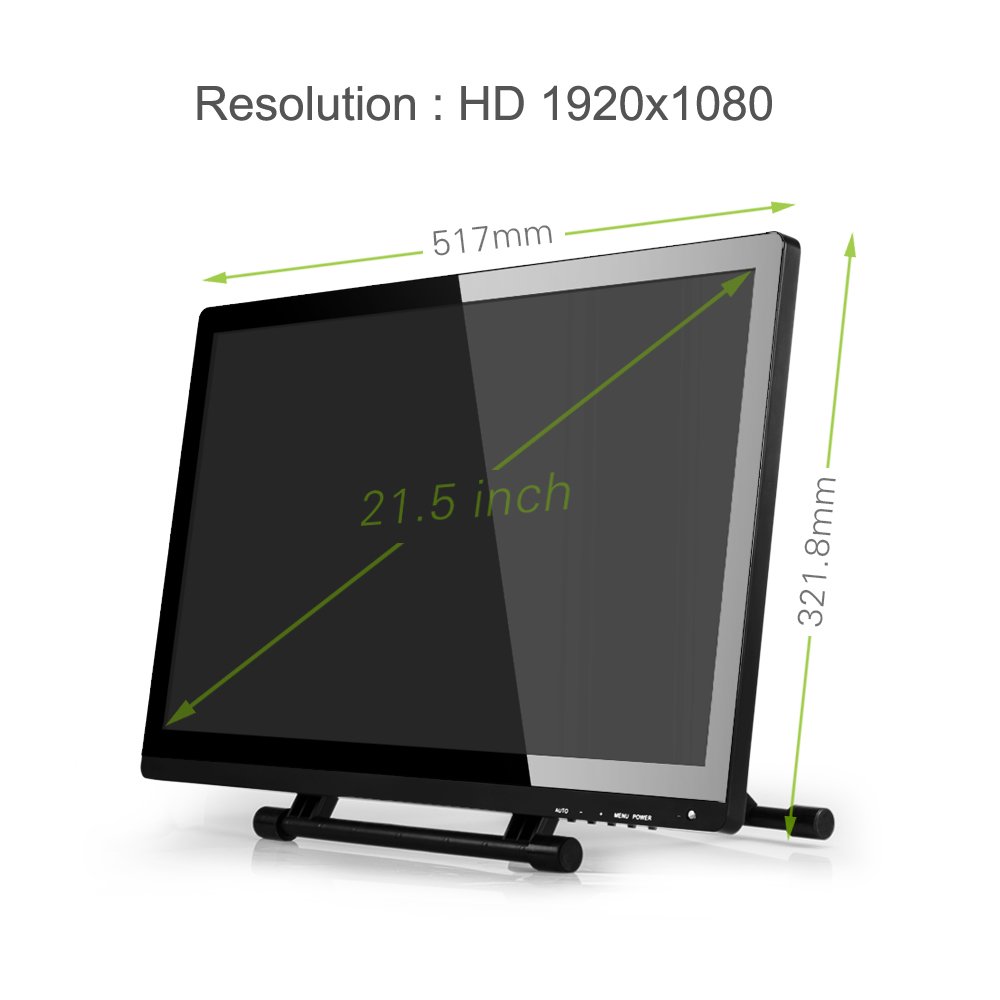
1920 × 1080
High-definition liquid crystal display, delicate and rich lines.
Regardless of whether 16.7 million new color gamuts are being painted or watching the video, we meet a lot of choices.
In case
Adopt electromagnetic pressure sensitivity technology, excellent sensitivity higher than 2048 level.
Easily control wire thickness and density.
This UG-2150 professional graphic tablet is also an ideal kit for multimedia education, completely exceeding the traditional blackboard
Tablet
Technology: electricity, magnetism
Pressure sensitivity: 2048 level
Resolution: 5080 LPI
Accuracy: 0.25 mm
Read height: 15 mm Max
Power supply voltage: + 5V
Report rate: 220 reports / sec
display
External dimensions: 517 x 321 x 30 mm
Display area: 476.64 x 268.11 mm
Display resolution: 1920 × 1080 pixels
Response time: 14 ms
Pixel pitch: 0.24825 X 0.24825
Electrical interface: Dual channel LVDS
Support color: 16.7M
Contrast ratio: 1000: 1
Backlight unit: lower side 1-LED light bar type
Brightness: 250 cd / m 2
Viewing angle: ~ 89 ° (H) -89 ° to 89 ° (V) - 89 °
Power supply: Universal with AC 100 to 240 V
【Compatible drawing software】 Photoshop CC, Flash Professional CS 6, Illustrator CS 6, Easy Paint Tool SAI, ArtRage 4, CLIP STUDIO, Maya 2016, ZBrush 4 R 7, Sculptris Alpha 6, blender, Mudbox 2015, Corel Painter 2016, Corel DRAW
X7, Corel PHOTO-PAINT X7 etc.
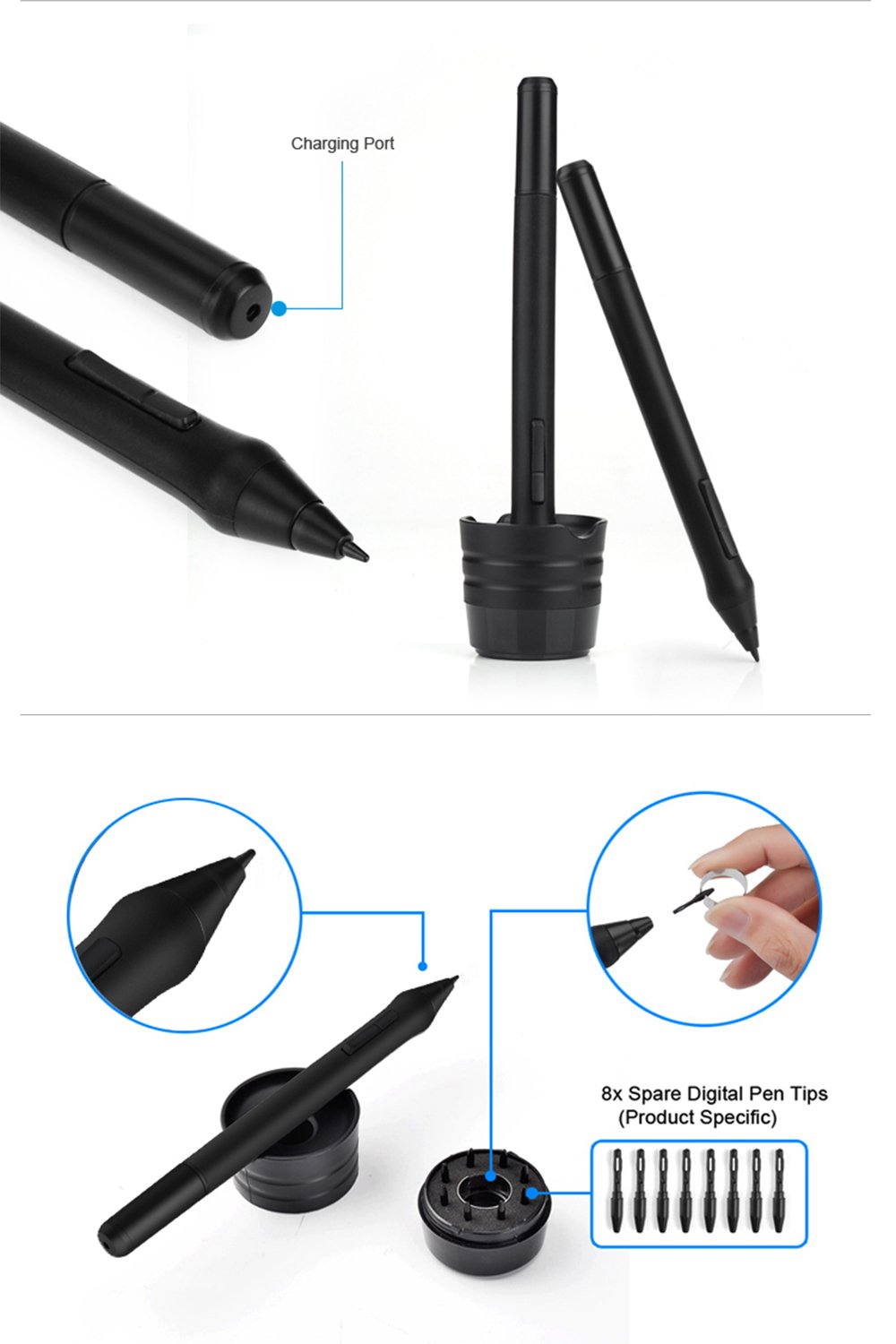
Please pull the tip from the old pen and use the removal tool.
Please insert a new pen tip into the stylus pen and push the tip until it stops.
When the tip of the battery-free pen is too short or a sharp edge, you can replace it with this kit.
Package contents:
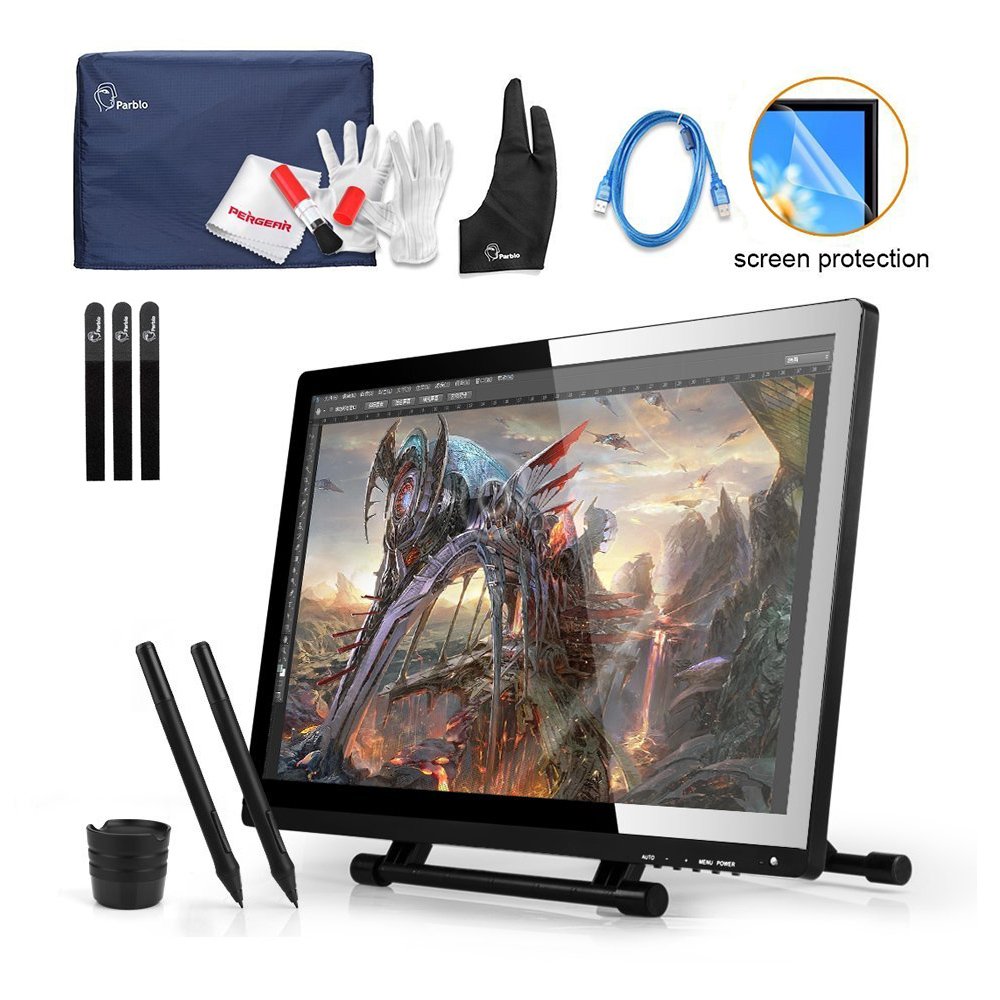
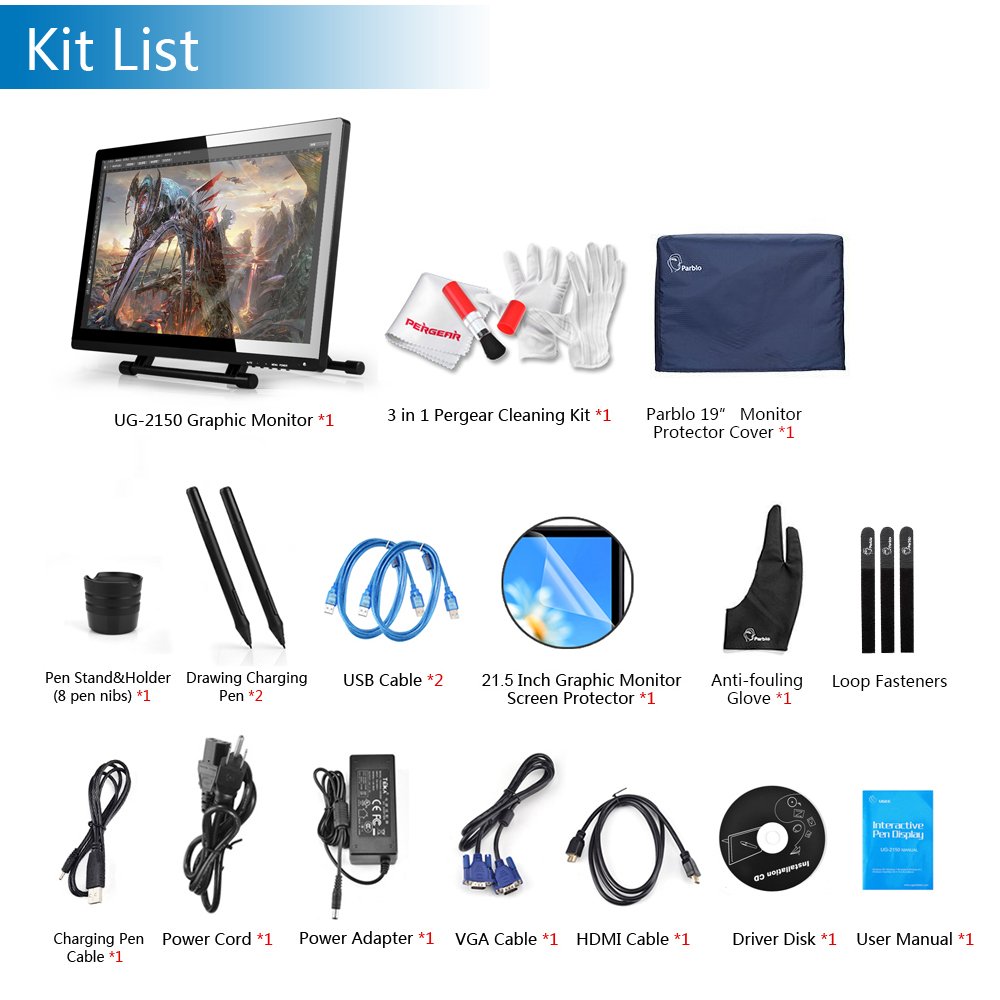
1 x UG-2150 monitor
1 x VGA cable
1 x HDMI cable
1 x Power Adapter
1 x Power cord
2 x USB cable
2 x Digital Stylus Pen
2 x pen charging cable
1 x barrel holder (8 hints and inside one deletion ring)
1 x Drive CD
1 x English Instructions
1 x Japanese Instruction Manual
1 x Monitor Protector Cover
1 x Screen Protector
1 x Pergear Cleaning Kit (Extra-fine Fiber Lens Cloth + Antistatic Glove + Cleaning Brush)
3 x cable tie
1 x 2 fingers Antifouling glove
Features:
- Please enter model number Confirm this is compatible:
- 【Genuine & Japanese manual included & one year warranty】 PS and PSE certified for windows and Mac (with adapter noise filter for converting 3P plug to 2P) "In case of lack of accessories, please send a message to our company and shortage
- We will redeliver. "
- [Accessories] Screen protector, tablet case for tablet monitor, cable tie, 2 finger gloves, 2 rechargeable pen P50S & charging USB cable, VGA cable, HDMI cable, Japanese manual, 3P plug to 2P
- Conversion adapter with noise filter
- 【Compatible drawing software】 Photoshop CC, Flash Professional CS 6, Illustrator CS 6, Easy Paint Tool SAI, ArtRage 4, CLIP STUDIO, Maya 2016, ZBrush 4 R 7, Sculptris Alpha 6, blender, Mudbox 2015, Corel Painter 2016, Corel DRAW
- X7, Corel PHOTO-PAINT X7, etc.
- [Supported systems] Windows 10/8/7 / Vista / XP (32/64 bit), Mac OS X 10.8 or higher.
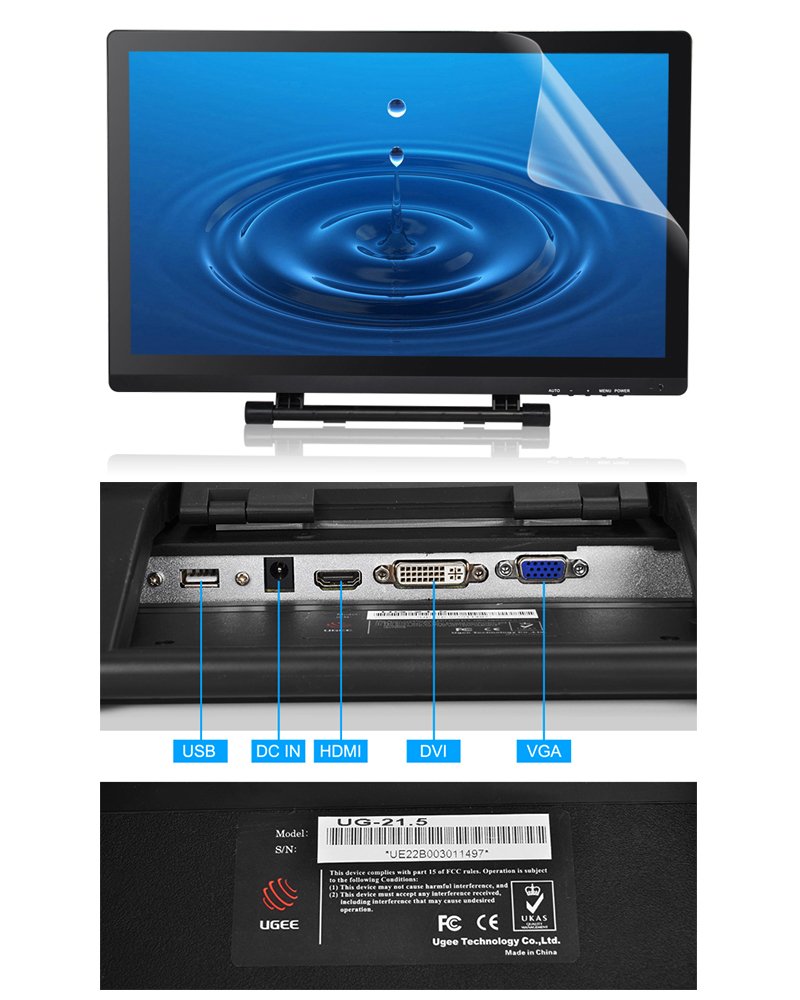
- I / O connector: DC power supply, VGA 15 pin input, DVI input, HDMI input, USB connector.
- A multi angle adjustable stand that flexibly sets the operating angle fits various customs and needs.
- Please work naturally and intuitively directly on the screen.
- Please enjoy the natural creative experience of working directly on the screen.
- 2048 level electromagnetic pressure sensitivity, control line thickness, color, transparency, convenience.
- 16ms IPS liquid crystal panel, providing 5080 LPI resolution and high brightness visual experience of 250 cd / m 2.
- Screen size: 19 "; reporting rate: 220 RPS; writing pressure: 2048 level; resolution: 5080 LPI; viewing angle: -80 ° to 80 ° (H), -80 ° to 80 ° (V); liquid crystal dimensions: 446 mm
- X 295 mm X 60 mm
Product information:
Shipping Weight: 8840 g
Package Dimensions: 16.41 x 49.00 x 57.99 cm
Customer reviews from Japan:

 Liquid tab review as a beginner
Review was limited so review. Because I purchase my first liquid tab, I thought that it was cheap so I thought that I purchased this item. Therefore, compared with other liquid tabs can not be reviewed. · There was nothing to think that it was difficult to draw though it was a change from the use plate tab. Again there is no basic lug which is quite easy to draw compared with the tab tabs, but if you try to draw a fine place a little lag will occur. · Attached product cable: Except for the power supply cable, it is rather short. Protect the power cable from 3P to 2P conversion cable protection film: It is a perfect film for the screen. Although air remained considerably, I gave it up. Pen: It is a rechargeable pen, but I think that it does not matter because it comes with two. Driver: I was pretty prepared because there was also another review, but I really could not use it .... Bring it from the official website and it will do something. Gloves: Difficult to draw when attached. No need · The total price The commodity that corresponds to the product is like feeling. I am quite satisfied with the first liquid tab. I think that if I use it for several years I will buy a better guy. If you can manage a driver by yourself, you can recommend it.
A code of 2P outlet was also included.
What I bought included both 2P power cable and 3P power cable. I ordered 3P → 2P conversion adapter from Amazon with reference to the review, but canceled it too late and became useless. Since cables were put in a place just opened, instead of a box that was packed together, was it suddenly added in response to inquiries from Japan? I want you to make it easy to understand. Those who purchase it after this may not need a conversion code. Postscript: Although I have raised about 5 thousand yen from ¥ 56,429 when I bought it, I think COSPA is okay if I consider the size of the screen. The drawing taste is pretty good, and the screen is also beautiful (however it is necessary to adjust ← this can be used as a sub monitor as well). I think that it is a very good product if it also has 5 to 10 years thereafter. A bit disappointing · It is difficult to adjust the power to give the middle between the thick line and the thin line (Well, the superiority of Wacom is lost if it fills up to it, but ...) · The default writing pressure is too hard (even if it is softest It can be adjusted a little with CLIP STUDIO PAINT) · It must be a specification that changes every time the Pen ⇔ Eraser switching button is pressed. (Wacom is an eraser while pushing it, pen when releasing it, and tool type shortcut when in eraser mode I can not use it) · Film is difficult to stick / Friction with the pen adds too much force, so I will not recommend it, but I could pull the air entering between the films by pushing with the fingers and pulling out (big It is easy to remove). The part with the dust was impossible. · Position of cable insertion port is bad. Further postscript: I wrote other people, but it is quite frequent that the cursor jumps to the upper left while drawing, if you manage to move pen somehow it will cure, but it is quite stressful so I will lower the evaluation.
very good
After using the huion's tab tab for about 1 year, this item will be used for about two weeks of review. In addition, since Wacom products touched what is lined up in the shop front, we can not compare very clearly. • Operating Environment OS: windows 10 64bit Memory: 4G × 2 CPU: Corei3 Software used: CLIP STUDIO PAINT PRO ○ Good point · Cheap. You can buy it at a price less than half the liquid tab of Wacom of the same size. · Drawing comfort, accuracy is good. I think that it is not bad compared with Wacom products. · Fever. Even if it is used for a long time, it feels warmth. × Bad point · It took quite a while to put the driver driver. I installed it from the official website of ugee, installed from the attached disk, deleted and put it in again ... and eventually I could install from disk. I do not quite understand why I entered why ... · I felt the writing pressure was hard when I initialized it. However, this is fine if you set the driver 's writing pressure and adjust the illustration software side. · When adjusting the angle of the stand, the cable is easy to interfere. · I am worried about things when I break down again. Unlike Wacom products, there is little information and ugee seems to have no Japanese corporation. △ Precautions · The power supply cable is of 3P. It is necessary to buy 3P → 2P conversion cable by yourself in advance. · If a driver of another company's pen tab is included, it is necessary to uninstall. · Overall comfort is very comfortable. I think that it is not inferior to Wacom products. However, it seems a mystery why the driver could be installed, and uneasiness remains in support. However, even including it, cost performance is outstandingly good. I think that those who like money like us, that there is not enough money to hand out Wacom products are worth considering.
The driver does not operate occasionally, but there is no problem other than that
There are times when the driver does not operate rarely, but it can be used without any problems other than that. Because the screen is big, Illustration · Manga production can be done comfortably. I will glare when sticking the protective film attached from the beginning, so I think that it is easier to see who bought the anti-reflection film and pasted it.
Drawing comfort is good, the driver is self-responsible because it is not usable at all
Use environment mother: SABERTOOTH 990 FXCPU: AMD-FX 4300 Memory: Corsair's bug 8 GB x 2 OS: Windows 8.1 Pro 64 bit paint software: ClipStudioEX ======== About the driver First of all, the included CD-R driver It is not usable at all. Why is windows 8.1 also written as compliant ... by myself downloading and installing drivers from ugee.com (ugee.eu is no good). At this time it will not install if conflicts with other tablet drivers. I deleted the intious pro driver I used before. However, the drivers taken at ugee.com seems to have some sort of trouble, so it disappears suddenly about 15 minutes after starting up the PC. Then, Windows itself detects the tablet and it moves for a while, no writing pressure comes out at all. Oh, I thought this was returns. But, press C: \ Windows \ SysWOW64 \ WTCliant.exe. Alternatively, right-click the task manager → details → WTCliant.exe, open the file location, → press WTCliant.exe. Resurrected by this operation. The driver icon that should appear in the lower right is moving for some reason why it is absent. =========== Using sense of use Christ EX. The comfort is good. I can not compare because I have not used cintiq, but after all it is totally better than the tab tab. I do not mind being careful with the delay. Sai can not use the bug in recognizing the screen range at all. This occasionally happened during intious pro occasionally, probably because it is caused by us dual monitor. Since it is 21 inches, it can be used as an ordinary monitor without having to worry about the marks of the pen's scratches. There are no buttons or wheels, so I have to put up with it by assigning shortcuts to the keyboard or the numeric keypad. I do not have any problem with that. There is no eraser function on the back side of the pen. I wonder if I should calibrate color development well. As an anxious point, compared with the Wacom product, it will respond if you can not bring the pen quite close to the screen. That's why I never have any trouble. ============ The physical thing outlet is the thing of 3 mouth which is the same as the air conditioner. Since I did not know anything, I was scared. If you buy a conversion plug at a nearby electric shop or an ion, it solves it. I bought Sanwa Supply. There is another volume adjustment button, but no sound comes out even if it outputs HDMI. (There is no one who expects sound from the liquid tab.) A protective sheet is attached properly. However, it is troublesome to use as it is without peeling off the protective sheet for packing. We must do the act of "charging to pen" which Wacom can not think. Because it is cheap, I have no choice but to endure it. Even though I painted it all day, I have a battery. I think that it is acceptable. ============ Other Company called UGEE does not have a Japanese corporation. There may be anxiety there. I think that support will be done with mail. The manual says, "Please contact your nearest broker if there is something" ^ ^; It is subtle that it can be put out for repair if the hardware breaks down ... It is a good point: cheap / comfortable to draw A good bad thing: The driver is out of the question, it has to do with it on its own, really it is out of the question / I need to charge the pen I got off my coffee scatteredly, but it just happened that my environment was bad. On the contrary it may only be for me. The mystery remains a mystery. The stated thing is "It was possible in this way I was able to do ~", so it is not a guarantee that I can do it in this way. Sorry. If the driver is decent ☆ I can raise 4 or 5, but it is ... indeed, the evaluation in the US Amazon is good.
SHIPPING METHOD
Delivered directly from Japan by Japan Post. It will take 3 to 5 business days to prepare the order for shipping. We guarantee careful packing and safe shipping.Please note that in some cases additional import or VAT charges may incur and have to be borne by the client.
1. Japanpost registered mail
Shipment by Japanpost Registered Mail (Standard). Trackable any time with tracking number. Insurance is not available. Delivery time usually is between 1-3 weeks from the date of dispatch. Some items are not eligible for Standard Shipping.
2. Qxpress Standard
Shipment by Qxpress standard service. Trackable at any time with tracking number. Registered and insured up to a value of item price and shipping fees.Delivery time is usually between 5-10 business days from the date of dispatch.
3. EMS
Shipment by Expedited Mail Service. Trackable at any time with tracking number. Registered and insured up to a value of $200 and usually delivered in 2-6 business day from the date of dispatch.

| Japanpost registered mail | Qexpress | EMS | |
|---|---|---|---|
| Shipping Method | Japanpost Registered Mail (Standard) | Standard Qexpress | EMS (Expedited Mail Service) |
| Trackable | Yes | Yes | Yes |
| Insured | N/A | Yes (Up to item price and shipping fees) | Yes (Up to $200.00) |
| Asia | 1-3 weeks | 5-10 days | 2-5 days |
| Oceania; North America; Central America and the Middle East | 2-4 weeks | 6-14 days | 2-6 days |
| Europe | 2-4 weeks | 6-16 days | 3-8 days |
| South America and Africa | 2-4 weeks | 10-18 days | 4-8 days |
NOTICE:
- For overseas delivery, please be aware that damage to the outer box can be seen.
- If you would like to avoid as much damage as possible, please choose the EMS shipping method.
"According to Qoo10 guide line,overseas shipping fees will be charged to you extra if you choose Qxpress standard shipping.We recommend you to compare the total price of your purchase with EMS."
