Product Description
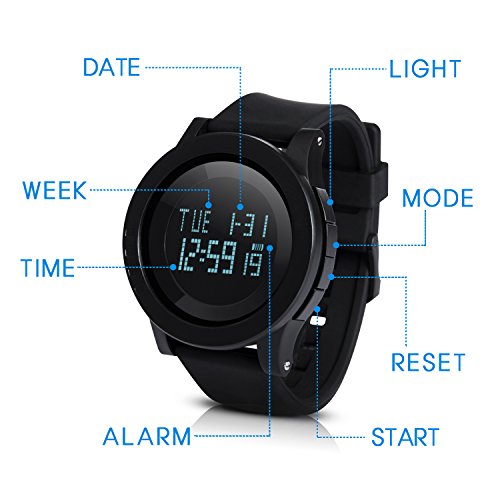
Time setting In Normal Time Mode, hold S3 till hour flash to enter alarm setting. Press S2 to change Second-Hour-minute-Year-Month-Day setting. Press S4 to add Second-Hour-minute-Year-Month-Day . Press S3 to finish setting.
In Normal Time Mode, press S4 to change 12/24 hour system. "P" means afternoon in 12-hour system
Week will change depend on the date you set.
AL (Alarm Mode) Press S2 enter Alarm Mode. Hold S3 till hour flash to enter alarm setting. Press S2 to change Hour-minute-Month-Day. Press S4 to add Hour-Minute-Month-Day. Press S3 to finish setting.
In Alarm Mode, press S3 to open/ close alarm. When alarm ring, it will last for 10s, press any button can stop it.
If you setting month and day for the alarm,it will ring in the exact day. If not, it will ring every day.
ST (Stopwatch Mode) Press S2 twice enter Stopwatch Mode. Press S4 to start/ stop it. Press S3 to reset.
In Stopwatch Mode, press S4 to start, press S3 into Split Function and "SPL" symbol appeared, and stopwatch will keep processing in the back ground. Press S3 again to continue the stopwatch.
DT (Second Time Mode) Press S2 three times enter Second Time Mode, hold S3 till hour flash. Press S2 to change Hour-Minute setting, press S4 to add Hour-Minute, Then press S3 to finish setting.
TR (Timer Resume Mode) Press S2 four times enter Timer Resume Mode, hold S3 till hour flash. Press S2 to change Hour-Minute setting, press S4 to add Hour-Minute, Then press S3 to finish setting. Press S4 to start Timer Resume and press S4 again to stop it.
In Timer Resume Mode, when you start timer resume, you can press S2 enter other mode, the Timer Resume will keep working in the back ground.
Timer Resume could be setting between 1 minute-24 hours. (0:00:00 means 24 hours)
More details, please contact us anytime!Feature