


Product Description
With the Belkin Thunderbolt Express Dock, you can quickly transfer and stream media between your laptop and up to eight other devices using just one cable. By connecting your laptop to the dock, you'll have access to Ethernet, FireWire, Thunderbolt, and USB 3.0 ports for high-speed file transfers as well as audio input and output jacks for listening to music. Moving large files is much faster with Thunderbolt technology (when compared with USB 2.0 or FireWire 800 transfer speeds) so you can spend more time enjoying your media and less time waiting. The dock has a sleek design and can be used to connect your laptop to an external display or monitor so you can view your files on a big screen (HDMI adapter sold separately).
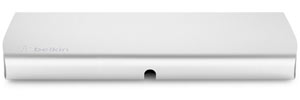
Connect the dock to your computer via Thunderbolt cable (sold separately).
View larger
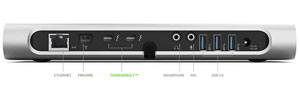
Eight ports (including Thunderbolt and USB 3.0) accommodate a range of devices and offer fast transfer speeds.
View larger
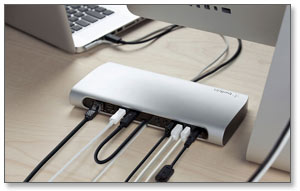
Add versatility and speed to your computer setup.
View larger
Speedy, Reliable Transfers with Thunderbolt Technology

The Belkin Thunderbolt Express Dock lets you take advantage of Thunderbolt technology to move data on two bidirectional 10 Gbps channels so you can transfer large files without the wait. The dock's three USB 3.0 ports each work 20 times faster than USB 2.0 and its two Thunderbolt ports operate 12 times faster than FireWire 800. This means you can transfer a favorite HD movie in 30 seconds or an entire year's worth of music in 10 minutes and spend more time enjoying your media.
Up to Eight Connections with One Cable
Using just one Thunderbolt cable (not included), you can connect your laptop to eight other devices. The dock includes Ethernet, FireWire, Thunderbolt, and three USB 3.0 ports as well as headphone and audio input jacks. Plug your laptop into all your devices with one cable instead of cluttering your workspace with multiple cables. If you need more ports, the dock allows you to daisy chain up to five Thunderbolt-equipped devices such as hard drives or monitors.
Connect to External Display or Monitor
The Thunderbolt Express Dock is compatible with Mini DisplayPort displays. You can also use a Mini DisplayPort adapter (sold separately) to connect to a DisplayPort, DVI, HDMI, or VGA display. This allows you to view your documents, movies, and photos on a larger screen.
Sleek, Low-Profile Design
The dock's sleek design lets it provide the functionality you need without taking up space. It includes a cable management channel so you can route the necessary cable to the front of the dock for connection to your computer. The dock measures 3.2 by 12.5 by 7.4 inches (H x W x D) and weighs 3 pounds.
Compatibility Information
The Thunderbolt Express Dock is meant for use with a MacBook Air, MacBook Pro Mac Mini, or iMac Thunderbolt-enabled computer. It requires Mac OS X v10.8.4 or later and a Thunderbolt cable for use.
What's in the Box
Belkin Thunderbolt Express Dock.

Belkin Thunderbolt Express Dock
At a Glance:
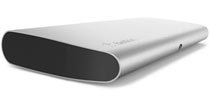
An elegant, lightweight addition to your computer desk.
Feature
Connect 8 separate devices to your laptop through a single Thunderbolt cable (Cable sold separately). Compatible with Thunderbolt 2 Technology