Auto Car Diagnostic Scanner (OBD2)
Key Functions:
- Diagnose your used car before buying a problematic car
- Diagnosing a check engine light problem
- Reading Engine Fault Codes
- Resetting Engine Fault Codes
- Live data logging for sensors including RPM, temperatures, throttle position, speed, G-Force (with supported mobile phones) and many others
- Display digital gauges such as RPM, temperature and speedometer live to show off to your friends!
Why buy from me?
- >10 years experience selling OBD2 devices
- Top notch customer service & support
Detailed Features:
- Extracts and logs the following live information while driving
- Vehicle Speed
- Calculated Load Value
- Coolant Temperature
- Fuel System Status
- Engine RPM
- Short Term Fuel Trim
- Long Term Fuel Trim
- Intake Manifold Pressure
- Timing Advance
- Intake Air Temperature
- Air Flow Rate
- Absolute Throttle Position
- Oxygen sensor voltages/associated short term fuel trims
- Fuel System status
- Fuel Pressure and other parameters depends on the car protocol.
- and many more!
OBD2 protocols supported:
- SAE J1850 PWM(41.6Kbaud)
- SAE J1850 VPW(10.4Kbaud)
- ISO9141-2(5 baud init,10.4Kbaud)
- ISO14230-4 KWP(5 baud init,10.4 Kbaud)
- ISO14230-4 KWP(fast init,10.4 Kbaud)
- ISO15765-4 CAN(11bit ID,500 Kbaud)
- ISO15765-4 CAN(29bit ID,500 Kbaud)
- ISO15765-4 CAN(11bit ID,250 Kbaud)
- ISO15765-4 CAN(29bit ID,250 Kbaud)
- SAE J1939 CAN(29bit ID,250*Kbaud)
- USER1 CAN(11*bit ID,125*Kbaud)
- USER2 CAN(11*bit ID,50*kbaud)
Cars Supported: (Most Cars Manufactured After 2001 with the Standard OBD2 Protocol)
Audi / Alfa Romeo / BMW / Chevrolet / Citroen / Chrysler / Daewoo/ Datsun / Dodge / Daihatsu / Fiat / Ford / Honda / Holden / Hyundai / Isuzu / Jaguar / Jeep / Kia /Lancia / Land Rover / Lexus / Lotus / Lamborghini / Mazda / Mercedes-Benz / MG / Mitsubishi / Mini/ Nissan / Opel / Peugeot / Proton / Renault / Rover / Seat / Skoda / Smart / Saab / Subaru / Suzuki / Toyota / TVR / Vauxhall / Volkswagen / Volvo and more.
NOTE: Please ensure that your car has the standard 16Pin OBD2 interface and Vehicle Emission Control unit (ECU) information Label must state that the vehicle is OBD II compliant. Due to manufacturers using different standards, we can't guarantee that the ELM327 will be 100% compatible for your car and will not be responsible if you have bought the item without doing your own homework. For a guide on the list of supported cars, we recommend checking here - http://www.outilsobdfacile.com/vehicle-list-compatible-obd2.php
Known Cars Supported:
Audi R8
Benz 2001/02/03 W203 C200K (ISO)
BMW X5 2002 (ISO) -3, -5/X5/Z3/Z4/Z8/740I/740L/750IL, (ISO1941)
Chevrolet Aveo (ISO)
Citroen C3 2004 (ISO)
Daihatsu YRV 2005 (ISO)
Daihatsu YRV Turbo 2006 (ISO)
Fiat Tipo 2002 (ISO)
Ford New Focus 2006(CAN)
Holden Commodore VE
Honda Accord 2006 JDM (ISO)
Honda Accord Euro R 2004 JDM (ISO)
Honda City GD8 (ISO)
Honda Civic ES 1.6A (ISO)
Honda Integra Type R DC5 JDM (ISO)
Honda Jazz 1.4M (ISO)
Hyundai Accent 2004 (ISO)
Hyundai Getz 1.3A 2004 (ISO)
Hyundai Getz 1.6M 2004 (ISO)
Hyundai Matrix 2004 (ISO)
Hyundai Santa Fe 2.4A (ISO)
Hyundai Sonata GLS (ISO)
Hyundai Sonata 2005 (ISO)
Hyundai Tuscani FX (ISO)
Kia Carens 2005 (ISO)
Kia Magentis 2005 (ISO)
Kia Rio LS (ISO)
Kia Sorento SUV 2005 (ISO)
Lexus es300 Mazda 2 (CAN)
Mazda 5 (CAN)
Mazda 6 (CAN)
Mazda Premacy 2001 (ISO)
Mazda RX8 (CAN)
Mitsubishi Colt 2003 (ISO)
Mitsubishi Colt Plus 2005 (ISO)
Mitsubishi Evo
Nissan Pulsar B17
Toyota Corolla
Toyota Camry 2003 V6
and many more cars!
Following cars may not work or have limited workability:
Holden Commodore VS, VX, VT
Mitsubishi Eclipse (GST--Turbo Car can be tested for the year 1995-2000; 8.2 * 4.6 * 2cm RS/GS 1994-1996 GS all can do; Turbo Car for the year 1996-2000, only have speed and TPS, can clear the DTCS)
Mitsubishi Lancer Evolution IX 2006 (ISO)
Mitsubishi Pajero 3.5 V6 2006 (ISO)
Nissan Sunny B14 (ISO)
Nissan Sunny VIP FB15 (ISO)
Nissan X-Trail 2.0L 2004 (ISO)
Nissan X-Trail 2.5L 2004 (ISO)
Peugeot 206 2001 Only can show RPM
Peugeot 206 (ISO)
Renault Megane II 2005 (ISO)
Renault Kangoo 2006 (ISO)
Subaru Impreza 1.6TS 2002 (ISO)
Toyota Camry 2.0A 2004 (ISO)
Toyota Corolla GLXi G8 1999 (ISO)
Toyota Corolla G9 2002 (ISO)
Nissan Sunny (N16)
Nissan Cefiro (Teana) 2005
Nissan sentra 1.8 2000/2005
Subaru Legacy GT 2005
Toyota camry 2002
Toyota Wish JDM (Missing Pin 5 in DLC)
Toyota IST JDM (Missing Pin 5 in DLC)
Peugeot 206 2000
Suzuki Jimny 1.3 2000
Google Android Apps Supported:
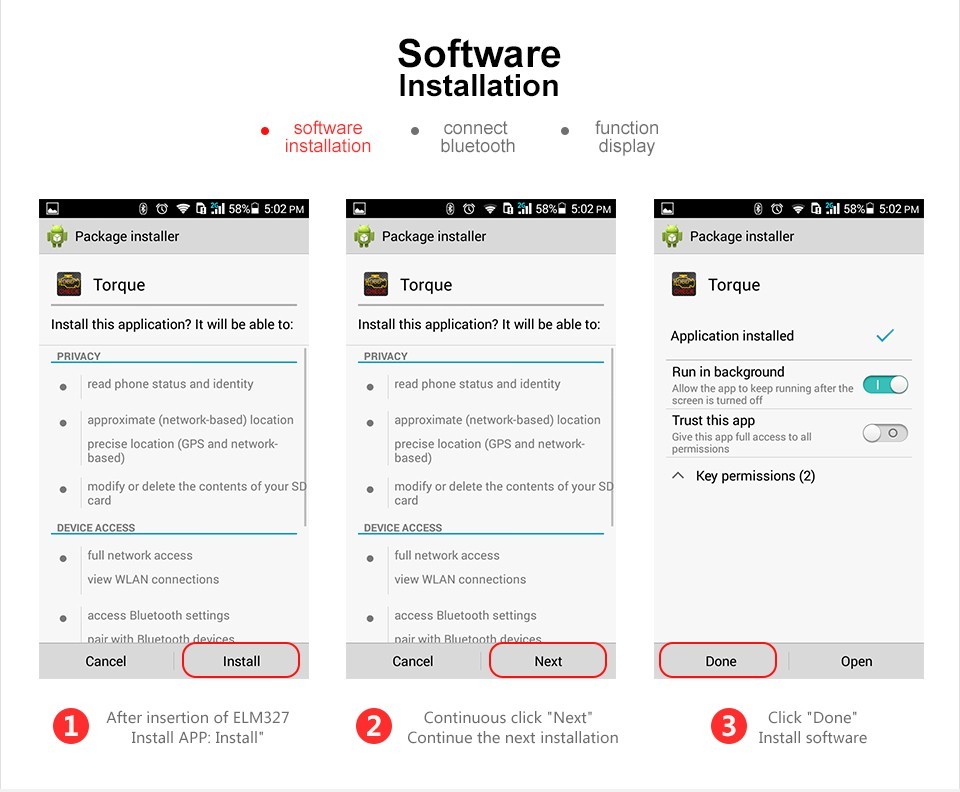
- Torque
- Dash Command
- OBD Auto Doctor
- Harry's
- OBD Car Doctor
Torque App Connection Guide:
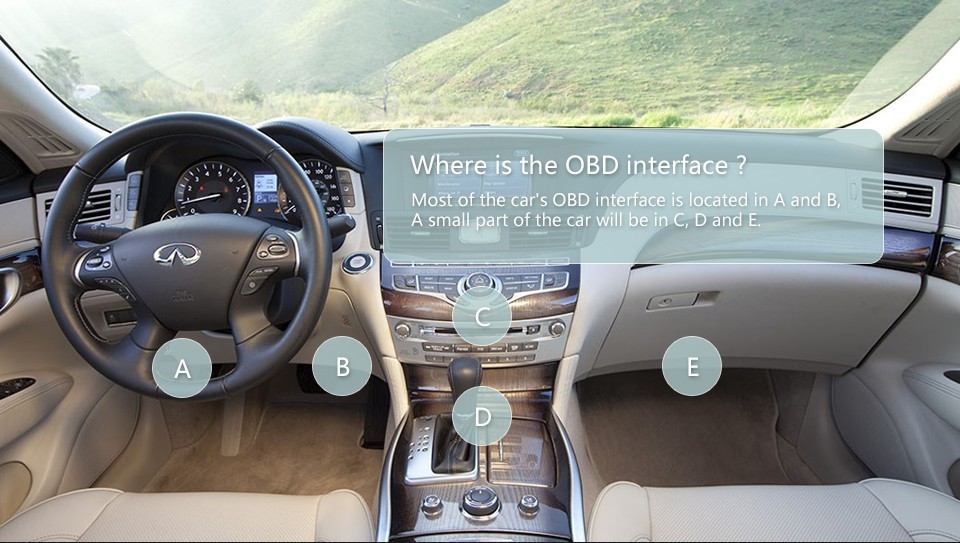
- Plug the OBD2 reader device in the OBDII port under the car's dashboard
- Start the car or turn it to ignition (right before cranking)
- Turn Bluetooth ON.
- "Scan for Devices" and connect to "OBDII” (Code is 1234, 0000 or none)
- Then start "Torque"
- Go to the "Settings" in Torque and select OBD2 Adapter Settings.
- Select "Bluetooth” in "Connection Type”
- Select "OBDII” in "Choose Bluetooth Device” menu
- Select "Auto Bluetooth On/Off" and "Only if BT was already off."
- Then go back to the "Torque" main screen and things should be working!
Where is the OBD port?
- Software Installation
- Connect bluetooth

- Torque OBD Application

Package Includes:
- OBD2 Car Diagnostic Scanner X 1
FAQ:
Q: What's the Password for Bluetooth Connection?
A: It's "1234"
Q: My phone connects to the device via bluetooth but can't identify my car?
A: Ensure that the "OBD II" option is selected in "adapter choice" in Torque software settings. If it still doesn't work, check that the protocol of this car is supported and try it in a newer car (post 2010)
After-sale Service
- If item is not working, please provide more information and contact us as soon as possible within 7 working days.
- You may contact us for any questions regarding functionality and we will try to advise.
Leave Feedbacks
- We will leave positive feedback
- We encourage buyers to leave positive feedback to help show your support for the service and product. We will continue to strive to ensure good customer service and that products are delivered in time and in good quality