
Fitbit Flex Wireless Activity + Sleep Wristband
Never stop moving with Fitbit Flex. Wear this slim, stylish device all the time and get the motivation you need to get out and be more active. It tracks steps, distance, and calories burned and shows you how you’re stacking up against your daily goals. At night, it tracks your sleep cycle, helps you learn how to sleep better, and wakes you silently in the morning. Access your stats anytime on your computer, tablet, or from smartphones – both iPhone and Android. Flex is your perfect companion, and stays with you everywhere - even in the shower.
At a Glance
What's in the Box
Flex Tracker, Large or Small Bands, Charging Cable, Wireless Sync Dongle, and Free Fitbit Account

Flexibility to Match Your Style
Flex tracker is flexible. You can take this tiny tracker out and put into any of Flex's colorful bands to fit your mood.
Comes in:

Pink

From left to right : Black / Slate / Orange (Unavailable) / Teal / Navy
Sizing

Small / Large
Set Your Goal. Sync Your Stats.
Goals and Tracking
Flex uses LED lights to show you how you’re stacking up against your daily goal. Each light represents 20% of your goal. You choose which one – steps, calories, or distance. It lights up like a scoreboard, giving you the motivation you need to get up and keep moving. Just check your stats right on your phone.

Wireless Sync
Flex syncs your info to select Bluetooth 4.0 devices, without plugging in or pushing buttons. It also syncs with select Android devices (Samsung Galaxy S III, Note II, and more), as well iOS devices (iPhone 5, 4S, iPad 3rd gen., iPad Mini, and more) and PCs and Macs. This gives you real-time access to your stats on the Fitbit dashboard throughout the day. Plus, with select NFC-enabled Android phones, simply tap your device to launch your Fitbit stats.

Dashboard
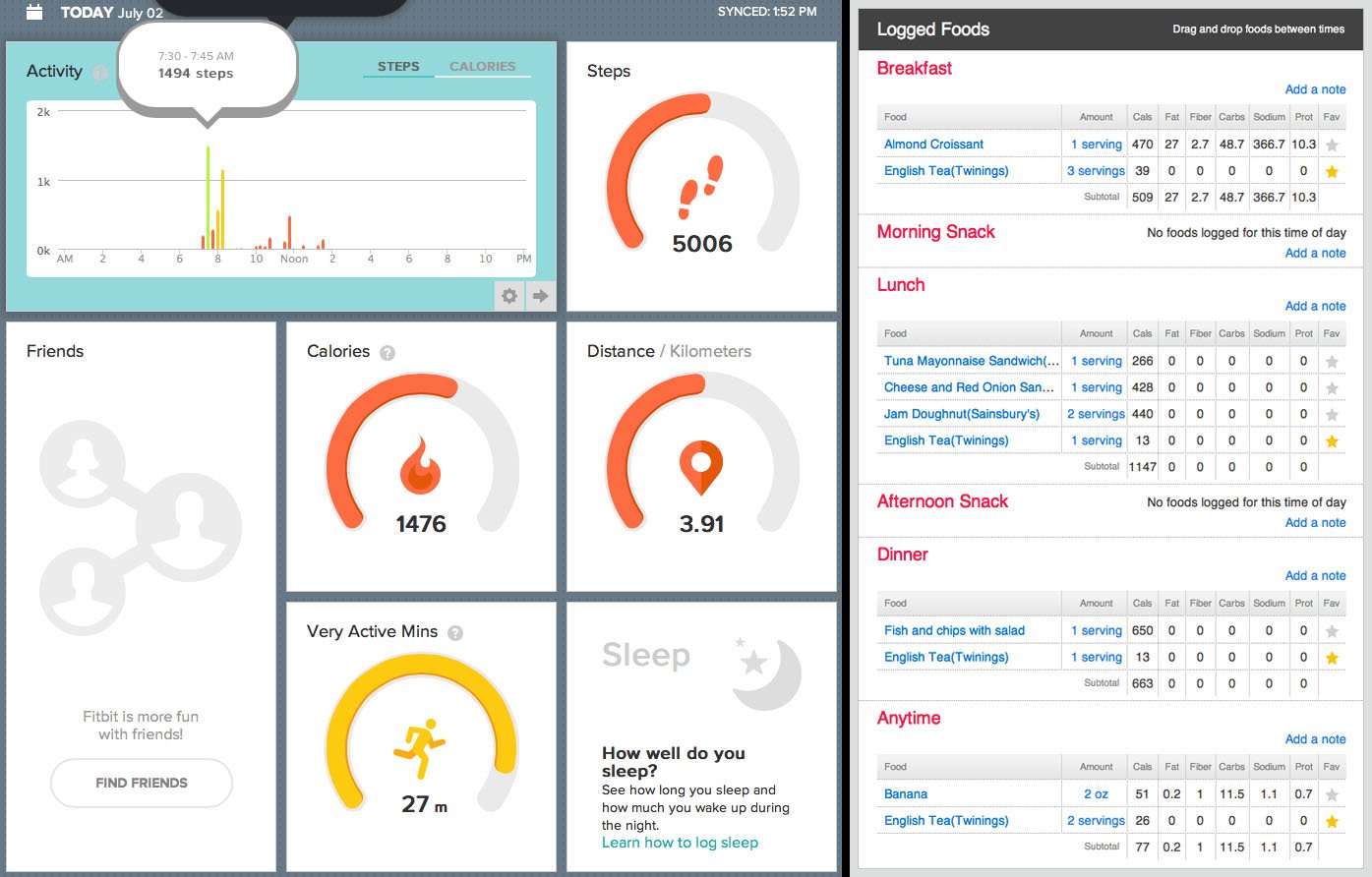
Flex comes with an arsenal of free online tools. Set goals on your personal dashboard and follow your progress through engaging graphs and charts. Use the Fitbit App for iPhone and Android to track steps, distance, calories, active minutes, and sleep, and receive goal progress notifications and milestone updates.
Compatability
Flex syncs with popular fitness apps for an integrated fitness regiment. Apps include Sparkpeople, LoseIt!, MyFitnessPal, MapMyFitness, Runkeeper, and Endomondo.
Badges
Flex keeps you motivated and helps you reach and celebrate milestones by awarding badges as you reach daily and lifetime achievements and goals.
Community
Enlist your friends and family in helping you reach your goals by sharing your stats, creating fitness challenges, and taking a group leader board challenge.
Logging
Log food consumption, weight, and weight changes, and additional workout info on the website and on the go using the Fitbit App for iPhone and Android.
Wear It All the Time
Flex never leaves your side - you can even wear it in the shower. Wear the comfortable wristband all day and night, and it will even track how long and how well you sleep. Online tools illustrate your deep sleep and wakeful patterns. Silent Wake technology wakes you with a gentle vibration at a desired time without an alarm or disturbing your partner.
FREQUENTLY ASKED QUESTIONS
What mobile devices are supported for syncing?
Supported devices for syncing
 iPhone 5, 5S, 5C
 iPhone 4S
 iPod Touch (5th gen.)
 iPad 3, iPad 4, iPad Air
 iPad mini
 Samsung
  Samsung
  LG G2, G Flex, G Pro 2, Vu3.0
 HTC One (OS v4.3+), HTC One (M8)
 Motorola Moto E, Moto X, Moto G
 Nexus 4 and 5
 Nexus 7 (2013)
 Sony Xperia SP, T, TX, V, Z, Z1, Z1S, ZL, ZR, Z Ultra, Z1 Compact, Tablet Z (OS v4.3+)
 Huawei Ascend P7
How do I charge my flex?
Your tracker battery lasts for about 5 days. To charge it, remove the tracker from the band and place it in the charger until all 5 lights are solid.
If you are having trouble, your tracker's charging contacts may be obstructed by microscopic dirt or debris that prevents them from making a good connection to the charger. Use hand sanitizer and a tissue or dampen a cotton swab with rubbing alcohol and carefully clean the charging contacts on your tracker. Do not submerge your tracker in water or use abrasive cleaners. Thoroughly dry your tracker before attempting to charge. Be sure to fully seat your tracker into the charger, with the charging contacts fully inserted into the charging cable enclosure.
How do I reset my tracker?
lf your tracker is not responding, it may be fixed by restarting.
1. Plug your charging cable into the USB port and insert your tracker into the charging cable.
2. Insert a paperclip into the small pinhole on the back of the charger.
3. Press on the pinhole for 3-4 seconds.
Your Flex will now be reset. Take your tracker out of the charger and insert it back into the wristband.
Can the wristband irritate my skin?
The Flex wristband is made of a flexible, durable elastomer material similar to that used in many sports watches. It does not contain latex. The clasp is made of surgical-grade stainless steel and contains traces of nickel. As with any type of jewelry, some people may experience allergies. Numerous factors can cause an allergy, such as a nickel sensitivity, reactions to bacteria that can accumulate in watch wristbands or other wearable devices, a reaction between the wristband and your soap or perspiration, or an allergy to the material of the wristband. If you notice any signs of skin irritation or experience any discomfort, please discontinue use.