?
Kindly Note:
This game controller don't support MTK CPU smartphone
Description: ? ? ? ? ? ? ? ? ? ? ? ? ? ? ? ? ? ? ? ? ? ? ? ? ? ? ? ? ? ? ? ? ? ? ? ? ? ? ? ? ? ? ? ? ? ? ? ? ? ? ? ? ? ? ? ? ? ? ? ?
Hignlight:
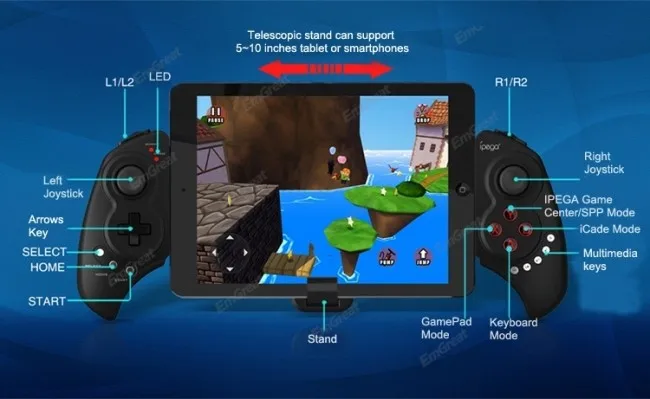
This wireless bluetooth game controller is specially designed for Tablet PC, pad, smartphone,etc.
With bluetooth 3.0 wireless transmission, it can be operated at a distance of 6-8meters without any
drivers. Telescopic design is one of its highlights, which can be extended to fit diffrent sizes of mobile
phones and tablets(from 5 to 10inches). It is compatible with *Pod/*Phone/*Pad?as?well?as?the?vast?majority?of?android?tablet?PCs
Features: ? ? ? ? ? ? ? ? ? ? ? ? ? ? ? ? ? ? ? ? ? ? ? ? ? ? ? ? ? ? ? ? ? ? ? ? ? ? ? ? ? ? ? ? ? ? ? ? ? ? ? ? ? ? ? ? ? ? ? ? ??
?1.Exclusive?gaming?application?platform,?the?classic?hand?travel?under?control?(ipega?game?lobby?only?for?Android?platform)
?2. Bluetooth transmission with any drivers, effective control distance 6~8 meters
?3. Built-in lithium battery, after charging fully, it can keep working for 20 hours, safe and stable
?4. Telesopic stand(5~10inch extending length), suitable for the Pod/Phone/Pad and various android tablet PCs
?5. With?volume+?and?volume-,?last?next?play/pause,?total?5?multimedia?function?keys(this?function?is?imcompatible?with?Y?key?mode)
?6. User-friendly?design,?automatically?enter?the?energy-saving?mode?under?no?connection?with?no?connection?state
?7.?Support?Android?3.2,?IOS?4.3?or?above
Specification: ? ? ? ? ? ? ? ? ? ? ? ? ? ? ? ? ? ? ? ? ? ? ? ? ? ? ? ? ? ? ? ? ? ? ? ? ? ? ? ? ? ? ? ? ? ? ? ? ? ? ? ? ? ? ? ? ? ??
?1. Model: PG-9023
?2. Bluetooth: 3.0
?3. Controlling distance: 6~8M
?4. Telescopic stand: Support 5~10" devices
?5. Working voltage: DC3.7V
?6. Working current: 30mA
?7. Input: DC5V 500mA
Game support description ? ? ? ? ? ? ? ? ? ? ? ? ? ? ? ? ? ? ? ? ? ? ? ? ? ? ? ? ? ? ? ? ? ? ? ? ? ? ? ? ? ? ? ? ? ? ? ?
Under Android system, it supports the vast majority of games and simulator games(such as MC4, Wild blood, Dungeon Hunter, Zombie, FC simulator
GBA emulator, arcade emulator, SF?simulator, N64 emulator, Shadowgun, Sonic CD, Cordy, Soulcraft, Zenonia4, 9 Innings2013, Riptide,etc.)
Download method of games?that are compatible:?Enter itunes and App Store to search for iCade. The handle can be compatible with the vast majority?of games, such as Gunman Clive, Helium Boy, League of Evil League of Evil2, Muffin Knight Free Stardash, Temple the?Run and so on.
?
User Manual ? ? ? ? ? ? ? ? ? ? ? ? ? ? ? ? ? ? ? ? ? ? ? ? ? ? ? ? ? ? ? ? ? ? ? ? ? ? ? ? ? ? ? ? ? ? ? ? ? ? ? ? ? ? ? ? ? ? ?
X.GamePad Mode:?Only Android 3.2+ version supports this?mode. When the handle is turned off,?first press the?X key,?then press the?HOME?key. Bluetooth LED?indicator flash. Then handle enter into the pairing mode and turn on the phone?and search?Bluetooth devices Ipega Extending Game Controller for pairing. LED indicator light is on after the
sucessful pairing.
A.?Keyboard Mode:(For Android system and support various types of simulators) When the handle is turned off,?first press the?A?key, then press the?HOME key. The?Bluetooth LED indicator flash and the handle enter into pairing mode. Turn?on the?phone and search?Bluetooth devices Ipega Extending Game?Controller for pairing. LED light?is on after successful pairing.
B.iCade modes:?When the handle is turned off,?first press the?B key, then press the?HOME key. The Bluetooth LED light indicator flash, and the handle enter into the pairing mode. Turn on?the phone and search?Bluetooth devices Ipega Extending Game?Controller?for pairing. LED light?indicator is on after successful pairing.
Y key has two modes:?1. SPP?Mode(for systems with?virtual keys?of the game), 2. iPega gaming desktop(see appendix)
1.?SPP Mode: When then handle is turned off,?first?press the?Y key, then press the?HOME key, LED lights flash and the handle enter into the pairing mode, if the pairing is successful, the LED light indicator is keeping bright. The handle is in the SPP mode; SPP mode requires corresponding Android APP software to complete the relevant key mapping function.
?
?
?
SPP Use: ? ? ? ? ? ? ? ? ? ? ? ? ? ? ? ? ? ? ? ? ? ? ? ? ? ? ? ? ? ? ? ? ? ? ? ? ? ? ? ? ? ? ? ? ? ? ? ? ? ? ? ? ? ? ? ? ? ? ? ? ? ??
1?Go?to?Settings?→?Language?and?input?→?Select?Input?Method?"GHTouch?IM"?
2?Open?the?application?"GHTouch"?→?Choose?device?"ipega?Extending?Game?Controller"?→?check?"virtual?screen?buttons"
→?Select?Input?Method?"GHTouch?IM"?→?The?device?will?automatically?connect?with?the?handle,?after?the
?connection?is?completed?,??the?LED?indicator?light?
3?After?entering?the?game,?press?the?volume?up?on?the?device?or?handle?"Select"?button,?the?button?icon?onto
?the?screen?corresponding?to?the?position?(Note:?Double-click?the?icon?to?set?the?size),?press?return?or?click?on
?
?input?method?setting:??Using?the?controller?to?play?game?should?set?the?phone?or?notebook?input?method?to?be?default?as?English?language?input?(For?the?ios?system,?be?sure?to?switch?the?input?method,?and?then?pairing.?If?not,?the?handle?does?not?work?properly.)
Charging?controller:??Accessing?the?controller?to?5V?power?supply?for?charging?(PC?device?or?mobile?phone?power?adapter).?In?the?process?of?charging,?the?charge?indicator?light?of?handle?is?orange?and??LED?is?off?after?fully?charged.
Switch?on/off?the?controller:?Press?"HOME"?button?for??3?seconds?until?the?Bluetooth?LED?is?off,?it?means?shutdown?is?successful.?If?the?phone?is?not?unpair?connection?when?controller?shutdown.?Just?do?it?again
Press?the?"HOME"?button?for?about?five?seconds,?until?the?LED?red?light?flashes?slowly.?It?means?that?the?handle?is?turned?on?(the?default?the?last?boot?mode),?the?boot?handle?will?automatically?paired?with?the?phone?connection.?If?the?connection?fails,?the?handle?will?automatically?shut?down.
Connect?the?PC:?Open?the?device’s?Bluetooth?PC?program,?and?select?the?"X,?A"?in?either?mode?can?be?paired?with(and?does?not?have?a?Bluetooth?PC?devices?need?to?use?the?Bluetooth?receiver).
Note:?To?change?the?controller?function?mode,?please??turn?off?the?controller?firstly?and?cancel?the?bluetooth?pairing?,?then?in?accordance?with?the?operation?mode?to?replace?the?steps.
?
?
About compatibility: ? ? ? ? ? ? ? ? ? ? ? ? ? ? ? ? ? ? ? ? ? ? ? ? ? ? ? ? ? ? ? ? ? ? ? ? ? ? ? ? ? ? ? ? ? ? ? ? ? ? ? ?
Our Ipega gamepad controller works well with?a varierty?of simulation games on Android system.
However, it has?not much games supported games?on?IOS(unless jailbreak). We have listed?
some tested games that are available?on your?IOS?device.
Entre iTune→App Store→searching iCade→dowload the games as below:
Testing Games for IOS device(No Jailbreak)
| 1.Midway Arcade-Warner Bros | 2.PAC-MAN for Pad-Namco Networks America Inc.Games |
| 3.Super Lemonade Factory-Shane Brouwer | 4.Blast Ball-UNCADE |
| 5.Gold Runner-YOMEN,Inc. | 6.Kung Fu Rabbit-Bulkypix |
| 7.Retro Racing-Me Qwak Limited | 8.Muffin Knight-Angry Mob Games |
| 9.Minotron:2112-Llamasoft | 10.Velocispider-Retro Dreamer |
| 11.No Gravity-Realtech VR | 12.Super Mega Worm-Deceased Pixel LLC |
| 13.Space Inversion-Silverline Arts | 14.Sideways Racing-Bjango |
| 15.Emerald Mine-Les Bird | 16.Freeesh-Realtech VR |
| 17.Commodore64-Manomio LLC | 18.The Exteriminator-SUMO Productions |
| 19.IronStar Arena-Appracatappra | 20.Compression HD-Little White Bear Studios,LLC |
| 21.Mos Speedrun-Physmo | 22.Warblade HD-Edgar Vigdal |
| 23.Plum Crazy-Claymore Games | 24.HungryMaster-xionchannel |
| 25.Cyborg Livestock-PopArcade | 26.Space Inversion2-Silverline Arts |
| 27.Stardash-OrangePixel | 28.GoatUP-Llamasoft |
| 29.Mintotaur Rescue-Llamasoft | 30.Bob's Action Racing-VariaMedia GmbH |
| 31.Silverfish MAX-Chaptic Box | 32.Retroid-Flat Black Films |
| 33.Box Cat-Rusty Moyher | 34.Fruity The Snake HD-22Moo |
| 35.AirAttack HD-Art In Games | 36.Temple Run-Imangi Studios,LLC(only support?1st |