Introduction Raspberry Pi multi camera adapter module is designed for connecting more than one camera to a single CSI camera port on Raspberry Pi board. One adapter board can connect 4 cameras and user can stack up maxim 4 adapter boards that means up to 16 cameras on a single Raspberry Pi board. Please note that Raspberry Pi multi camera adapter board is nascent product that may have some stability issues and limitations because of the cable’s signal integrity and RPi’s closed source video core libraries, so use it on your own risk. Application - IoT cameras
- Robot cameras
- Wildlife cameras
- 3D scanner
Features - Accommodate 4 Raspberry Pi cameras on an multi camera adapter board
- Stackable and maxim cascade 4 adapter boards
- 3 GPIOs required for multiplexing on one adapter board, 5 GPIOs for two adapter board, 9 GPIOs for four adapter board
- All camera ports are FFC (flexible flat cable) connectors
- DIP switches for easy stack up configuration
- Support Raspberry Pi A/B/B+ and Pi 2.
Pin Configuration DIP switches are used here for easy stack up configuration. When only one multi camera adapter board is used, the switches 1and 5 should be switched to ON position. If two multi camera adapter boards are used, the downside board should be switched 1 and 5 to ON and upside board should be switched 2 and 6 to ON position, and if 3 or 4 multi camera adapter boards are used together each board layer should be configured as the Table 1 shown. Table 1 Pin Configuration 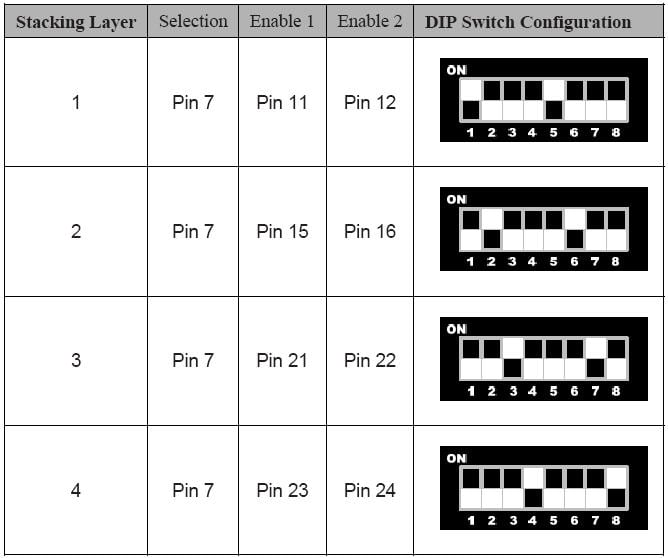
Operation For proper operation, only one camera should be enabled at a time. In case of only one multi camera adapter board is used, driving Pin12 HIGH and driving Pin11 , Pin7 to LOW to enable camera A on the adapter board. Enable camera B, C and D, please refer the Table 2 for camera selection configuration. To disable all cameras on one adapter board, Enable 1 and Enable 2 signals should be toggled HIGH. Care should be taken that it is not allowed to drive the Enable 1 and Enable 2 LOW at the same time. When connecting more than two multi camera adapter boards, only one of the cameras can be enabled by enabling the desired camera on one adapter board, and disable all the cameras on the rest of adapter boards. Table 2 Camera Selection Configuration | Camera Selection Configuration | Selection | Enable 1 | Enable 2 | | A | 0 | 0 | 1 | | B | 1 | 0 | 1 | | C | 0 | 1 | 0 | | D | 1 | 1 | 0 | | No Camera | X | 1 | 1 | | Error | X | 0 | 0 |
(X: don’t care) Software Demonstration Before using it, required dependency python-rpi.gpio have to be installed with 1 | sudo apt-get install python-rpi.gpio |
command from the Terminal. Then run the following code for the quick demo. 45 | cmd = "raspistill -o capture_%d.jpg" % cam |
48 | if __name__ == "__main__": |
As normal camera operation, user can still use raspistill or raspivid command to take photos or videos. By control the GPIOs according to the Table 1 and Table 2 configuration, user can take photos or videos by switching between different cameras. Have funs! PACKAGE INCLUDES - 1 x Multi camera Adapter module fully compatible for official Raspberry Pi Board


|