
iPod touch is a great iPod?? a great pocket computer?? and a great portable game player. Click to enlarge.
| iPod touch is a great iPod?? a great pocket computer?? and a great portable game player. Click to enlarge. |
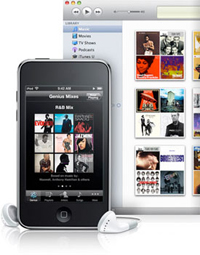 Genius Mixes creates multiple mixes you'll love. |
 Give iPod touch a shake to shuffle to a different song in your music library. |
Next-Level Fun: The New iPod touch
Music
Flick through your albums. Listen to a unique mix created just for you. Or watch the video for your favorite song. With iPod touch it's more than just hearing your music.
Cover Flow
What a song does for your ears Cover Flow on iPod touch does for your eyes and fingers. It's a virtual party for the senses. Turn iPod touch on its side and glide through your music by album art with the flick of your finger. Tap an album cover to flip it over and display a track list. Tap again to start the music.
Genius Mixes
Now the Genius feature is even more powerful. Introducing Genius Mixes. All you do is sync iPod touch to iTunes and Genius automatically searches your library to find songs that sound great together. Then it creates multiple mixes you'll love. These mixes are like channels programmed entirely with your music.
Genius Playlists
Say you're listening to a song you really like and want to hear other tracks that go great with it. The Genius feature finds other songs on your iPod touch that sound great with the one you were listening to and makes a Genius playlist for you. Listen to the playlist right away?? save it for later?? or even refresh it and give it another go. Count on Genius to create a mix you wouldn't have thought of yourself"p>
Shake to Shuffle
Shake things up a bit. Musically speaking?? that is. The next time you're listening to your tunes?? turn on Shake to Shuffle?? then give iPod touch a shake to shuffle to a different song in your music library.
iTunes
Fill your iPod touch with songs and music videos from your iTunes library on your computer. Or buy and download new music on your iPod touch when you access iTunes over Wi-Fi. Songs you purchase on iPod touch transfer to your Mac or PC the next time you connect iPod touch to your computer.
Bluetooth
Look?? no cables. iPod touch includes the iPhone 3.1 software?? so you can pair Bluetooth stereo headphones with it. Keep your iPod in your bag or charging on your desk across the room and still listen to your music.
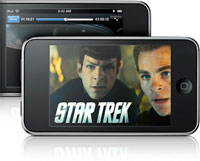 Carry hours of video with you and watch it on the crisp 3.5-inch color widescreen display. |
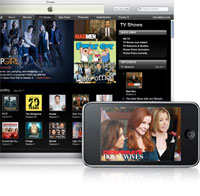 With iTunes on your iPod touch and a Wi-Fi connection?? you can buy movies and TV shows on the fly. |
Movies + TV shows
A feature film. A video podcast. Your favorite TV show. Now appearing on a subway train or a plane near you.
Widescreen Viewing
Carry hours of video with you and watch it on the crisp 3.5-inch color widescreen display. Shop the iTunes Store and choose from thousands of movies?? TV shows?? and video podcasts to load up your iPod touch. From Hollywood blockbusters to independent favorites?? there's something for everyone. Download and watch movies with a few taps. Prefer TV shows? Get a single episode or an entire season's worth all at once.
Onscreen Controls
While watching " video?? tap the display to bring up the onscreen controls. You can play or pause?? view by chapter?? and adjust the volume. You can also use the volume controls on the left side of iPod touch. Want to switch between widescreen and full screen? Simply tap the display twice.
iTunes
Need some entertainment for your next flight or road trip? With iTunes on your iPod touch and a Wi-Fi connection?? you can buy movies and TV shows on the fly. You can also rent movies?? in case you're not sure if that flick is a keeper. And of course?? you can purchase movies and TV shows on your Mac or PC?? then sync them to your iPod touch.
 Discover apps in categories from games to lifestyle?? social networking to education?? and more. |
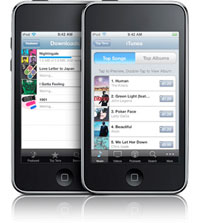 The built-in Wi-Fi capability in iPod touch gives you access to the iTunes Store anywhere?? anytime. |
Browse Apps
Shop the App Store a number of ways. Tap Featured and get a list of new apps and to see what's hot. Peruse by category. Check out the Top 25 apps. Or if you know exactly what app you're looking for?? find it by doing a quick search.
Amazon-Related Apps
Have Amazon at your fingertips with these applications:
Genius Recommendations for Apps
There are tens of thousands of apps in the App Store?? with more added every day. A new feature of iPod touch makes finding cool new apps even easier. It's Genius for apps?? and it works just like Genius for your music. Tap the Genius icon and get recommendations for apps that you might like based on apps you and others have downloaded.
Download Apps
When you find an app you want?? buy and download it wirelessly to your iPod touch from anywhere over Wi-Fi?? and start using it right away.
Update Apps
iPod touch tells you whenever an app update is available?? so you'll always have the latest versions of your favorite apps.
iTunes
Discover and download new music?? movies?? TV shows?? and audiobooks with iTunes on your iPod touch.
The built-in Wi-Fi capability in iPod touch gives you access to the iTunes Store?? where you can choose from millions of high- quality iTunes Plus songs and thousands of movies?? TV shows?? audiobooks?? and free podcasts and iTunes U lectures. Browse New Releases?? Top Tens?? and Genres. Or find exactly what you're looking for by typing in a quick search. Play a preview of any song or video?? then tap once to buy it. Not sure if that movie is worth owning? Just rent it. Everything you buy on iPod touch is the same price you pay on the iTunes Store on your computer.
Sync with iTunes
When you connect iPod touch to your computer?? the music?? movies?? TV shows?? audiobooks?? and podcasts you downloaded on the go sync to your iTunes library on your Mac or PC. If you've partially downloaded something on iPod touch?? your computer completes the download automatically.
With storage for up to 90??000 of your favorite photos?? iPod touch lets you flick through and share all those remember-that-day moments. 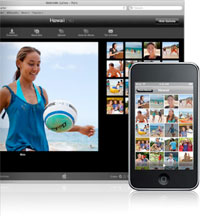
Save Photos
If you receive a great image in an email?? save it to your photo library on iPod touch. Once there?? it acts just like any other photo. You can set it as your wallpaper?? share it on the web?? or pass it on.
Sync Photos
iPod touch uses iTunes to sync photos you have in iPhoto on a Mac or in Adobe Photoshop Elements and Adobe Photoshop Album on a PC. Just choose which photos or albums to sync to your iPod touch?? then you can look at them--and share them--anywhere you go.
Home Screen
Maybe you want Maps as the first app in the second row. Or Mail down in the Dock. Whatever the arrangement?? make iPod touch your own with customized Home screens.
Customize Your Home Screen
Arrange the icons on your Home screen any way you want right on iPod touch or from your computer using iTunes 9. Move an app one row up?? two apps over?? or even to another Home screen. Create up to 11 Home screens for quick access to the games and applications you download from the App Store and to your Safari web clips.
Home Button
No matter where you are on iPod touch?? one press of the Home button at the bottom of iPod touch takes you to the main Home screen. You can also take a shortcut from any Home screen back to your main Home screen by pressing the Home button.
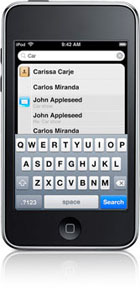 Search the entire contents of your iPod touch?? all from one place. |
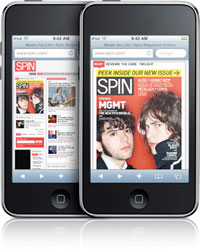 iPod touch features Safari?? the most advanced web browser ever on a portable device. |
Spotlight Search
Looking for something? Search the entire contents of your iPod touch?? all from one place. On your main Home screen?? just swipe to the right to bring up Spotlight. Once you start typing?? Spotlight begins searching all of your music?? videos?? contacts?? email?? calendars?? notes?? and even your audiobooks and podcasts.
Add Apps and Web Clips
Whenever you download an application from the App Store?? a new icon appears on your Home screen. And if you check the same websites every day?? just create web clips. They appear on your Home screen?? and you can access the sites directly with a single tap.
Search the Web Web Clips Zoom mail on iPod touch looks and works just like email on your computer. With Maps and a Wi-Fi connection?? you can get directions?? find local businesses?? and check traffic.
iPod touch syncs your bookmarks from your PC or Mac?? so you can access your favorite sites quickly. It has Google and Yahoo! search built in?? so it's easy to find what you're looking for on the web.
If you check a website frequently--a favorite newspaper?? blog?? or sports site--why not create a Home screen icon?? or web clip?? for it? Make web clips with Safari?? and your favorite sites are always just a tap away.
Get a closer look at any web page by zooming in and out with a tap or a pinch of the Multi-Touch display. View websites in portrait or landscape. Rotate iPod touch 90 degrees and the web page rotates?? too.

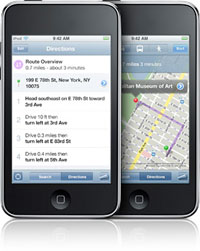
Mail
Email on iPod touch looks and works just like email on your computer. And it works with the email accounts you already have.
View Messages and Attachments
iPod touch supports rich HTML email?? so images and photos appear alongside text. And you see email attachments in their original formats?? not stripped-down versions. Rotate?? zoom?? and pan in more than a dozen standard file and image formats?? including PDF; Microsoft Word?? Excel?? and PowerPoint; and iWork.
Access All Your Accounts
Access your email from popular providers--including MobileMe?? Google Gmail?? Microsoft Exchange?? Yahoo! Mail?? and AOL--and most industry-standard IMAP and POP mail systems.
Compose Instantly
iPod touch recognizes email addresses in different applic"ou run across an email address on a web page or a map listing?? for example?? just tap it and iPod touch opens a new message and addresses it for you.
Type Smart
With its built-in dictionary??* the intelligent iPod touch keyboard predicts and suggests words as you type?? making it fast and easy to write email. And when you rotate iPod touch on its side?? the keyboard instantly switches from portrait to landscape for larger keys and more room to type.
Search Your Inbox
No need to scroll through message after message in your inbox looking for the right one. A quick downward flick brings up a search field that lets you find email by sender?? recipient?? subject?? or all headers.
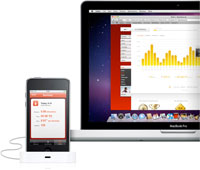
Get Directions Explore and share your favorite YouTube clips. Track your workouts?? set goals?? and challenge friends with Nike+.Click to enlarge.
Just type in an address and get directions from wherever you are. Choose the method of transportation--car?? public transit?? or on foot--and view a list of turn-by-turn directions. See a highlighted map route with estimated travel time. You can also mark specific locations and find the best route between them.

Switch Map Views
Just like Google Maps on your computer?? Maps on iPod touch lets you switch between views of Google map data?? satellite images?? and a hybrid of both. Multi-Touch makes the difference. Tap to zoom?? pan?? and change your view on the move.
See Traffic
Maps on iPod touch shows you live traffic information?? indicating traffic speed along your route in easy-to-read green?? red?? and yellow highlights.
Nike + iPod Compatibility
Rock out your workout. iPod touch has built-in support for Nike + iPod. It's music and motivation rolled into one.
Tune Your Run
iPod touch includes built-in Nike + iPod support. Just slip the Nike + iPod Sensor (available separately) into your Nike+ shoe and start your run. The sensor communicates wirelessly with your iPod touch" tracking your time?? distance?? and calories burned. It even gives you voice feedback on your progress.
Tune Your Cardio Workout
This feature also works with new cardio equipment available in many fitness centers. Just look for Nike + iPod compatible treadmills?? ellipticals?? stair steppers?? and stationary bikes.
Sync with nikeplus.com
When you get back to your computer?? sync your iPod touch with iTunes and transfer your exercise data to nikeplus.com?? where you can track your workouts?? set goals?? and challenge friends.
 Play the latest head-to-head games with a friend--whether your friend is sitting next to you or across the country. |
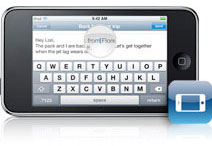 Want more room to type? Rotate iPod touch to landscape to use a larger keyboard in Mail?? Notes?? and Safari. |
 Download movies?? TV shows?? music videos?? and audiobooks over Wi-Fi from the iTunes Store on iPod touch. |
More Features
iPod touch comes with the latest software already installed. And you also get convenient apps including Contacts?? Calendar?? Notes?? Stocks?? and Weather.iPhone 3.1 Software Features
Genius Mixes
This new feature acts as your personal DJ searching your iTunes library to find songs that go great together then organizing them into mixes you'll love. All automatically.
Genius Recommendations for Apps
With thousands of apps in the App Store how do you find cool new ones? Let Genius help. It looks at the apps you're using and recommends others you might like.
Peer-to-Peer Gaming
Play the latest head-to-head games with a friend--whether your friend is sitting next to you or across the country.
Buy Movies TV Shows and Audiobooks via Wi-Fi
Download movies TV shows music videos and audiobooks over Wi-Fi from the iTunes Store on iPod touch.
Landscape Keyboard
Want more room to type? Rotate iPod touch to landscape to use a larger keyboard in Mail Notes and Safari.
Cut Copy & Paste
Cut copy and paste words and photos even between applications. Copy and paste images and content from the web too.
Spotlight Search
Find what you're looking for across your iPod touch?? all from one convenient place. Spotlight "arches all your contacts?? email?? calendars?? and notes?? as well as your music and video.
Automatic Wi-Fi Login
Log in to a Wi-Fi hotspot and iPod touch remembers your user name and password the next time you connect.
Accessibility
The new iPod touch comes with standard accessibility features that help people with disabilities experience the fun of iPod touch.
Stereo Bluetooth
Enjoy music and other audio wirelessly. Pair your iPod touch with compatible Bluetooth stereo headphones.
Shake to Shuffle
Just give your iPod touch a shake?? and it shuffles to a different song in your music library. You'll always be surprised by what you hear.
Parental Controls
Decide what music?? videos?? and apps your kids can access.
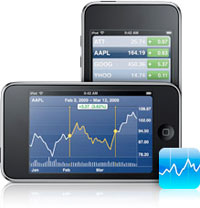 Stocks on iPod touch shows you performance in |