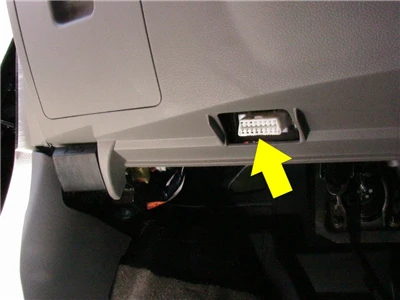
OBD2 Automotive Scanner KONNWE KW680 Brief Description
The KONNWEI KW680 OBD2 / EOBD / CAN Auto Diagnostic Scanner supports all 10 OBDII test modes on all OBDII compliant vehicles for a complete diagnosis. Featuring the unique patented One-Click I/M Readiness Key, TFT color display and built-in speaker, Real Time Battery Voltage Monitoring, the KONNWEI KW680 is truly the ultimate in power and affordability, allowing users to do their jobs faster.
In addition, thousands of troubleshooter code tips(by press ? button) help technicians and home DIY users to accurately diagnose even the toughest problems. With the newest friendly diagnostic interface, KW680 will be the most useful car diagnostic tool for every family and professional mechanic technician!
OBD2 Automotive Scanner KONNWE KW680 Functions and Feature
1. Works on ALL 1996 and newer vehicles (OBDII & CAN) - domestic and import
2. Features the unique patented One-Click Readiness Key for quick State Emissions readiness check and drive cycle verification.
3. Bright color coded LEDs indicators and built-in speaker provide both visual and audible tone for readiness verification
4. Retrieves generic (P0, P2, P3 and U0), manufacturer specific (P1, P3 and U1) codes and pending codes
5. Easily determines the cause of the Check Engine Light(MIL)
6. Turns off Check Engine Light (MIL), clears codes and resets monitors
7. Enhanced OBD2 Mode 6 On Board Monitoring Test Results for Specific Monitored Systems.
8. Views freeze frame data
9. Displays monitor and I/M readiness status (emissions)
10. Reads live PCM datastream
11. Displays live O2 sensor test data
12. EVAP System test data
13. Live sensor data in text mode and graph mode (1996 and newer vehicles)
14. Reads, stores and playbacks live sensor data
15. Troubleshooter code tips guide technicians to the root cause of a trouble code faster, saving diagnosis and repair time
16. Battery Voltage real time monitoring.
17. Built-in DTC look-up library and display definition.
18. Retrieves vehicle information (VIN, CIN and CVN)
19. Internet updateable and upgradeable
20. Prints data via PC
Top 9 Reasons to Choose KW680 OBD2 Automotive Scanner:
1. Multilingual diagnostic interface: KW680 Supports up to 8 different languages user interface,
English, Spanish, Portuguese, French, Russian, German, Dutch, Italian
2. Mini Multifunction OBD2 Automotive Scanner with good price
3. High Quality and High Resolution TFT colorful display helps you easily to find out the troubles of your car.
4. Bright color coded LEDs and built-in speaker provide both visual and audible tone for readiness verification.
5. Brand New design Key pad, unique patented One-Click I/M Readiness Key, it is the best partner for your car repairing.
6. Featured battery real-time monitoring during diagnostics, avoid un-expected happened.
7. Intergrated memory card allows storage of Trouble Codes, Live Data and freeze frame, Playback and review data when out of vehicles.
8. Data printable through USB cable, allows modify and print-out storaged data.
9. Internet upgradable via usb port, adapted to Windows XP- Windows 7.
OBD2 Automotive Scanner KONNWE KW680 Support Car Makers
American Car makes: Works on obd2 car from 1996 to now
Fit for Chrysler ,Fit for Ford ,Fit for GM ,Fit for Jeep
European Car makes: Works on obd2 car from 2001 to now
Fit for Alfa Romeo ,Fit for SAAB ,Fit for Acura ,Fit for Opel, Fit for Audi ,Fit for Seat ,Fit for Peugeot ,Fit for Renault
Fit for Bentley ,Fit for Skoda ,Fit for Daewoo, Fit for Benz ,Fit for Daihatsu ,Fit for Land Rover
Fit for BMW ,Fit for Vauxhall ,Fit for Citroen, Fit for Volvo ,Fit for Fiat ,Fit for VW ,Fit for Ford ,Fit for Jaguar
Asian Car makes: works on obd2 car from 2008 to now
Fit for KIA , Fit for Isuzu ,Fit for Honda ,Fit for Mitsubishi, Fit for Hyundai ,Fit for Dacia ,Fit for Lexus ,Fit for Mazda
Fit for Nissan, Fit for Subaru , Fit for Suzuki, Fit for Toyota
If you want to know whether your car is standard OBDII vehicles or not (fit for ELM327), please leave us message in this format, "Audi, a4, 2002, 2L ", we will reply you within 12 hours.
OBD2 Automotive Scanner KONNWE KW680 specification
Display: TFT color screen ( 320*240dpi)
Operating Temperature: 0 to 60 ℃ (32 to 140 ℉)
Storage Temperature: -20 to 70 ℃ (-4 to 158 ℉)
Power: 8 to 18 V provided via vehicle
Supported Protocols: J1859-41.6, J1850-10.4, ISO9141, KWP2000 (ISO 14230), and CAN (Control Area Network ISO 11898)
Dimensions: 124mm (4.88in) x 70mm (2.76'') x 20mm (0.79'')
Weight: 0.45KG
OBD2 Automotive Scanner KONNWE KW680 Supports Free Update
1. Please plug the USB to you pc and connected the konnwei kw680 .Meanwhile press any button of KW680, you will see below pictures shows.
Notice: Please turn off anti-virus software when installing, otherwise it will not be able to install the driver properly

2. Please search this webiste www.itosaanner download this software ,you will see below pictures shows. and click checked update
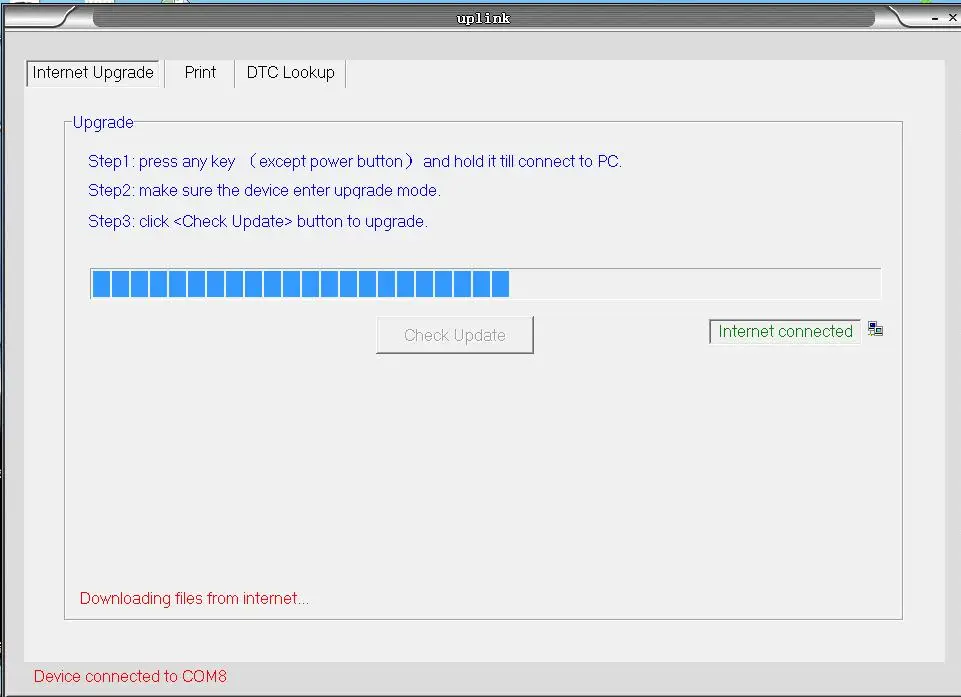
3. Wait for the update process finished, the scanner KW680 will be ready to go! we will update to latest version before shipping out, normally there is no need to update for a long while.

KW680 Prints out data to PC
1. After install the KONNWEI program on PC, connect the scanner to PC with USB cable.
2. Open software "Konnwei" , Select "Print" optioni.
3. Operation on scanner: go to main menu, select " Print Data" ; Select the data option that you want to print to PC,
4. After select the print datastream, the data stream that storaged in scanner will be sent to PC software.
4. After select the print datastream, the data stream that storaged in scanner will be sent to PC software.
and you may modify them before printing them out from PC.



1*KONNWEI KW680 Auto Diagnostic Scanner
1*User's Manual in English
1*OBD2 Cable
1*USB Cable