| Gender |
Men's |
| Movement |
Quartz |
| Type |
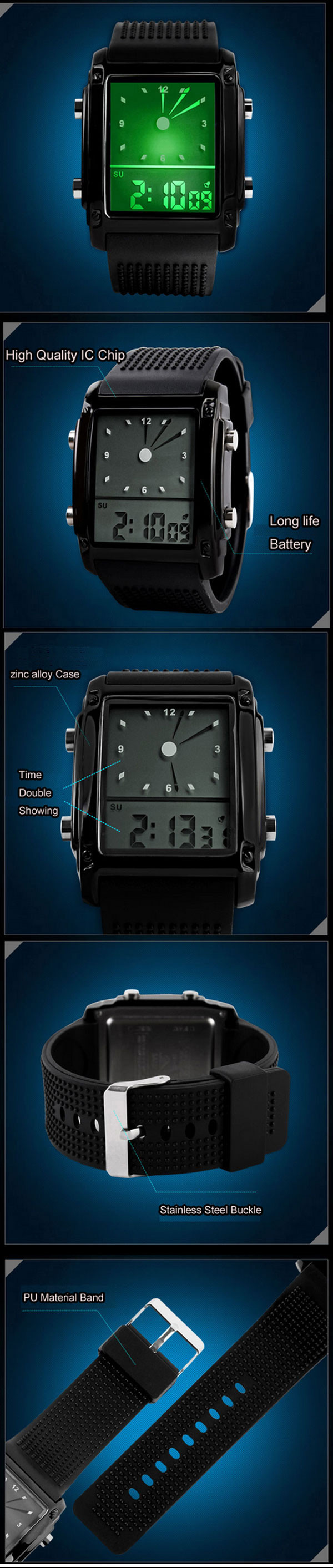
Wrist Watch, Sport Watch, Multifunction Watch |
| Feature |
LED, Digital, Analog, Electro Luminescent, Chronograph, Calendar, Alarm |
| Band Material |
Silicone |
| Band Color |
White, Purple, Pink, Blue, Black |
| Case Diameter Approx (cm) |
4 |
| Case Thickness Approx (cm) |
1.4 |
| Band Length Approx (cm) |
27.3 |
| Band Width Approx (cm) |
2.5 |
| Net Weight(kg) |
0.07 |
| |
|
Using Manual
1. Setting time
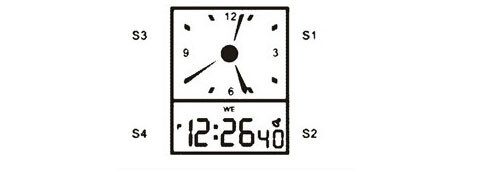
In normal mode, press S4 for 3 times, the second number will be flick, then press the S1 for one time, the minute number will be flick, press S3 to adjust the minute.
When finish the minute setting, press S1 again, the hours number will be flick, press S3 to adjust the hours.
When finish the hours setting, press S1 again. the date will be flick, press S3 to adjust the date.
When finish the date setting, press S1 again, the month number will be flick, press S3 to adjust the month.
When finish the month setting, press S1 again, the weekdays will be flick, press S3 to adjust the weekday. When finish all the setting, press S4 to return the normal mode.
2. Setting seconds counter
In normal mode, press S4 for 1 time, the seconds counter will show. Press S1 to return to zero second. Press S3 to start the seconds counter, press S3 again to stop the counter, then press S3 again to restart it, press S1 to return to zero.
3. Alarm clock setting
In normal mode, press S4 for 2 times, the alarm clock will show. Press S3 for setting alarm hours, then press S1 to turn to the alarm minute setting, press S3 to setting the alarm minute. When finish the alarm clock setting. Press S4 to return the normal mode.
Pressing both S1 and S3 buttons, the voice of the alarm clock will ring, that means the alarm clock is setting successfully. If not that means the alarm clock is setting unsuccessfully, you must set it again.
4. On time Alarm
Hold on pressing S1 and then press S4, if the weekdays show, that means the on time alarm is setting. Press S4 again to cancel the on time alarm.