Google Chromecast
[Authentic - with official firmware updates]
Brand new in original retail packaging
Stock status : In Stock (Ship out from local - Singapore - frequency: Everyday) - While Stock last!
We specialise in selling authentic Google Chromecast.
Our Google Chromecast gets latest firmware update wherever and whenever it is connected to internet. We are proud to say our supply orginate from USA. Get firmware update with original chromecast only.
"When you buy a google product,you will always get yours updates coming in" : Google 2015
No additional hidden charge
Comes with orginal adapter (US-pins) for additional power source for device.
We offer warranty upon delivery!
Please feel free to look at all our positive reviews!
Our shoutout to our buyers!
**Many thanks to everyone who have taken effort and gave us many many great reviews to this product with us. Thank you for your supports guys and appreciate every each of them. - Geekzalley
FAQ- buying with us:
1. Why buy from us?
We are responsible Singapore-based seller. We use and love chromecast too!
We hear from you guys through feedbacks and make enhancements everytime! All our reviews are solely for chromecast only~
2.Is there stock and when the stock will come?
Once we confirmed your order, rest assured that available stock has been reserved for you. We will ship out based on the posting date indicated.
^This listing is previously known as 'CHROMECAST by Google [Pre-order only]'/ 'Preorder for Google Chromecast'. As stock is readily available as of 14 Jan14. Preorder will no longer be accepted.
How to try your first cast
Use your phone or tablet to cast your first video from YouTube to your TV in three easy steps (see below for compatible devices):

Remote-free
Chromecast works with Android tablets and smartphones, iPhone® and iPad® devices, Chrome for Windows, Chrome for Mac® and Chromebooks. Browse for what to watch, control playback and adjust volume using your smartphone, tablet or laptop.


Sit Back, Watch Together
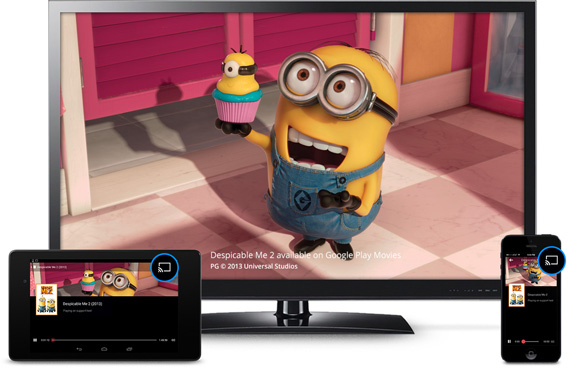
Chromecast is the easy way to enjoy online video and anything from the web on your TV. Plug it into any HDTV and control it with your existing smartphone, tablet, or laptop. No more huddling around small screens and tiny speakers. Chromecast automatically updates to work with a growing number of apps.
With Chromecast, you can easily enjoy your favorite online content on your HDTV - Learn how.
Remote Free

Control in the Palm of Your Hand
Chromecast works with devices you already own, including Android tablets and smartphones, iPhones, iPads, and Chrome for Mac and Windows. Browse for what to watch, control playback, and adjust volume using your smartphone, tablet, or laptop. You won't have to learn anything new.
Plug in and Play

Get Started in 3 Easy Steps
Plug Chromecast into any HDTV, connect it to WiFi, then send videos and more from your smartphone, tablet or laptop to your TV.
It's for Everyone in Your House
Friends and family can use your Chromecast with their smartphone, tablet, or laptop without any additional setup.
Supported Operating Systems
| Height | 0.5 inches |
|---|---|
| Width | 1.4 inches |
| Depth | 2.8 inches |
| Weight | 0.1 pounds |
| Interface Slot Type | HDMI/USB |
| System Requirements | Minimum: Supported Wi-Fi–enabled device, HDTV, and Wi-Fi 802.11b/g/n access point or router; OS: Android 2.3 and higher, iOS 6 and higher, Windows 7 and higher, Mac OS® 10.7 and higher, Chrome OS (Chromebook Pixel, more Chromebooks coming soon) |
| Wireless Standard | Wireless N |
| ENERGY STAR Certified | Unknown |
| Product Depth | 2.8" |
| UPC | 811571013579 |

11 Dec 14 - Chromecast Update Brings Guest Mode, Beta Mirroring, Fresh Material UI
The Chromecast app received an update yesterday that not only included the much anticipated Guest Mode, but the UI of the app also got a fresh Material Design makeover and screen mirroring is open in beta to most devices running Android 4.4.2+. The update is rolling out in stages (of course it is) on Google Play or can be sideloaded using the link we included below.
With Guest Mode, which uses a special WiFi beacon from the Chromecast to ping guest devices, you can setup your Chromecasts to allow friends and family to share content to your dongles without needing to be on your WiFi network. As long as they have an Android device (4.3+) they can connect, once you enable the feature. In the video at the bottom of the post, you will see how to enable Guest Mode (open Chromecast app, connect to a Chromecast, tap Guest Mode, turn on).
As I mentioned in the opening, the app also received a makeover with Material Design. You are now treated to a bright blue action bar with full-page navigation drawer and rippling animations throughout. It’s pretty.

11 July 2014 - Chromecast update lets you mirror your Android screen on a TV
"Google vowed that Android users would finally get official screen mirroring on Chromecast through an update, and it's making good on that promise by rolling out the Chromecast 1.7 app today. Grab the new release and supporting devices (primarily from HTC, LG and Samsung) can send just about anything to a TV just by hitting a "cast screen" button. If you're using a Nexus device, you don't even have to launch any software -- the feature will pop up in Android's quick settings. You're high and dry if your devices aren't on Google's compatibility list, but don't worry too much. We hear there are third-party mirroring apps that can pick up the slack."
Source: http://www.engadget.com/2014/07/09/chromecast-screen-mirroring-arrives/
How to screen cast? Does it work well?
Check this out: http://www.tomsguide.com/us/how-to-screen-cast-chromecast,news-19138.html
Term and conditions:
Please opt for taqbin mail(highly recommended). Seller will not responsible for loss of items for standard/normal mail (Singpost).
All our items are in total brand new condition and are inspected prior before sending, as such we would maintain all sales are no exchange/refund would be accepted.