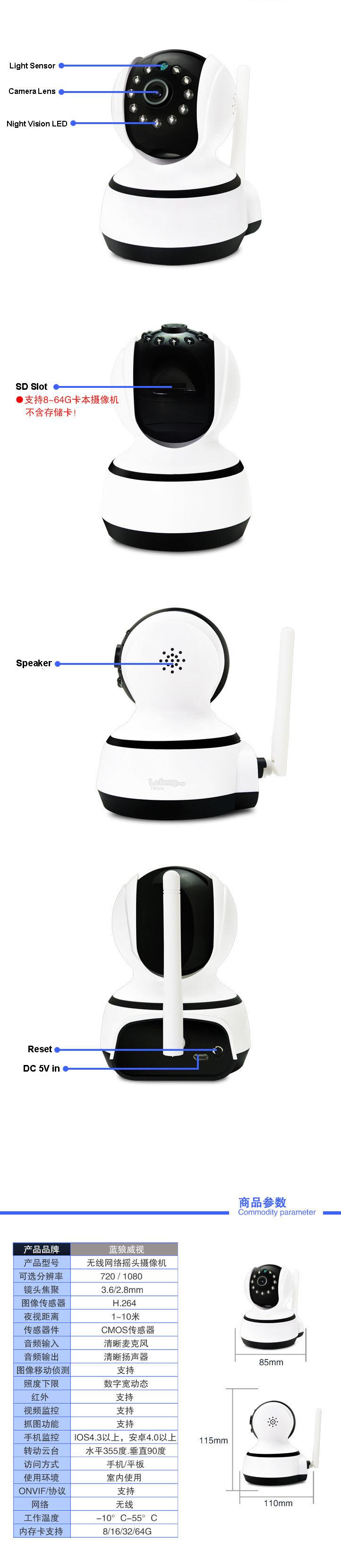
Features:
* H.264 1/2.5" Color CMOS Sensor 1,000k Pixels.
* Maximum support 64GB TF Card.(option)
* High image & video quality, audio monitoring.
* P2P(Plug&Play)technology, penetration degree can be 99%.
* Allow remote Pan/Tilt control (Pan : 355°& Tilt : 120°).
* Mechanical IR-Cut device offers outstanding day/night performance, great color.
* Buit-in motion detection
* Allow remote viewing & record from anywhere anytime with 3G/4G far distance control
* Wi-Fi compliant with wireless standards IEEE 802.11b/g/n.
* Support TCP/IP, SMTP, HTTP, FTP, DHCP, DDNS, UPNP, PPPOE and other Internet related protocols. |
| Features: | | | System Security | Account, password authority management | | Free DDNS | Free DDNS, supports dynamic IP | | View by Phone | Support HD pic IOS, Android mobile view (iOS 4.3, Android OS 2.3 above) | | Local Storage | Support up to 64GB MicroSD card, 24-hour loop recording | | Monitor Advantage | Support PC computer monitoring, smartphone multi-pic view (I.E) | | PnP | Plug & Play, 99% penetration rate, Easy to setup: 1, connect power adapter, 2.install APP, scan camera IP to add camera. 3, Click online camera to view the camera | | QR Code Scanning | UID scan technology applied, easy to operate, and highly confidential | | Upgrade | Upgrading by remote via internet | | Reset | Intelligent self repair function | | Super Client | 1, 4, 9, 16, 25, 36, 64 channel central management software, no user number limitation, centralized surveillance, remote record and playback, alarm email ect | | System | | | OS | Embedded Linux OS | | Control Protocol | ONVIF 2.0 protocol, high interoperability for NVR | | Video Coding | Multi stream : 720P(1280 * 720) HD | | | | | Video | | | Compression Format | H.264 | | Sensor | 1/2.5" 1080p Progressive CMOS sensor | | Video Code Stream | 64Kbps-8Mbps | | Frame Rate | 0-30fbs | | Resolution | 720 * 1280 | | Image rotation | Not support | | Minimum Illumination | 0.5Lux | | Adjustable Video Parameters | Auto adjustable Saturation, brightness, contrast and sharpness | | IR Control | IR turned on: night vision view enabled, infrared Ray, ICR auto detect. IR turned off: night vision disabled, infrared ray off, ICR stay in day view mode | | Lens/Viewing Angle | 3.6mm (95 degree) | | Night Vision | | | Night Vision | Dual IR-CUT Filter auto switch, 10pcs Φ 5mm LED, 10m IR distance | | Audio | | | Compression format | G.711 G.726 | | Audio channel | Built-in sensitive MIC, | | Input | 1 Channel Internal -48dB Microphone | | | | | P/T Network | | | P/T | Pan: 355°, Tilt: 120° | | Preset Postion | Support up to 4 preset postions | | Network Interface | No | | Network Protocol | TCP/IP, UNP/TP, HTTP, UDP, SMTP, FTP, DHCP, DDNS, UPNP, NTP, PPPOE | | Wireless Network Security | WPS encryption | | Online Visitor | Support multiper online visitors simutaneoursly | | IP Address | Dynamic IP and static IP address | | WIFI | IEEE 802.11 b/g/n | | Alarm | | | Alarm channel | Alarm input 1 road | | Motion Detection | Support motion detecting with direct notify your smartphone | | PC support | Download solfware from Camhi | | System Configuration | Win98 SE/ME/2000/XP, Vista, iOS4.3, The android version 2.3 or higher | | Other Information | | | Model APP | CamHi | | Housing Material | ABS | | Application environment | Indoor | | Power Supply | DC 5V 2A | | Temperature | -10~55 °C | | Power Consumption | <5W | | Color | White | | Item Weight | Approx. 390g / 11.3oz | | Item Size | Approx. 13.5 * 11.5 * 18.5cm / 5.31 *4.53* 7.28in (L * W * H) | | Package Size | Approx. 20 * 17.5 * 12.8cm / 7.87 * 6.89 * 5.04in (L * W * H) | | Total Weight | Approx. 663g / 1.46Lb | | Quantity | 1pcs | | Warranty | 3 months |
CamHi is a useful app which enables you to view the live footage from your network cameras on your Smartphone on the go. If you have been looking for a way to watch the live feed of your network cameras on your phone then this app is exactly what you need. It allows you the chance to stream the surveillance footage that your camera is recording onto your android device. CamHi has an intuitive user interface and a smart design which makes it incredibly easy to use. Even an inexperienced user who hasn't used a network camera viewer before would have no difficulty in using this app. 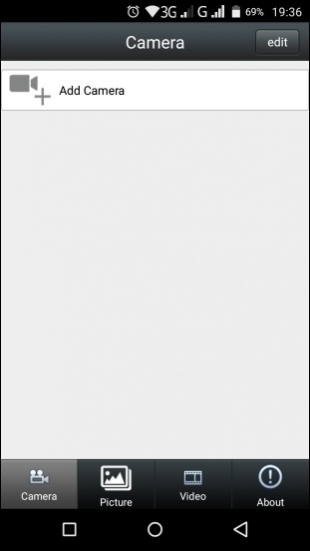
CamHi CamHi allows you to add cameras to your device in a simple and easy manner. You will have to tap on the Add Camera option in the Camera window in order to add a camera into this network camera viewer. This option is located on the top bar of the app. Tapping on this option will lead you to a new window labeled Add Camera. Here, you will be asked to put in a few details of your network camera so that it can be added into the app. The information that you will have to provide includes Name, Username, UID and Password. CamHi provides three different means of adding a camera to you. The first one is Scan QR Code. This option for adding a network camera is located in the Add Camera section of this app. This option allows you to add your network camera to the app simply by scanning its QR code. To activate this option, you will need to tap on this option and then place your phone's camera near the QR code of your network camera so that it can be scanned and the camera is added into the app. The second option for adding a network camera into this network camera viewer is Search Camera from LAN. Utilizing this option only requires you to tap on its button. The app will begin the search for the camera itself and will add it automatically if it finds any. The third option for adding a camera into CamHi is Wireless Installation. Clicking on this option will lead you to a separate window which is labeled WiFi Connect. Here, you will have to provide the SSID and Password of your WiFi connection and then press the Apply button located below these two fields. Do remember to turn up the volume of your phone and place it as close as possible to the camera before tapping on the Apply button. Apart from giving you the chance to view live surveillance footage of your network cameras, CamHi also provides you the opportunity to take photos of the live video that is being streamed from your cameras. These photos can be viewed in the Picture tab. In addition to this, this network camera viewer enables you to record video clips of the live stream too. You can view these videos in the Video tab of this app. CamHi is a network camera viewer which is ideal for people who want to get the live stream of their network cameras on their phones. It provides them the opportunity to see the surveillance footage being captured by their network camera. It is certainly a nice app to have on your phone provided you have a network camera. 
|