


HD Game Capture, HD video capture module, 1080P HDMI/YPbPr Recorder
Capture 1080P video through HDMI or YPBPR from game consoler ,STB,DVD or other video source, stand along, no PC required, Simply press the recorder button, save to USB flash drive or USB hard disk.


Features:
- 1080P recording with one click, no PC enquired. You only simple insert one USB Flash disk or SD card to get it anywhere, anytime.
- Bring it out of your room and share the gameplay and fun with your friends anywhere.
- Easy to use, no any set-up. You just click RECORD button( on the top of the device) to record your gameplay, and re-click to stop recording.
- With 1080P HDMI by through, you can play HD gameplay when you're recording it.
--Can support AV/YPbpr,HDMI singals.
- With extral audio input, allows you record your own live voice from microphone with gameplay video together.
Specifications:
Connection
- Interface: USB 2.0 host for USB Flash disk or USB hard disk , support SD card .
- Video Input: Digital / HDMI, Analog / Component Video, AV signals.
- Audio Input: Digital / HDMI, Analog / RCA Audio L/R, 3.5mm Line In, 3.5mm Microphone In.
- Video Output: Digital / HDMI (Pass-through from HDMI or Component).
- Audio Output: Digital / HDMI(Pass-through from HDMI or Audio RCA L/R Input), Analog / 3.5mm Stereo (Pass-through from HDMI or Audio RCA L/R Input)
Application Connections with Game Consoles
- HDMI: WiiU, Xbox 360, Xbox One, PS4
- Component: WiiU, Xbox 360, PS3
- Compsoite: PS2,VHS,Hi8, v8 etc
Hardware Extra
- Codec: Hardware MPEG4 encoder
- User Interface: On-board Button for one-click recording / streaming, LED indicator for working sratus.
Standards
- Storage Media: USB Flash Disk, Portable Hard Disk (exFAT format is not supported)
- Input Resolution / Pass-through:
720 x 480 (60p), 720 x 576 (50p), 1280 x 720p (50p), 1280 x 720p(60p), 1920 x 1080 (50i), 1920 x 1080 (60i),
1920 x 1080 (24p), 1920 x 1080 (25p), 1920 x 1080 (30p), 1920 x 1080 (50p), 1920 x 1080 (60p)
- Capture Resolution:
720 x 480 (60p), 720 x 576 (50p), 1280 x 720p (50p), 1280 x 720p(60p), 1920 x 1080 (50i), 1920 x 1080 (60i),
1920 x 1080 (24p), 1920 x 1080 (25p), 1920 x 1080 (30p), 1920 x 1080 (25p), 1920 x 1080 (30p)
- Record Format: Video / AVI MPEG4, Audio / AAC Stereo
- Record Quality: Max 18Mbps@1080P 30fps
- Record File: Max 2GB/per file
- Record Place: Max 140MB/minute, 8.4GB/hour
- Power Supply: DC 5V 2A
Package Contents:
- ezcap282 Game Capture Recorder Box
- Component video audio connection cable
- Power supply
- Manual
- Video editing software CD
Capture up to 1080p HD video by HDMI or YPBPR
save to a plugged USB flash driver, works stand alone
one button click record, no PC required.
1080P recording with one click, no PC required. You only simple insert one USB Flashdisk to get it anywhere, anytime.
Portable design, bring it out of your room and share the gameplay and fun with yourfriends anywhere.
With 1080P HDMI Pass-through, youcan playing HD gameplay whenyou're recording it. Easy to use, noany set-up. You just click RECORDbutton to record your gameplay, andre-click to stop recording.
Included video editing software, you can do editing and converting easily!
Upload to YouTube directly!
Package Contents
Working with PS4:
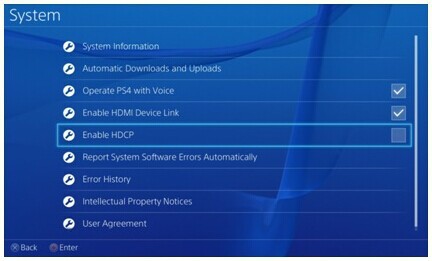
PS4 has disabled HDCP for firmware 1.7 or later, so use can easily record game play with ezcap HD VIDEO CAPTURE.
Update firmware to 1.7 or later:
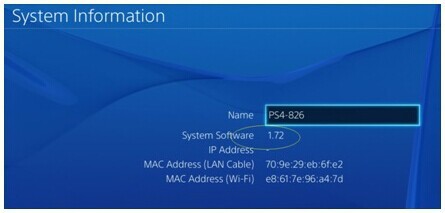
Go settings---System disable “Enable HDCP” option:
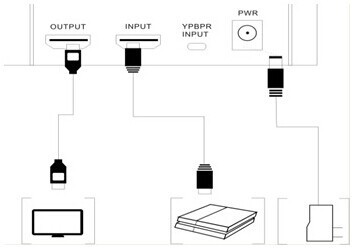
Then connect PS4 to ezcap HD video capture with HDMI cable, you will see the game play picture pass thought on monitor, and you can record video now:
2, Working with PS3 through Component connection:
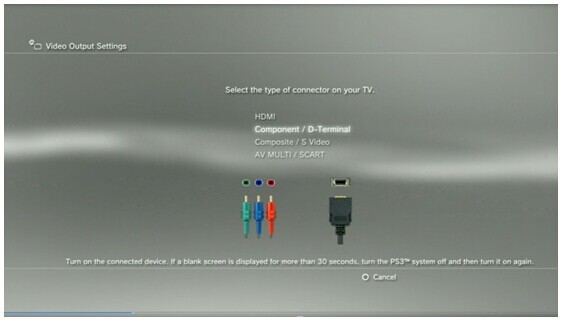
Because the HDMI out of PS3 has HDCP protection, so there is no way to connect it directly to ezcap capture with HDMI cable, so the first suggestion is to use component cable connection:
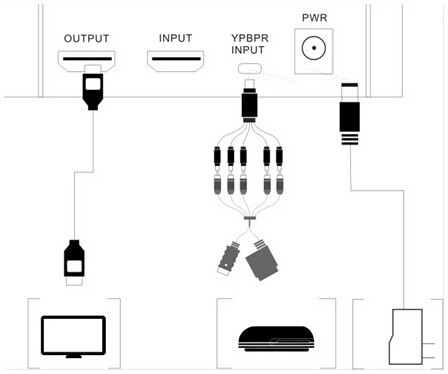
Go to the settings---Video output settings, choose “Component/D-Terminal”:
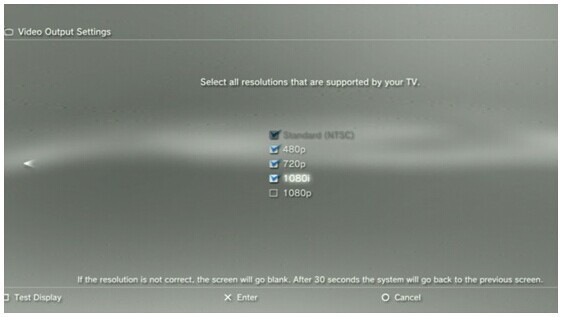
At the resolutions setting, make sure the “1080P” option is NOT be ticked, otherwise some game play (e.g. GT5) cannot be recorded by ezcap capture devices.
3, Working with PS3 through HDMI connection:
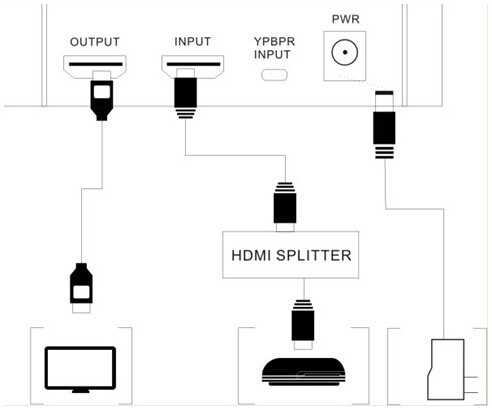
If don’t have a component cable, and want to record with HDMI output, then you need a device such as a HDMI Splitter which can decode HDCP protection, and connect as following, you can record video when you get pass through on monitor:
SomeHDMI Splitter, HDMI TO AV/HDMI, HDMI/AV TO HDMI, HDMI TO HDMI +AUDIO,
scart/HDMI to HDMI , etc, this device can cancel HDCP protection.
4, Updating program for AUTOMATICAL STOPPING RECORDING - oct, 2014:
If your device stop recording automatically when you're recording video, please update your program of your device following guide.
Download the program at first: --Please ask the seller for the latest firmware.
Then move into your USB disk.
Unconnect power with device, and plug the USB disk into USB port of device, then connect power with device.
The LED should flash afte few seconds, then become green, it means you finish the updating already.
Please check your recording again.