
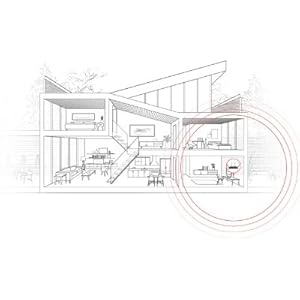
Relying on a single router is like asking a loud speaker in your living room to provide great sound throughout your home. It’s simple physics: WiFi waves don’t go through walls well and have an even harder time climbing stairs? Ever tried to stream a show from your bedroom when your router’s in the office downstairs? It’s a buffering nightmare. To solve this, you need multiple access points — devices that broadcast WiFi — distributed throughout your home. That’s what you’ll find in office buildings, both big and small. But these solutions are out of reach for most of us, and all we’re left with is a band-aid solution: range “extenders,” which don’t live up to their name.
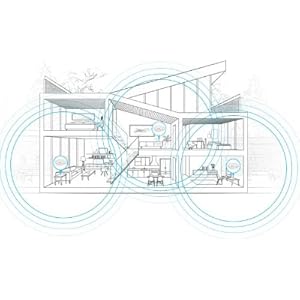
With eero, you simply plug one device into your modem. Additional eeros only need power from a standard outlet. Powered by TrueMesh, they automatically connect to each other to create a single wireless mesh network that covers your whole home. If you already have Ethernet wiring, you can always choose to hardwire your additional eeros. Three eeros cover the typical home. You can start with one and eero-up depending on the size of your space. You already pay for high-speed Internet — isn’t it time to get what you’ve paid for in every corner of your home?
Easier to set up than almost any other gadget in your home, eero is truly frustration-free WiFi. The simple mobile app helps you get your network up and running in minutes.

Manage your entire WiFi network from a simple, intuitive app. See which devices are connected and the speeds you’re clocking.

Automatic software updates that bring new features happen overnight and only take a minute. That means your eero system gets better with time.

In the box: eero WiFi System (3 eeros) power adapters (3), Ethernet cable, quick start guide Processor, memory, and storage: 1.0GHz dual-core processor, 512MB RAM, 4GB flash storage Security and networking services: WPA2 personal wireless encryption, DHCP, NAT, VPN passthrough, UPnP Wireless connectivity: Dual-band WiFi radios, simultaneous 2.4GHz and 5GHz wireless, 2x2 MIMO, IEEE 802.11a/b/g/n/ac, Bluetooth Smart Wired connectivity: Dual auto-sensing Gigabit ports for WAN (cable or DSL modem) and/or LAN (networked device) connectivity, USB 2.0 port Electrical and environmental requirements: 100-240V AC, 50-60Hz

Where did the idea come from?
Years, almost decades of WiFi frustration – and the resulting WiFi setup that Nick installed in his parents’ home in suburban Chicago. Tired of being the Weaver family personal IT troubleshooter, Nick jury-rigged a system that was easy for him to reset remotely from California. Or, anyone could simply hit a big red button to reboot the entire network. This solution was completely absurd and planted the seed for what would become eero.
Why Wifi?
Because WiFi is the new electricity. Our homes are slowly but surely coming online: speakers, thermostats, light bulbs, front doors, cameras, washers, dryers, and everything in between. Outside of our smartphones, WiFi is the modern technology we depend on the most. The foundation of the digital home. Without it, almost nothing works. But it’s broken: the products are impossible to set up, the equipment couldn’t be more of an eyesore, and our homes remain riddled with dead zones. We started eero to fix it.
How is eero different from a traditional router?
eero was designed from the ground up to work as a distributed system – so that you always have a strong WiFi signal wherever you are in your home. And it’s much simpler. Until now, setting up multiple access points in your home and getting them to all broadcast the same WiFi network has been close to impossible. With eero, you just unbox your units and a few minutes later your whole home’s covered. If you move or your needs change, add another eero in under a minute.
Why is design so important to eero?
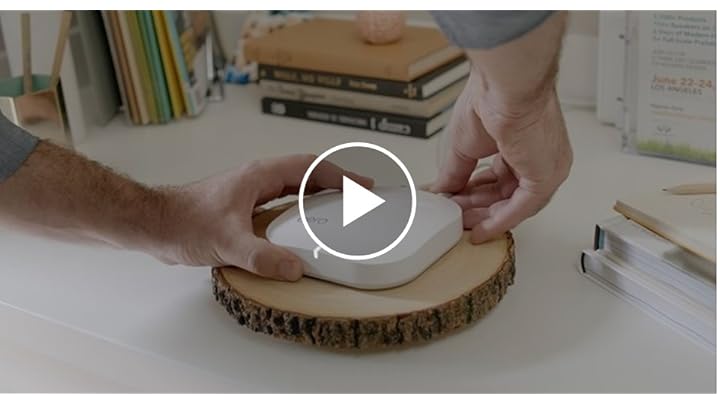
For something so essential to your home, WiFi equipment sure isn’t built with beauty in mind. Most of us hide our routers in a closet or under the bed, inhibiting signal. If we’re going to ask you to place WiFi hardware throughout your home then it had better be understated and tasteful. Something you can put on top of beautiful coffee table books on a shelf and have it blend right in. Something that your friends will ask about when they’re over.
What's the company's backstory?
Based in San Francisco, we’re a growing, passionate team of more than 70 that wants to change an old, broken industry. We’re pushing the boundaries or technology and design, blazing the trail for the future of home WiFi. Everything we love doing – streaming music and videos, scrolling through Instagram, FaceTiming with family – is powered by WiFi. It connects, simplifies, and elevates our lives at home. We’re going to add features to WiFi that you’ve never seen before and that you’re going to love. We promise.