


All built-in tones, including piano and acoustic instrument tones, now sound better than ever before! 48-tone maximum polyphony provides plenty of margin to minimize the chance of notes being dropped when tones are layered and when playing with Auto Accompaniment.
* Acoustic & Highly-compressed Large-waveform

An easy-to-play keyboard with an appearance resembling that of an acoustic piano.
Touch Response let's you add delicate nuances to notes by varying how much pressure you apply to keyboard keys.
Use effects to add reverb for more depth and breadth in your music.

You can sample a sound from a portable audio player or other device, and then play the sound on the keyboard. You also can use sampled sounds to compose music. The sampling feature is a great way to create new sounds that are highly creative.

Start playback of the portable audio player connected to the keyboard’s AUDIO IN jack to sample voices, musical phrases, and other sounds in the playback.

Play notes on the keyboard using the sampled sound!
If you sample the "Ting!" sound of a triangle, for example, you can then play notes with the sound
on the keyboard. You even can add reverb, vibrato, and other effects to the sampled sound.
Incorporate a sampled sound into accompaniment patterns!
You can sample a favorite musical phrase or drum sound, and use the same to replace some Auto Accompaniment drum sets.
Connect a digital audio player, CD player, or other audio device and you can play along with music played through the keyboard's speakers.
Test your response with an exercise that is just like playing a game!
Music Challenge tests your reaction speed by requiring you to press the keys indicated by the on-screen keyboard guide in time with the Auto Accompaniment tempo using the correct fingers indicated by the on-screen fingering guide.
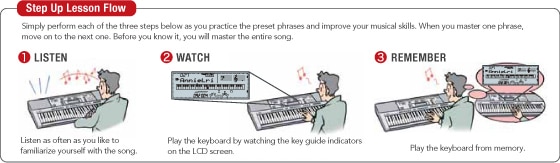
To master a song, it is best to break it up into short phrases, master each of the phrases, and then put everything together. Step Up Lesson does exactly that, providing you with the support you need to improve your play.
Your lesson score appears on the display screen.
If the keyboard senses you are having problems, it will help you by calling out finger numbers in a simulated human voice.
Built-in songs cover a wide range of genres for lesson play and for your listening enjoyment. Includes Exercise phrases!
* The Song Book does not include music for Exercise phrases. Due to copyright restrictions, some Song Bank tunes may not be included in the Song Book.
A wide selection of musical instrument tones supports play of songs from various genres.
An advanced Auto Accompaniment feature provides you with access to a large collection of ethnic rhythms from around the world, with a special emphasis on Latin rhythms. In addition to Bossa Nova, Samba, and other basic rhythms, you also get Cumbia, Reggaeton, Calypso, and more!
Rotate the wheel to slide the pitch of the sound being output upwards or downwards. This effect comes in handy when reproducing the sound of ethnic instruments, etc.
A wealth of information is displayed to support your keyboard play.


USB port for computer connection*
General MIDI (GM Level 1) support allows connection with a computer or another GM-compatible device.
* Supported operating systems: Windows® XP Home Edition (SP2 or later), Windows® XP Professional (SP2 or later, 32-bit), Windows Vista® (32-bit), Windows® 7 (32-bit, 64-bit), Mac OS® X (10.3.9, 10.4.11 or later, 10.5.8 or later, 10.6.7 or later)
For the latest news about driver and application support under Windows® 7, visit here.
One Touch Preset automatically sets up the keyboard to match the currently selected rhythm.


KEYBOARD STAND
SUSTAIN PEDAL SP3
SUSTAIN PEDAL SP20
KEYBOARD BENCH
DUST COVER
CASIO HEADPHONES